Chapter 1 About This Machine
27
1
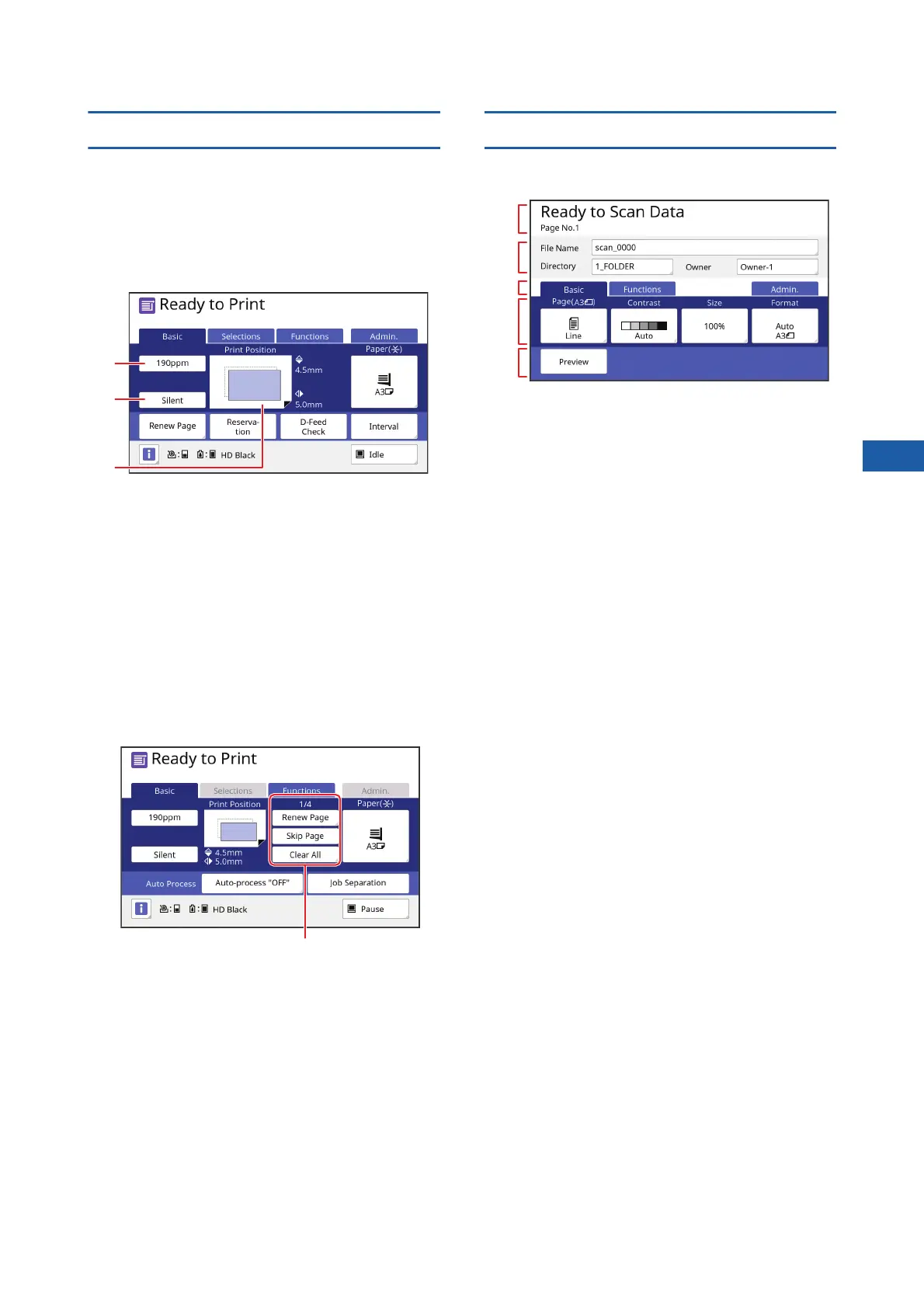
Print basic screen
This screen is used to set functions for the printing
process.
Some display items are different between when a
paper original is used and when a data original is
used.
■ For paper original
1 [190ppm]
You can change the print speed to 190 sheets /
minute with a single touch.
(A 78 “Adjusting the Print Speed [SPEED]”)
2 [Silent]
You can change the print speed to the lowest
speed with a single touch.
(A 78 “Adjusting the Print Speed [SPEED]”)
3 [Print Position]
Shows the print position adjustment value.
(A 80 “Adjusting the Print Position [PRINT POSI-
TION]”)
■ For data original
1 Original data operation area
[Renew Page]: You can perform master making
again when the master that is being used for print-
ing is deteriorated.
(A 81 “Making a Master Again [Renew Page]”)
For other display items, see the description for the
master making basic screen.
Scan basic screen
This screen is used to configure settings for scanning
a paper original on this machine and saving it as data.
1 Message area
Shows the status of this machine and operation
instructions.
Touch [End] to save the scanned original data.
2 Basic information area
You can configure settings for the original data to
be saved.
• [File Name] (A 111)
• [Directory] (A 111)
• [Owner] (A 112)
3 Tab buttons
You can change tab screens by touching each tab.
4 Function setting area
Shows the function buttons that can be set.
5 Direct Access Area
It is useful if you register functions that are used
frequently in this area.
(A 100 “Registering Frequently Used Functions
for Each User [My Direct Access]”)
(A 124 “Registering Frequently Used Functions in
the [Basic] Tab Screen [DirectAccess Entry]”)
1
2
1
1
2
3
4
5



 To Next Page