DISPLAY PANEL MANUAL
10-3
10.2 COM.CONFIGURATION
●Communicating Configuration
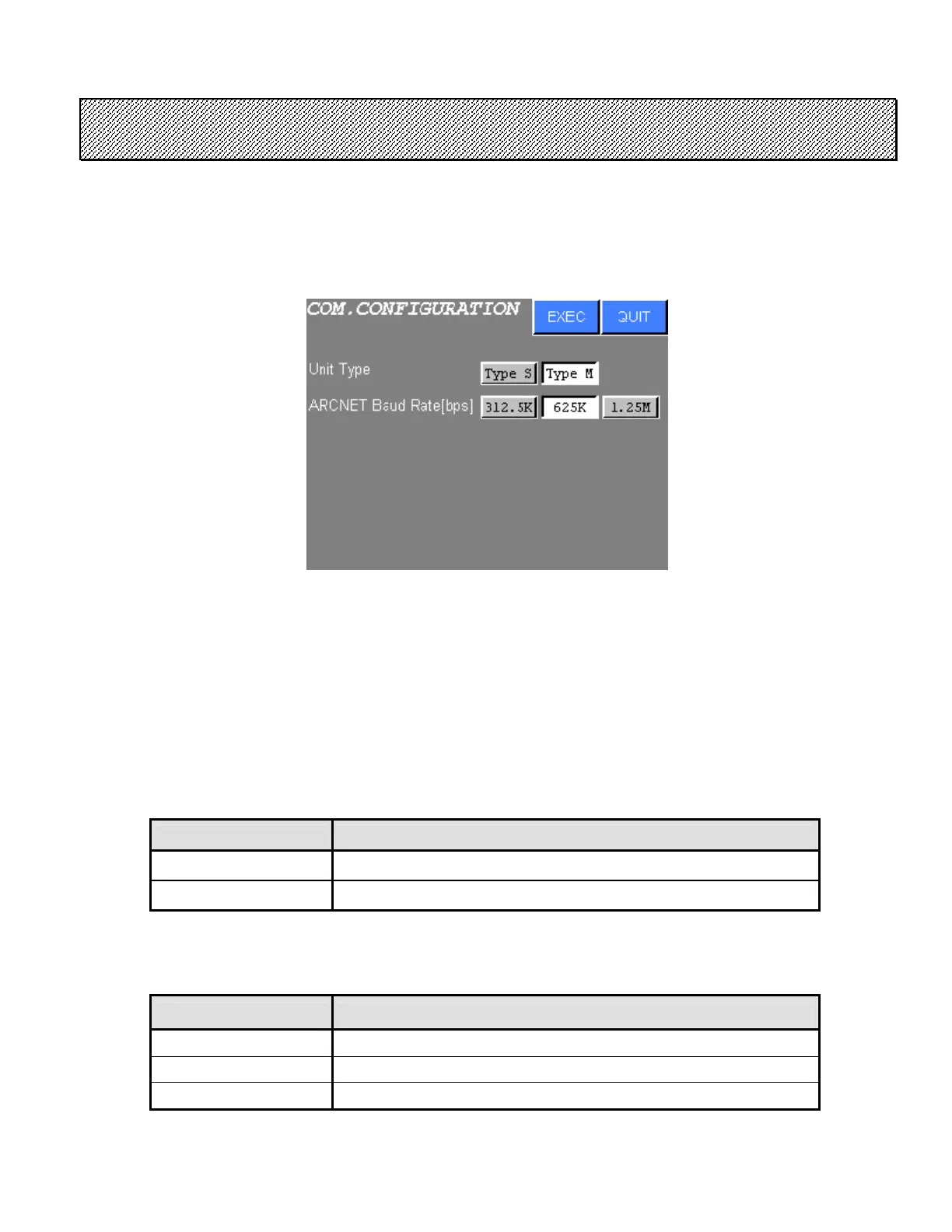
1) The following screen will be displayed when COM.CONFIGURATION is chosen from the
CONFIGURATION menu.
Figure 10.2-1 COM.CONFIGURATION
2) Press touch switch of the desired setting item.
3) Press EXEC to write new settings to the NUTRUNNER.
RESTART will be executed when these settings are changed.
Press QUIT to cancel all new settings and return to the CONFIGURATION menu.
a. Unit Type
Connecting NUTRUNNER type is selected.
Unit Type CONTENTS
Type S Type S is set.
Type M Type M is set.
Table 10.2-1 Unit Type
b. ARCNET Baud Rate [bps]
ARCNET Baud Rate of the DISPLAY PANEL is set.
ARCNET Baud Rate CONTENTS
312.5K Baud Rate is set to 312.5 Kbps.
625K Baud Rate is set to 625 Kbps.
1.25M Baud Rate is set to 1.25 Mbps.
Table 10.2-2 ARCNET Baud Rate [bps]



 To Next Page