DISPLAY PANEL MANUAL
11-3
11.1.1 SYSTEM MAIN MENU
Some settings of the TOUCH PANEL, confirming setting contents, maintenance and so on can be executed
in the SYSTEM MAIN MENU. Only important items are explained in this chapter. Refer to the ‘Hardware
Specifications V806’ ‘Hardware Specifications V8’ for other contents.
Below items are explained in this chapter.
ITEM CONTENTS
RUN
Press RUN to exit the SYSTEM MAIN MENU and change to RUN
mode.
SRAM/Clock This switch is used for correcting the clock of the DISPLAY PANEL.
I/OTest
This screen is used to check that there is no problem with the
interfaces and touch switch operation.
Language
This switch is used for changing language of the SYSTEM MAIN
MENU.
Set the language used in NR mode or USER mode in the
CONFIGURATION SETTING.
Table 11.1-1 SYSTEM MAIN MENU item
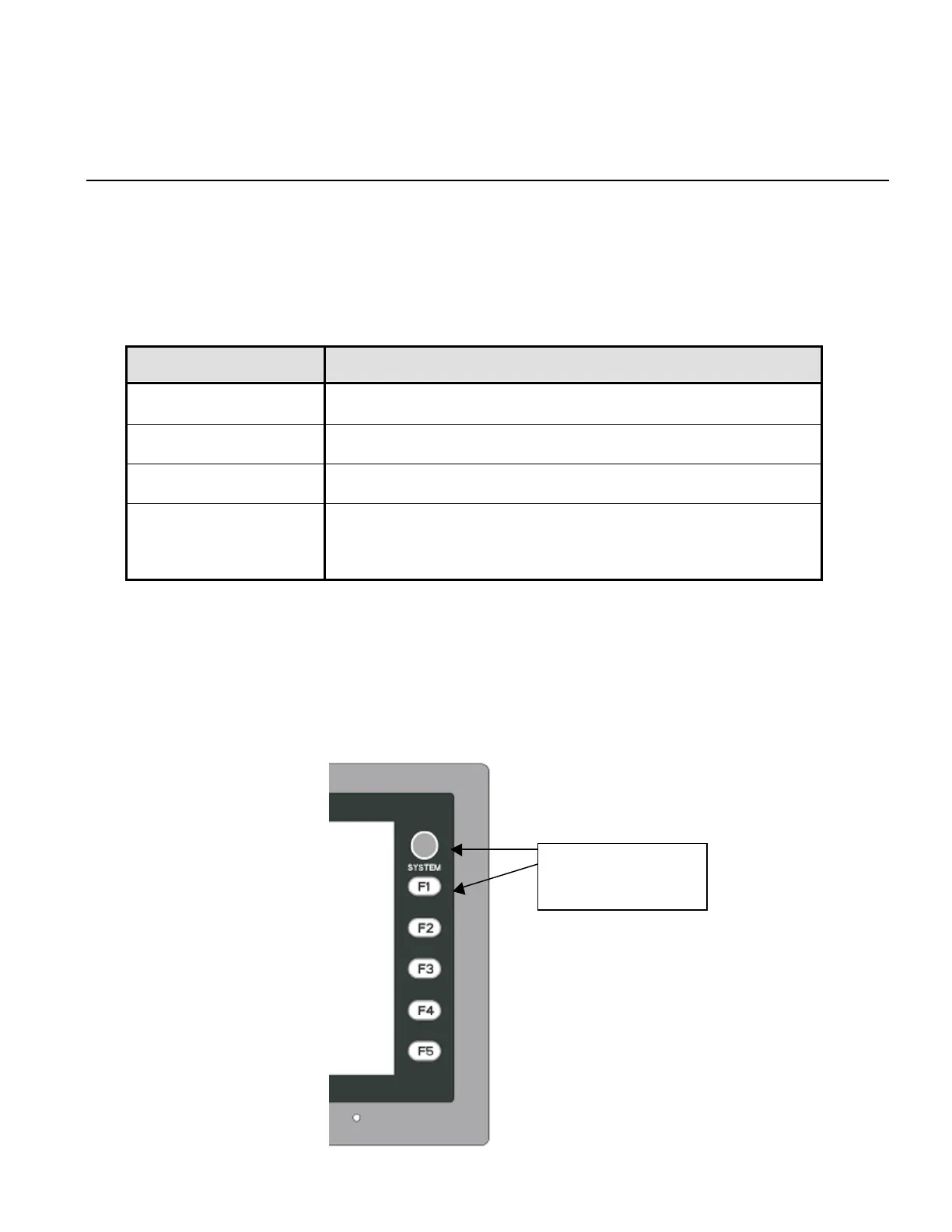
●Change to the SYSTEM MAIN MENU
To bring up the Main Menu screen in the RUN mode, press the [SYSTEM] switch and then the [F1] switch
while the switch menu is displayed.
Press F1 after
pressing SYSTEM.



 To Next Page