Operation 4
Switching on
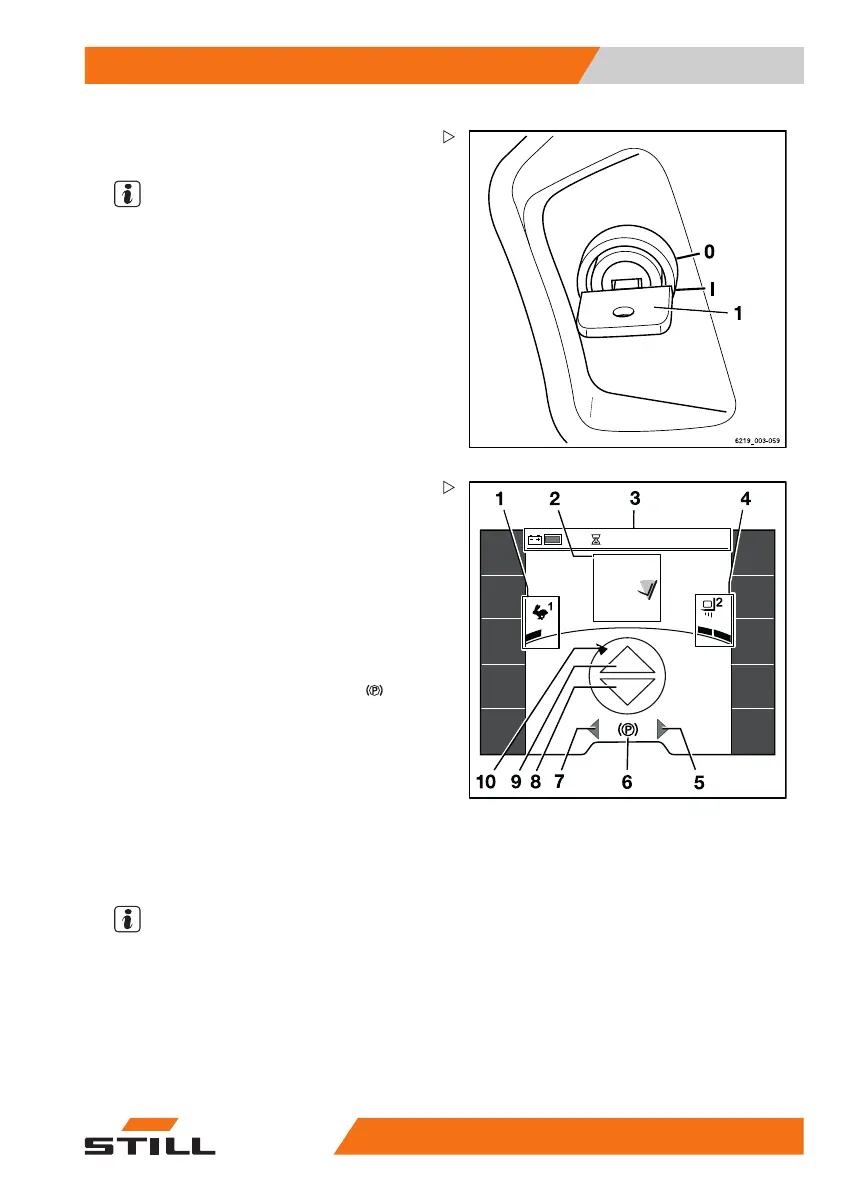
– Insert the switch key (1) into the key switch
and turn it to the "I" position.
NOTE
If the truck is equipped with the "Access
authorisation with PIN code" variant, the
display initially changes to the input menu
for access authorisation.
Once the truck is ready for operation, the main
screen is shown on the display.
432 h
08:20
1,6 t
7°
2,71
m
Main screen
1 Selected drive programme with driving
dynamics display
2 Load information (
variants)
3 Status bar: battery charge, operating
hours, time
4 Selected load dynamics programme with
dynamics bar
5 "Right" turn ind
icator display
6 Driving speed or parking brake
7 "Left" turn indicator display
8 "Reverse" drive d
irection indicator
9 "Forward" drive direction indicator
10 Steering angle display
Additional inform
ation may appear on the
display.
– Refer to the chapter entitled "Display
messages".
NOTE
After connecting the battery, the correct
charge state may not be displayed until the
battery is placed under load by driving or lifting
operations.
563
68011531 EN - 06/2019 - 02 117



 To Next Page