Operation 4
Attachments
2
3
4
5
1
6219_003-118_V3
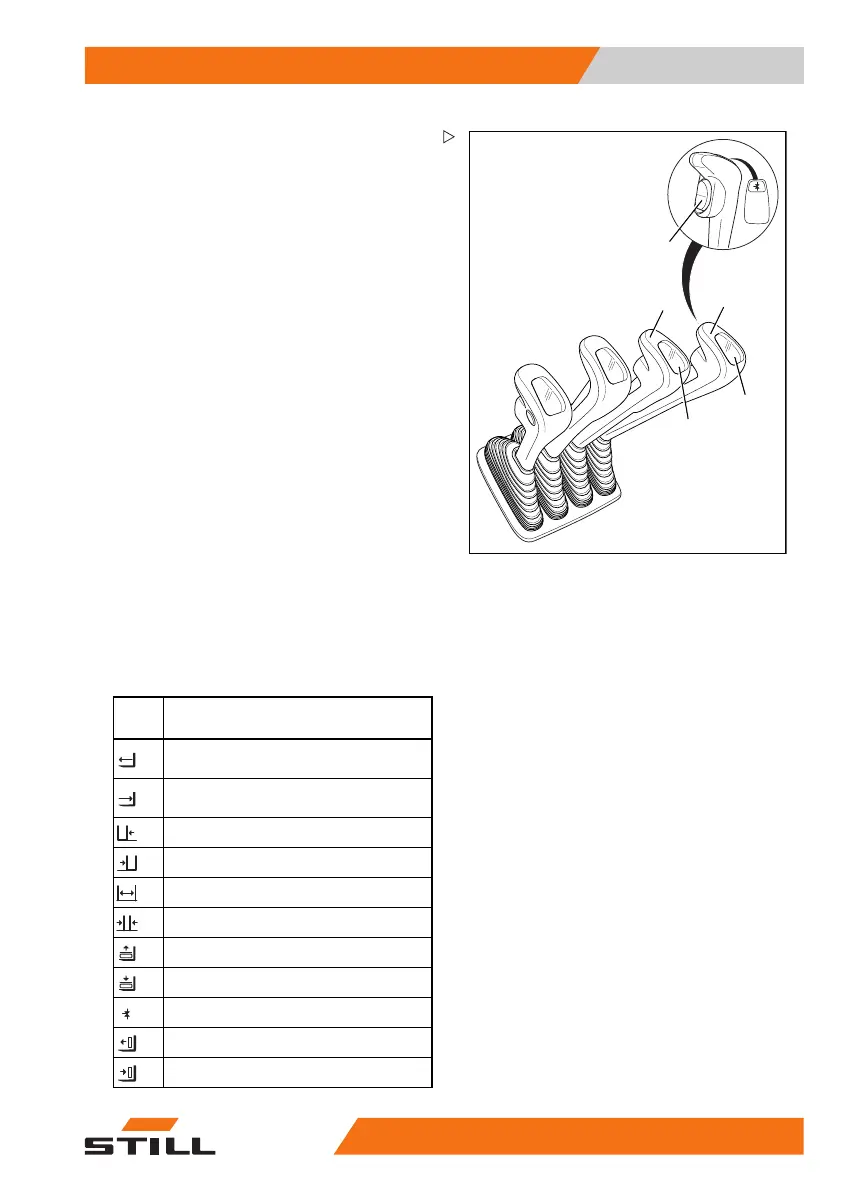
Controlling attachments usi
ng
multi-lever operation
In this version, the attachm
ents (variant) are
controlled using the operat
ing levers (1, 3)
and the function switch (2).
The adhesive
labels bearing the pictogra
ms for the hydraulic
functions (4, 5) are affixed
on the operating
levers.
– Observe the pictograms on the adhesive
label (4) or (5).
The pictograms are arranged according to
the direction of movement of the operating
lever (1) or (3).
The following applies:
– Move the operating lever forwards.
Theattachmentmovesinthedirectionof
movement shown in the upper part of the
pictogram.
– Move the operating leve
r backwards.
Theattachmentmovesinthedirectionof
movement shown in the lower part of the
pictogram.
– Note the following attachment functions and
pictograms.
Picto-
gram
Attachment functio
n
Move the side shift frame or fork
forwards
Move the side shift frame or fork
backwards
Move the sideshift to the left
Move sideshift to the right
Adjust fork arms: open
Adjust fork arms: close
Release load retainer
Clamp load
retainer
Release auxiliary hydraulics
Push off the load
Pull in the load
563
68011531 EN - 06/2019 - 02 231



 To Next Page