Operation 4
Auxiliary equipment
Actuating the windscreen wipers and
windscreen washers (variant)
Repeatedly pressing the resp
ective button
switches between the operati
ng stages in the
sequence shown below.
Button actuation
Operating stage
Off
1Times
On
2 Times Intermittent mode
3rd Times
Off
Hold (possible in all
operating stages)
Washer
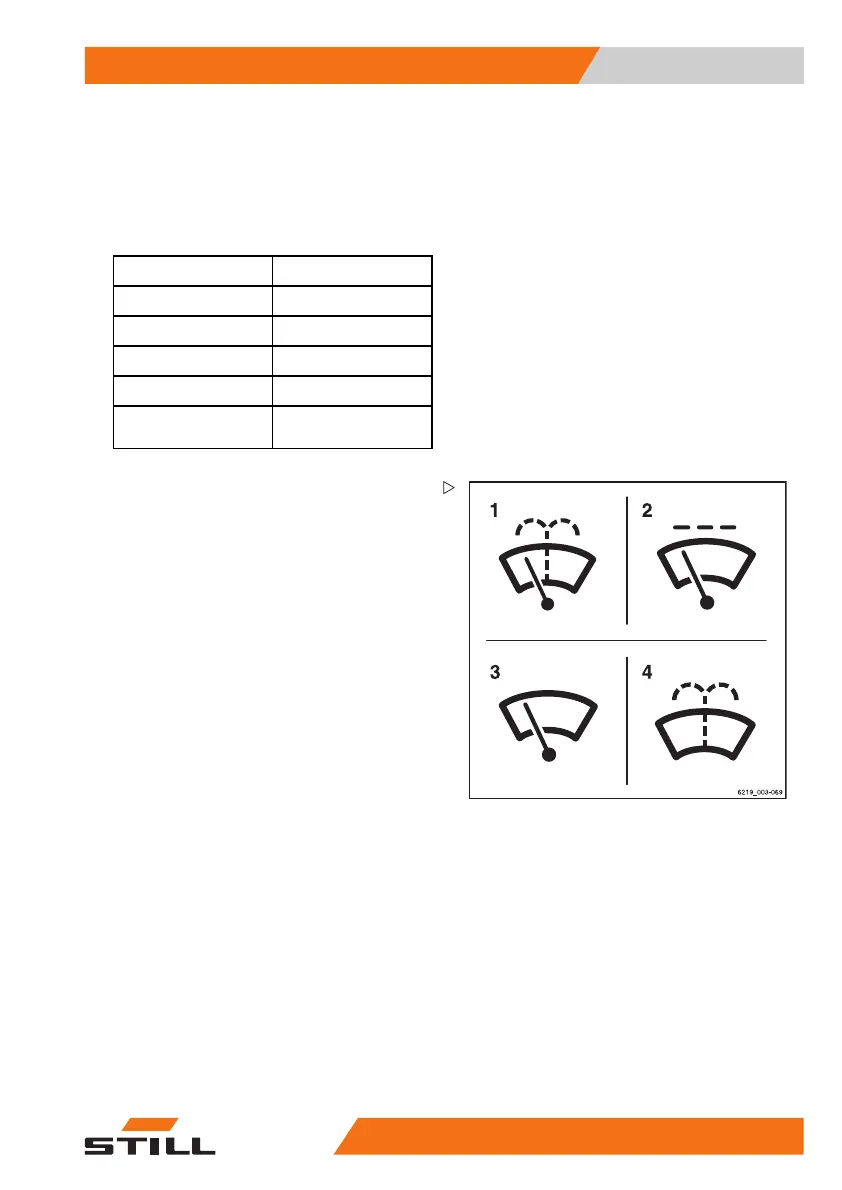
1 Front windscreen wiper and washer symbol
2 Intermittent mode
3On
4 Washer
Front windscreen wiper and washer
– To activate the "On" operating stage,
press the corresponding Softkey for the
symbol (1) on the display-operating unit.
The "On" operating
stage is activated. The
symbol (3) appears
– To activate the "Intermittent mode" operat-
ing stage, press the Softkey again.
The symbol (2) is highlighted with an orange
point.
– Toactivatethe
"Washer" operating stage,
press and hold t
he Softkey.
The "Washer" operating stage is activated.
The symbol (4) is displayed for as long as the
Softkey is pressed.
– Once the window is clean, release the
Softkey.
The previous op
erating stage is reactivated.
– To deactivate the operating stage, press
the Softkey again.
563
68011531 EN - 06/2019 - 02 257



 To Next Page