Operation 4
Traction
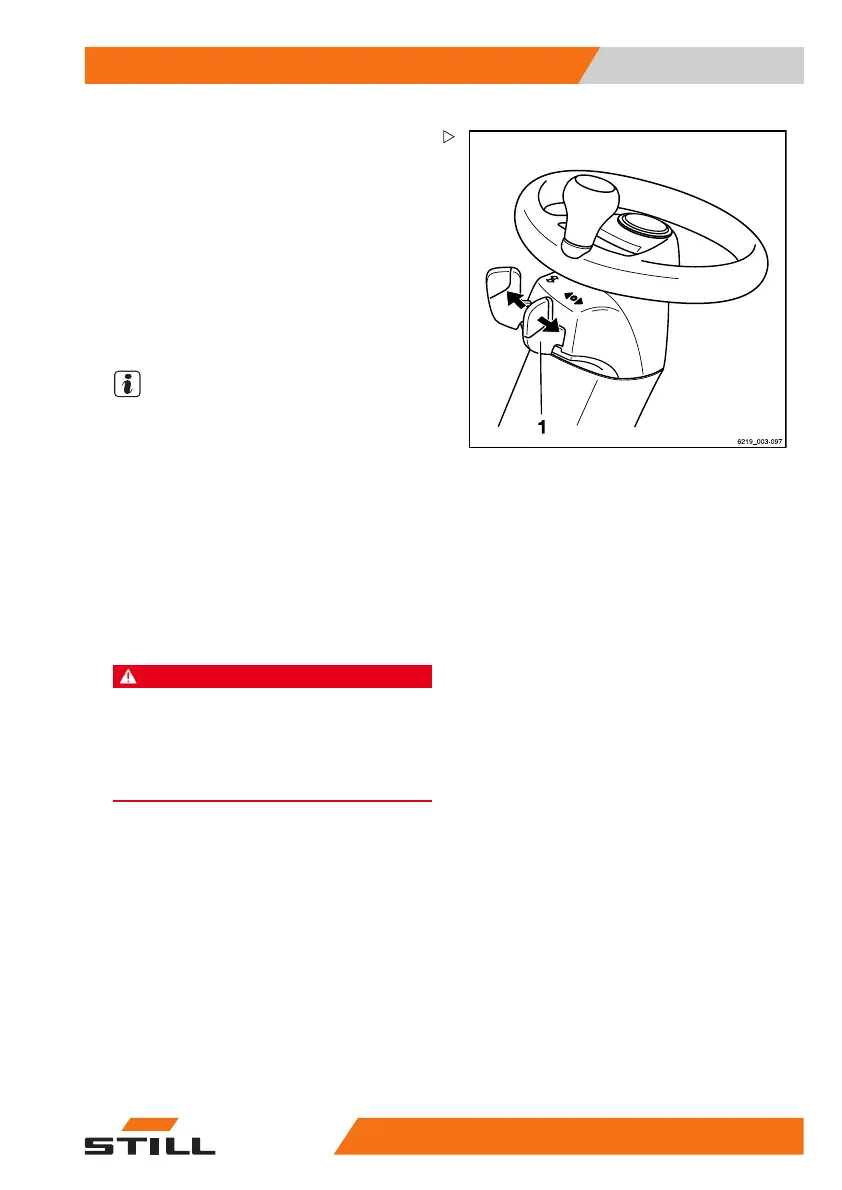
Actuating the drive direction switch,
mini-console version
– For the "forward" drive direction, push the
drive direction switch (1) forwards.
– For the "backward" drive direction, push the
drive direction switch (1) backwards.
Alternatively, the drive d
irection can also be
selected using the drive di
rection switches
on the operating devices fo
r the hydraulic
functions.
NOTE
If the drive direction switch on the operating
devices is faulty and the truck comes to a
standstill in a danger area, the drive direction
switch on the mini-console can be used as an
emergency drive direction switch.
– To do this, push down the drive direction
switch (1) in the desired direction of travel.
– Drive the truck out of the danger area.
Starting drive mode
DANGER
Being trapped under a rolling or tipping truck could
cause fatal injuries!
–Sitonthedriver'sseat.
– Fasten the seat belt.
– Activate the available restraint systems.
– Observe the information in the chapter
entitled "Safety regulations when driving".
The driver's sea
t is equipped with a seat
switch. This s
eat switch checks whether the
driver's seat
is occupied. If the driver's seat
is not occupied
or if the seat switch is mal-
functioning, the
truck cannot be moved and all
lifting function
s are locked. In these situations,
the message
Sit in th
e driver’s seat
is shown on the displ
ay of the display-operat-
ing unit.
– Sit on the driver's seat. Fasten the seat belt.
563
68011531 EN - 06/2019 - 02 145



 To Next Page