Operation 4
Lifting
2
1
6219_003-113
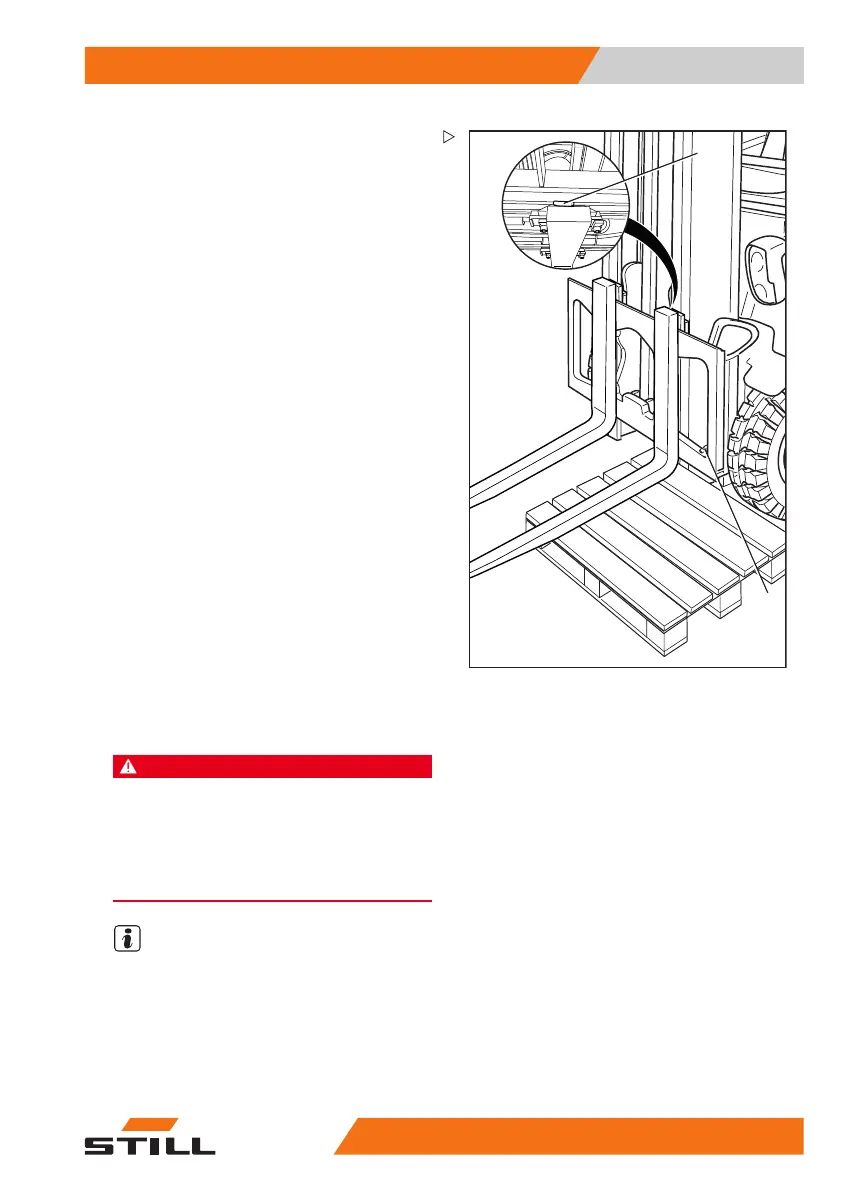
Removing
– Select the pallet according to the size of the
fork arms.
– Position the pallet to the left
or right of the
fork carriage.
– Raise the fork carriage until the lower edges
of the fork arms are approx. 3 cm higher
than the height of the pallet.
– Actuate the parking brake and make sure it
is applied securely.
– Turn the switch key to the lef
t and pull it out.
– Undo the locking screw (2) on the right or
left.
– Pull the locking lever (1) upwards and push
the fork arms outwards onto the pallet.
Installing
– Position the fork arms on
a pallet to the left
or right of the fork carr
iage.
– Push the fork arms onto the fork carriage
from the outside towards the centre.
– Pull the locking lever (1) upwards and push
the fork arms into the required position.
Ensure that the locking lever snaps into
place.
– Fit and tighten the lock
ing screw (2).
DANGER
There is a risk of fatal injury from a falling load or
fork!
It is not permitted to drive or to transport loads
without the locking screw in place.
– Tighten the locking screw (2) each time a fork is
changed.
NOTE
If the truck is equipped with the "load mea-
surement" comfort feature (variant), a "zero
adjustment of the load measurement" must
always be performed after the fork arms have
been changed. Otherwise, correct load mea-
surement cannot be guaranteed.
563
68011531 EN - 06/2019 - 02 181



 To Next Page