Operation 4
Attachments
The LED for the "5th function" lights up.
– Move the operating lever (1) in the direc-
tion (E) or (F).
The attachment moves accordin
gly in the
directions (E) or (F) as shown i
n the pictogram.
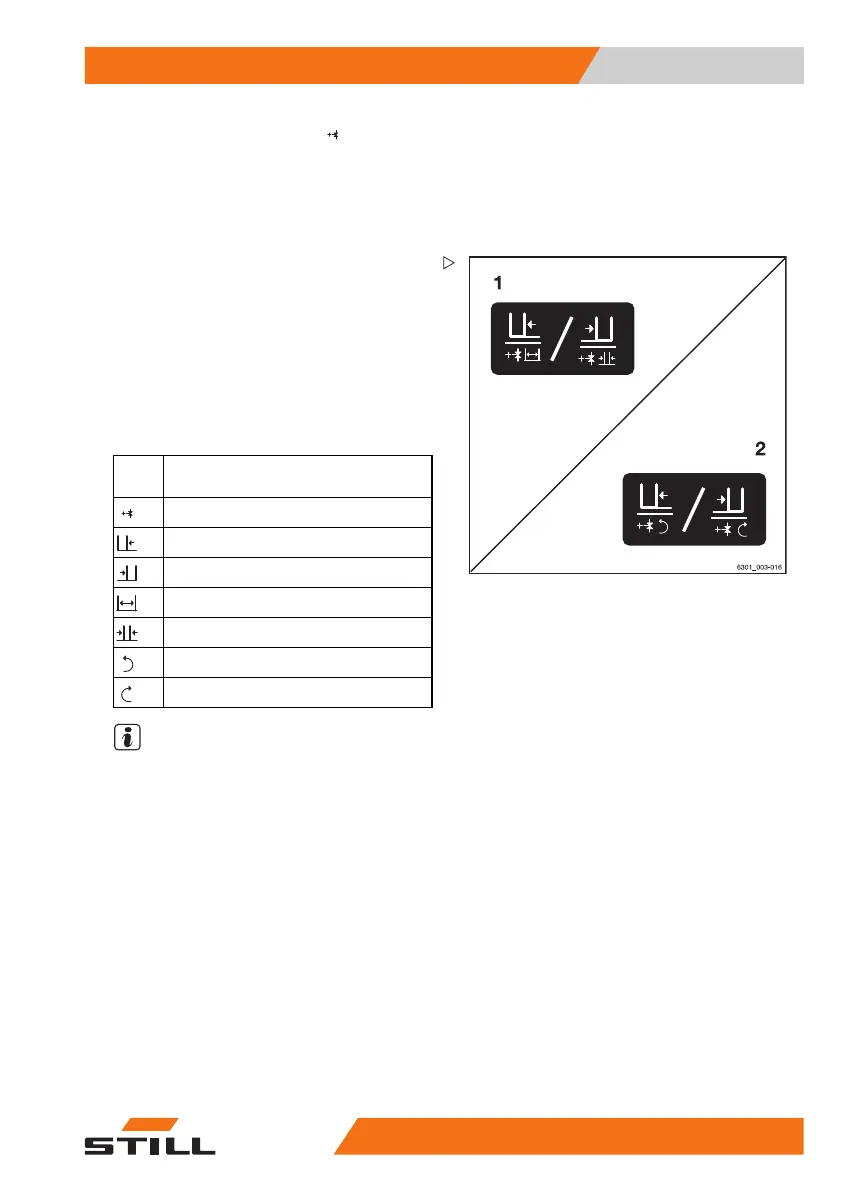
Example using the pictograms for configura-
tion (1):
If the operating lever (1) i
s moved in the
direction of the arrow (E),
the sideshift moves
to the left.
If the function key for the "5th function" (2) is
actuated and the operating lever (1) is moved
in the direction of the arrow (E), the fork arms
open.
Picto-
gram
Attachment function
Auxiliary hydraulics "
5th function"
Move the sideshift to the left
Move sideshift to the
right
Adjust fork arms: op
en
Adjust fork arms: c
lose
Rotate to the left
Rotate to the right
NOTE
The pictograms are affixed according to
the attachment fitted at the factory. If an
attachment with different functions is fitted,
the authorised service centre must check that
the pictograms bear the correct representation
and must change them if necessary.
563
68011531 EN - 06/2019 - 02 241



 To Next Page