Operation 4
Handling the battery
1
3
2
1
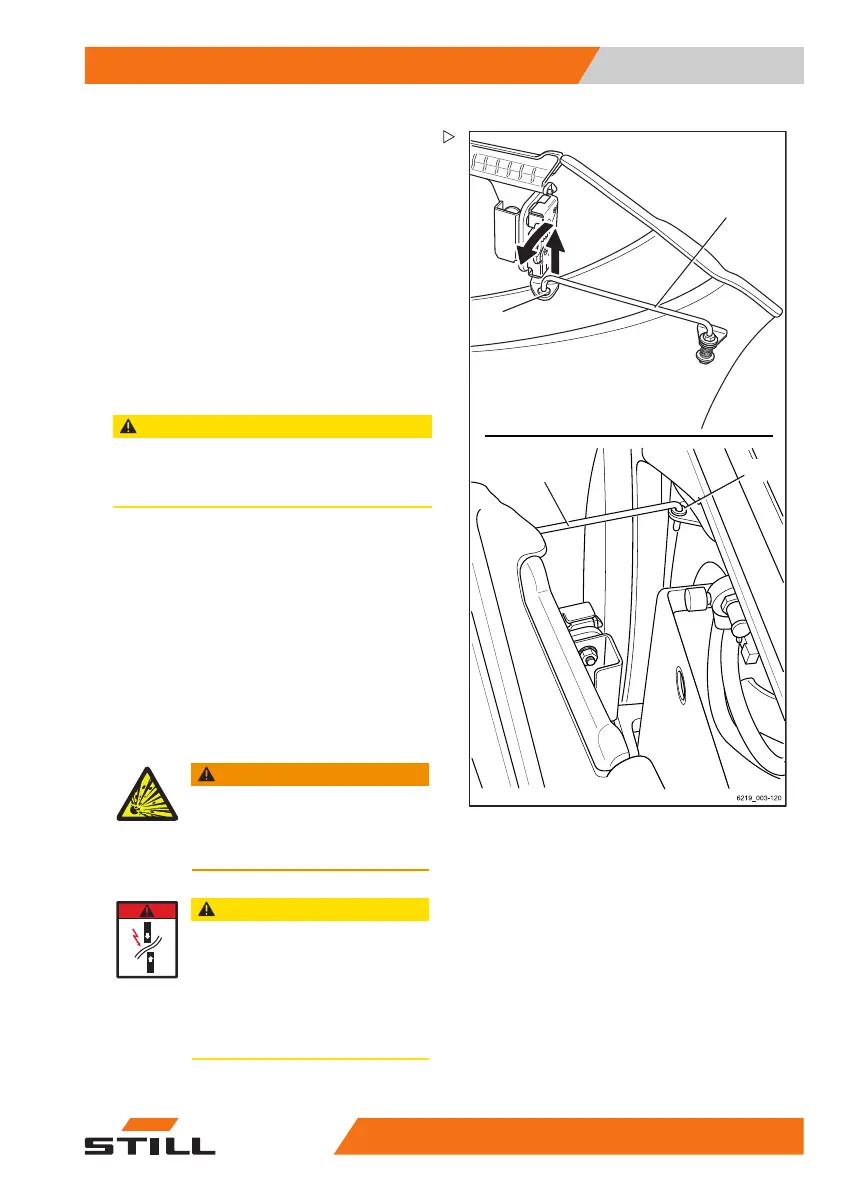
The battery door can be locked in the open
position using a support bracket.
– Pull the support bracket (1) up and out of its
support eyelet (2) on the battery door.
– Swing the support bracket (1
)outwardsin
an anticlockwise direction
.
– Press down on the support bracket (1) to
clip it into the support eyelet (3) on the truck.
The battery door will lock into a slightly open
position.
After charging
CAUTION
Risk of component damage!
– Switch off the battery charger before disconnec-
ting the charging cable.
– Switch off the battery charger.
– Swing the support bracket (1) back into
position and lock it into the support eyelet (2)
on the battery door.
– Open the battery door and lock it into the
open position.
– Disconnect the battery male connector from
the plug for the battery charger.
– Insert the battery male connector fully into
the plug connection on the truck.
WARNING
Risk of explosion!
Theplugmayonlybedisconnected
from the socket when the truck and
battery charger are switched off.
CAUTION
There is a risk of short circuit if the
cables are damaged.
Do not crush the battery cable when
closing the battery cover.
– Ensure that the battery cable does
not come into contact with the
battery cover.
563
68011531 EN - 06/2019 - 02 321



 To Next Page