User’s Manual
136 Software Configuration
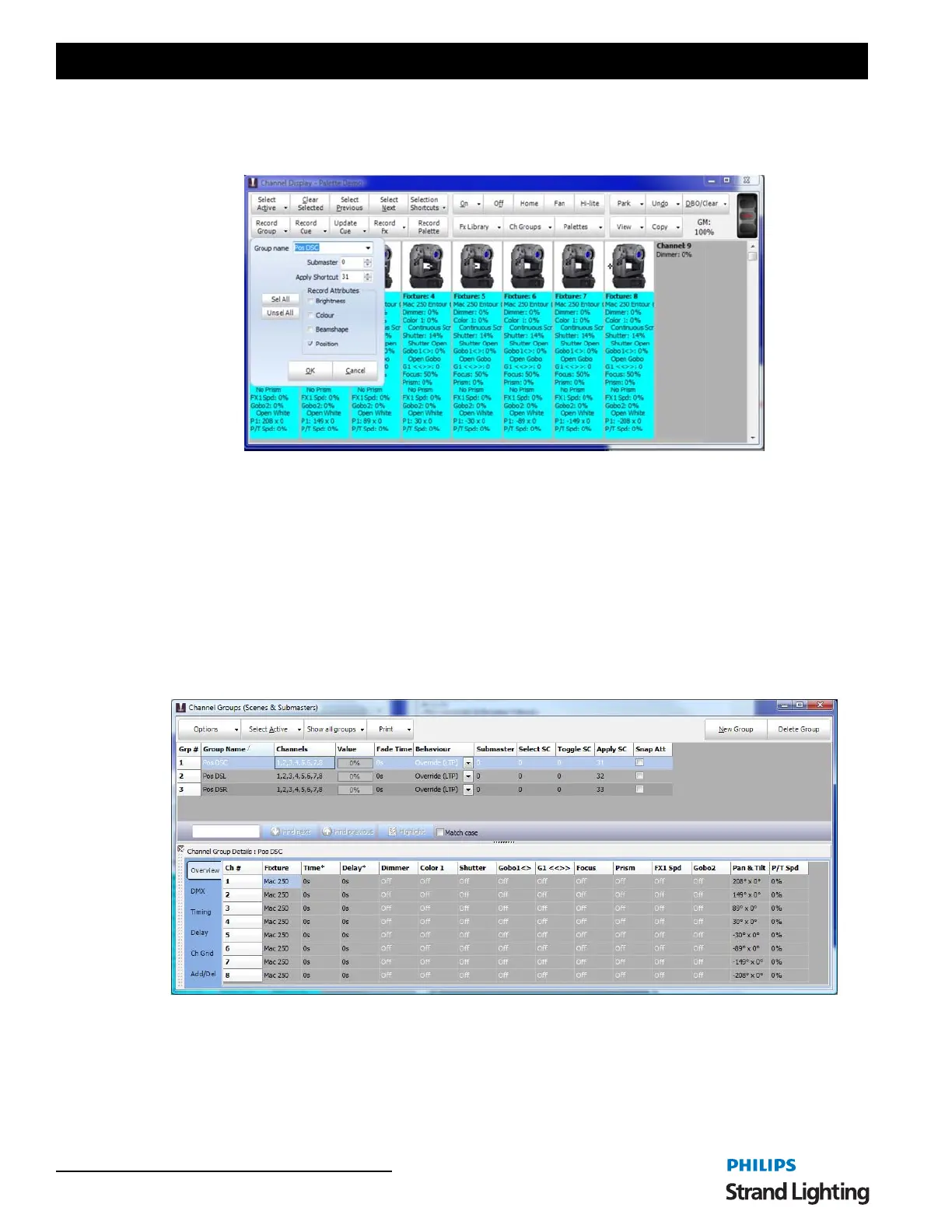
With all of the fixtures selected click on the "Record Group" button. In the group name enter a description of the
position (e.g. Pos DSC or Position Down Stage Center). Set the submaster to 0 so that no submaster will be set for
this group. In the shortcut field enter 51 and select only "Position" in the "Record Attributes" options.
Click "OK" to proceed with the record and a new channel group will be created recording only the position
information for the 8 fixtures.
Note that as soon as the group has been recorded the verbose display will show the group name in the list of
attributes. This indicates that NEO has automatically set the fixture to the new position preset so that if we record a
cue the correct reference will be recorded (more on this later).
Repeat this process for positions down stage left and down stage right so that you have recorded 3 channel groups.
Assign the shortcut numbers 52 and 53 the new positions.
Open the channel group window and you will see the 3 new groups labeled appropriately. Double click on the
channels field of the first group to open the "Channel group detail" window.
Notice that in the channel details for the newly created group that all of the attributes are set to "Off" except for the
pan & tilt and the P/T Speed. If we do not want to include P/T speed into the position preset simply select all of the
values and press "O" (for off) and press the enter key.
Creating Position Presets
Creating Position Presets - Details


 To Next Page