Automatic Show File Backup Service 171
NEO Lighting Control Console
can grab the fade and manually complete it using this handle. If you [Halt] the cue, you can either press [GO] to
complete it, or use the handle to manually complete the transition to the next cue. If you are sitting in a cue, moving
the handle will initiate the transition to the next cue.
All levels going up and down will be affected. All times will be re-scaled to the distance the handle has to travel, with
the greatest time in the cue being measured using that distance and all others scaled to that. Wait times will be scaled
too.
At any point before reaching the end of travel, you can move the handle backward to reverse the transition. Once you
reach the end of travel, the next cue in the cue list will be pending. You do not have to physically reload a cue or move
the fader back to its starting position. The next cue transition will begin by moving the fade off the end of travel you
just reached or by simply pressing [GO].
If you hold down [SHIFT] while manually moving a Crossfader, you can move backwards through a cue list. (i.e., the
cue that has just been completed will be the pending cue, rather than the next cue in the cue list). In this case, the
pending cue is Cue 1 - the cue just before Cue 2:
Cue List Split Crossfader
The Split Crossfader mode sets up the left-hand fader to, at will, manually control the levels moving up in the next
cue while the right-hand fader manually controls the levels going down in the next cue. Moving these faders in
tandem executes a standard crossfade. Both handles need to reach their end-travel destination before the cue
completes. Once the cue completes, the pending cue changes and the handles are ready to execute the next manual
fade. You do not need to exercise the full travel of the handles to re-load the next cue.
NEO NOTES & TIPS: Regardless of configuration of the A/B and C/D faders, the [SELECT], [HALT/BACK] and
[GO] buttons will function as normal on the appropriate cue list.
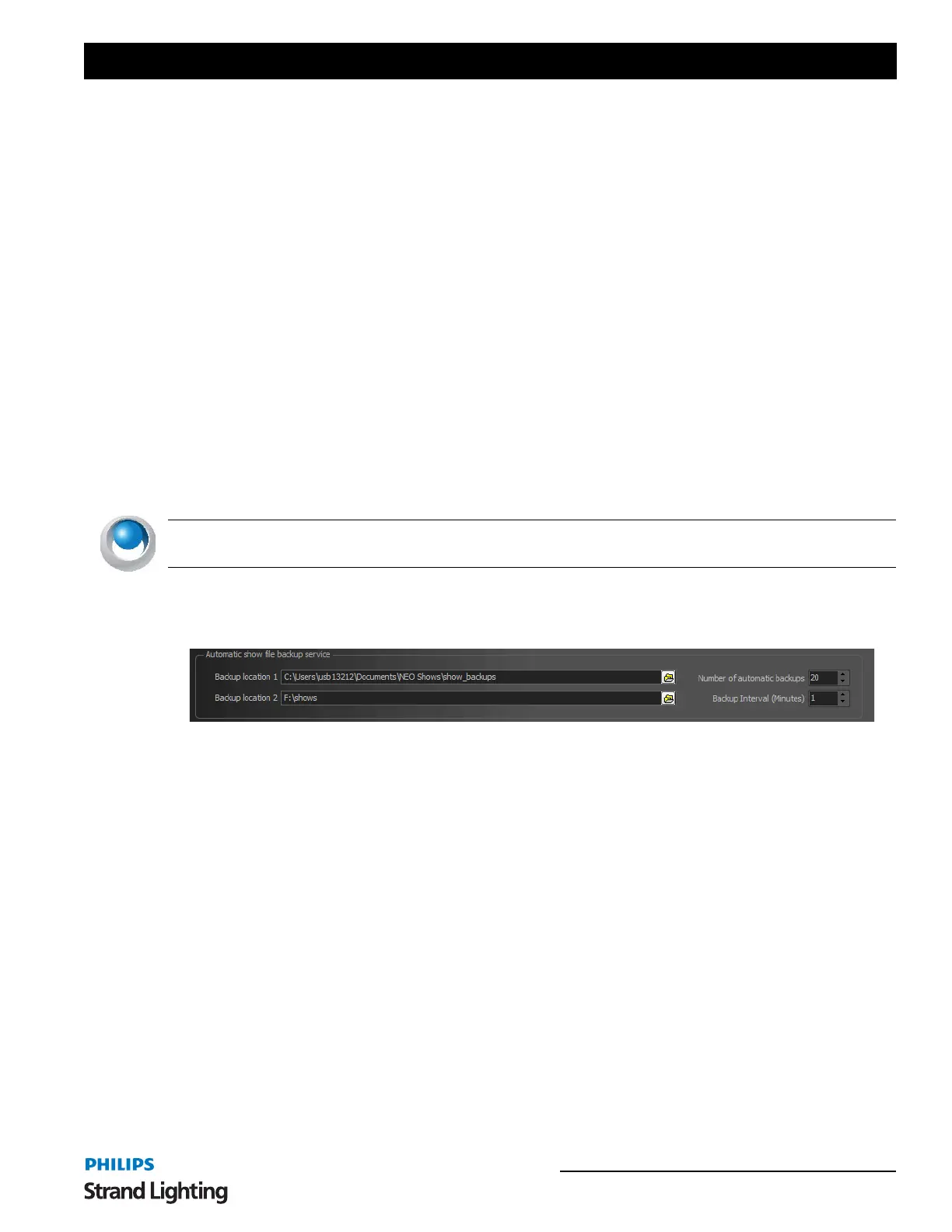
27. Automatic Show File Backup Service
Determines backup file settings.
Backup location
By default NEO will store the backups in a sub folder of the "NEO Shows" directory. Use this field to change this
location. This can be useful for automatically storing the backup on a remote system.
The second location allows you to double your backup locations for backup redundancy.
Number of automatic backups - Determines the quantity of backups kept in the configured folder.
Backup Interval (Minutes) - Determines the frequency at which the backups are triggered.
When NEO is shut down the software will automatically create a backup of your current show file. Each backup file
created will have the date and time encoded into the name of the file. Use this option to determine how many of these
backups should be kept before automatically deleting the oldest one.


 To Next Page