User’s Manual
206 NEO Console & Software
9. Maintenance
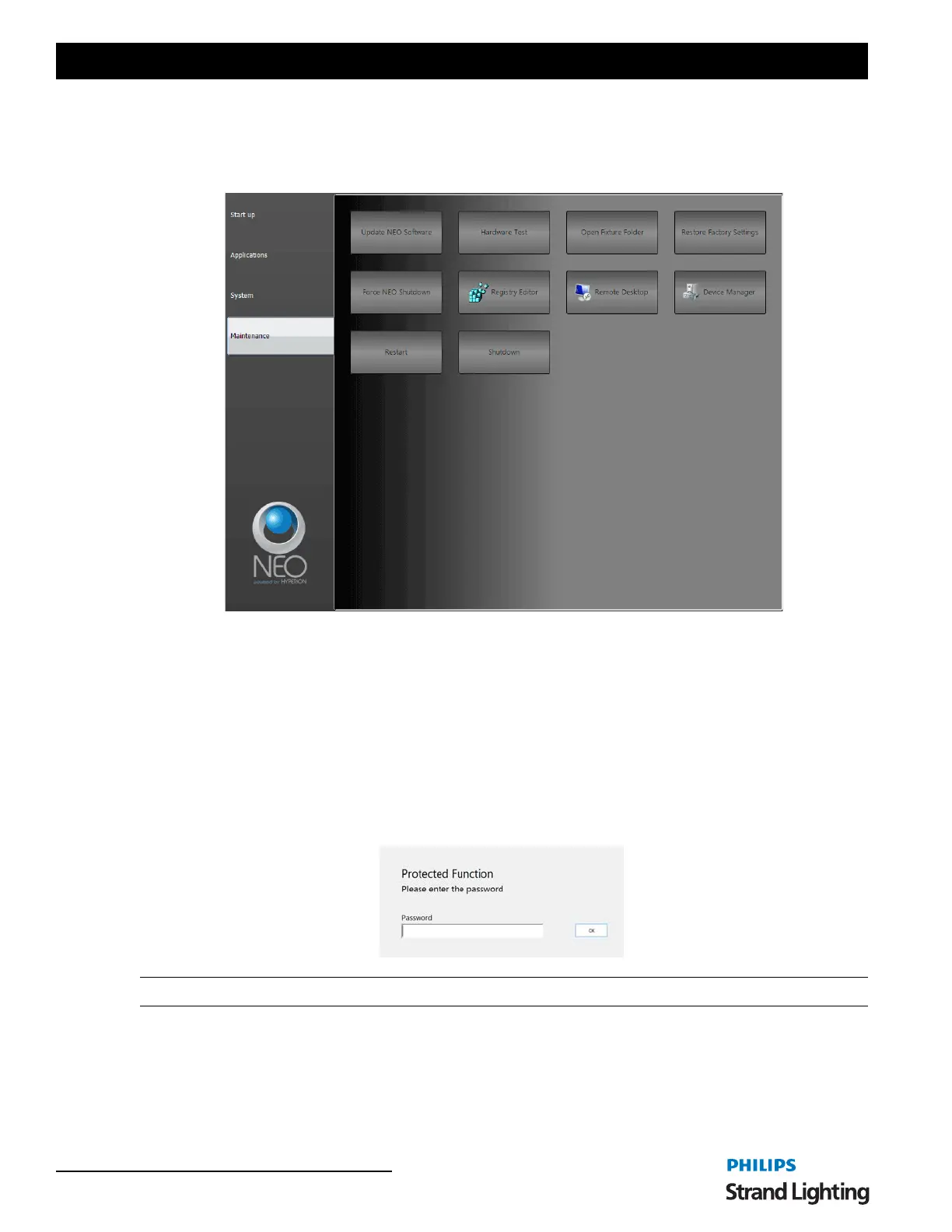
The NEO Control Panel: Maintenance gives you access to higher level functionality for commissioning,
troubleshooting and other system level functions.
Update NEO Software - the first step to updating your NEO console is to copy the software file to the C: drive. Then
Force NEO Shutdown. Once done, you can press the Update NEO Software button and follow the prompts to update
your console's software.
Hardware Test - for future expansion, this will launch the Hardware Test utility.
Open Fixture Folder - this will use File Manager to open the folder where NEO's fixture library is stored.
Restore Factory Settings - will restore the NEO console to factory defaults.
Force NEO Shutdown - will force the NEO software to shutdown. This is required prior to updating NEO's
software.
Registry Editor - this accesses the Windows Registry Editor and is password protected.
Note: This should only be accessed by authorization of Philips Entertainment Technical Support.
Remote Desktop - this will launch the Windows Remote Desktop settings application.


 To Next Page