User’s Manual
166 Software Configuration
System Input/Output (DMX)
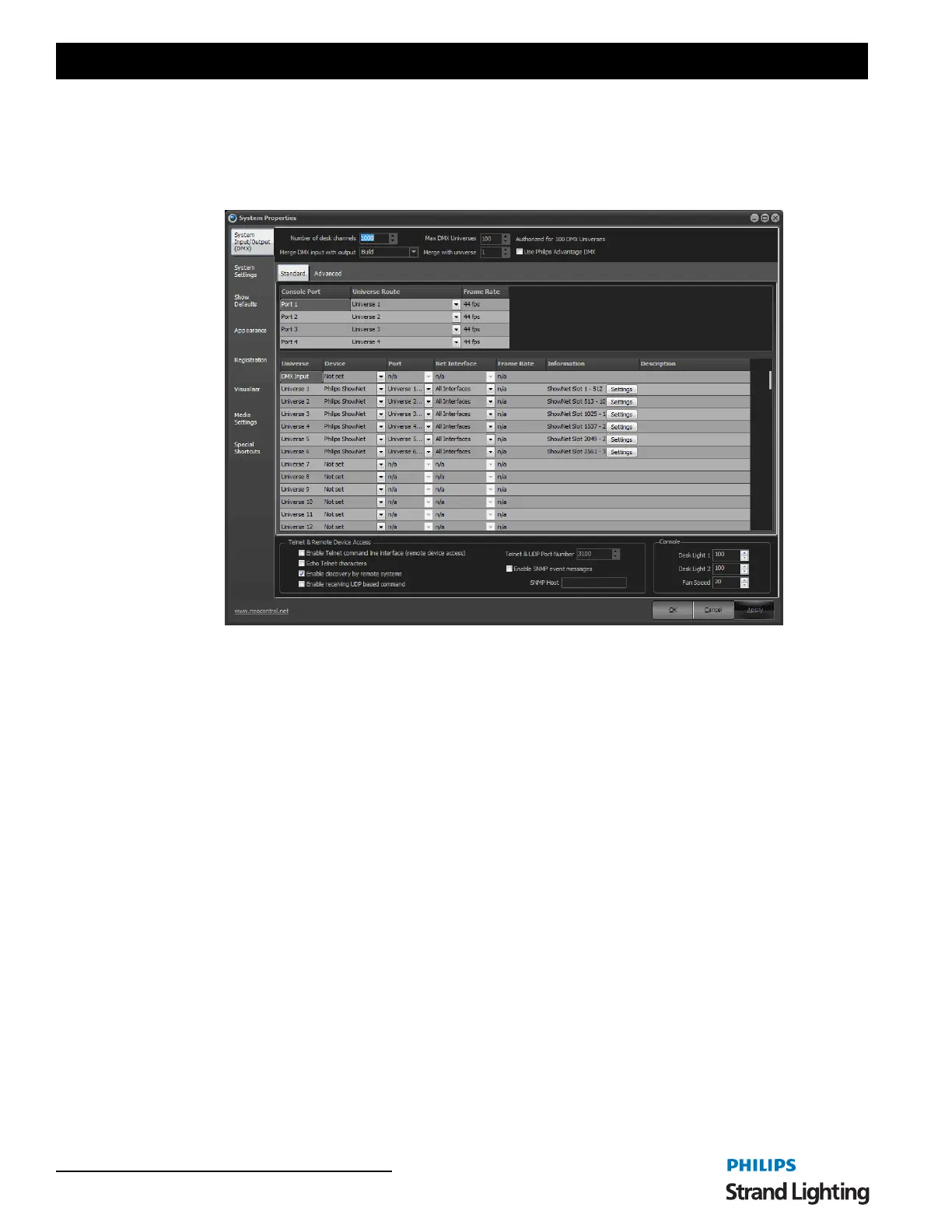
The system input/output tab provides access to settings affecting overall operation of the software. This is primarily
related to external DMX hardware installed with your software. Also found in this tab is setting to enable the telnet
and UDP interface.
Figure 13: System Properties, System I/O Tab
Number of Desk Channel
NEO can support over 25,000 desk channels (also referred to as system channels). Each desk channel can control
multiple DMX channels either by patching several DMX channels to a desk channel or by patching an intelligent
fixture that requires multiple DMX channels for operation.
The more desk channels you configure the software for the more CPU and resources will be required. By default the
software configures 500 desk channels as this will run without issue on the minimum specification for the software.
Any PC purchased in the last couple of years will easily run a lot more than 500 channels.
This number will also define the number of cells in the channel display window. Some may find it easier to view this
window will only the number of channels they need for a show.
Enter the number of channels you want the software to use and restart NEO for the change to take effect.
Max DMX Universes
By default the software will be setup for 10 DMX universes. A DMX universe is a block of 512 DMX channels. You
can think of a DMX universe as a physical cable running out from the system.
Although any number of Universes can be configured output will always be restricted to the limit of your registration.
You can configure as many universes as you want but on the universes registered will be active. This allows you to
program any sized show you want without the registration being required until output is needed.
As you change the "Max DMX Universe" spin edit you will notice the number of rows in the grid below will also
change. Each row defines the output for a DMX universe.
Merge DMX input with output


 To Next Page