Control Panel 195
NEO Lighting Control Console
Load Layout and Settings
This allows the user to load their NEO window layout. The layout is loaded from a separate file.
8. Control Panel
The PaletteOS software runs on a PC processor under a Windows® operating system (OS). An OS system means that
only the software necessary to run the console is installed and no unauthorized software can be installed by the user.
There are no user-configurable applications that are included in the OS. This protects the system and the operating
software parameters, assuring that system integrity is never compromised.
Since the Windows OS is used, other features are available, such as a web browser, file manager and more. The Light
Palette console can also be connected to a network to take advantage of services like DHCP networking, mapped
network drives, Internet connectivity, and more.
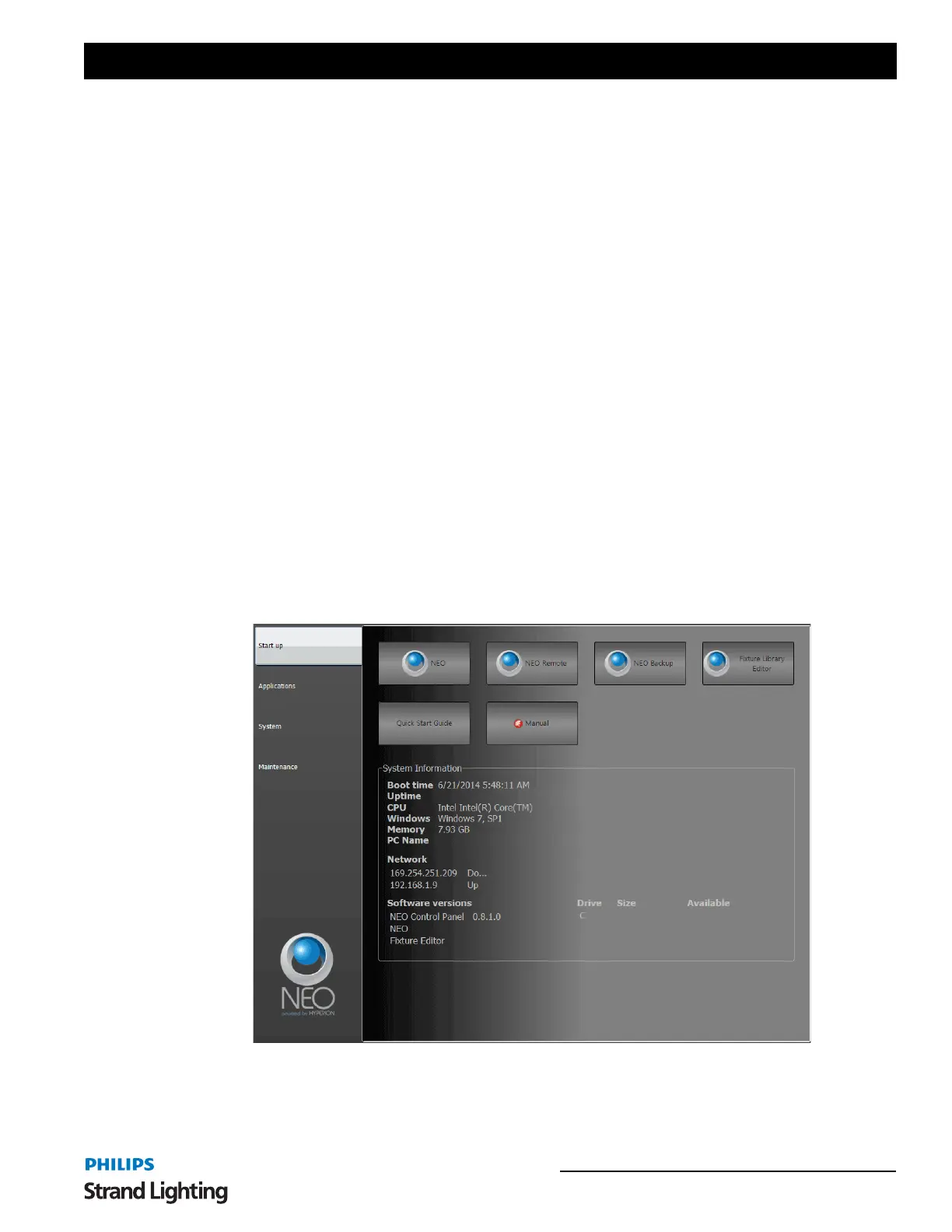
The Control Panel appears when called up through the MORE display.
The Control Panel provides management of your console, lighting system configuration and data.
It is divided into four categories:
•Start Up
• Applications
•System
• Maintenance
Click a category to view its control icons.
Start Up
The NEO Control Panel: Start Up gives you access to basic start up icons.
NEO - launches the NEO operating software.
NEO Remote - launches the NEO Remote Console software.
NEO Backup - launches the NEO software to connect as a tracking backup.


 To Next Page