User’s Manual
44 Software Configuration
Command Pulldown - Items
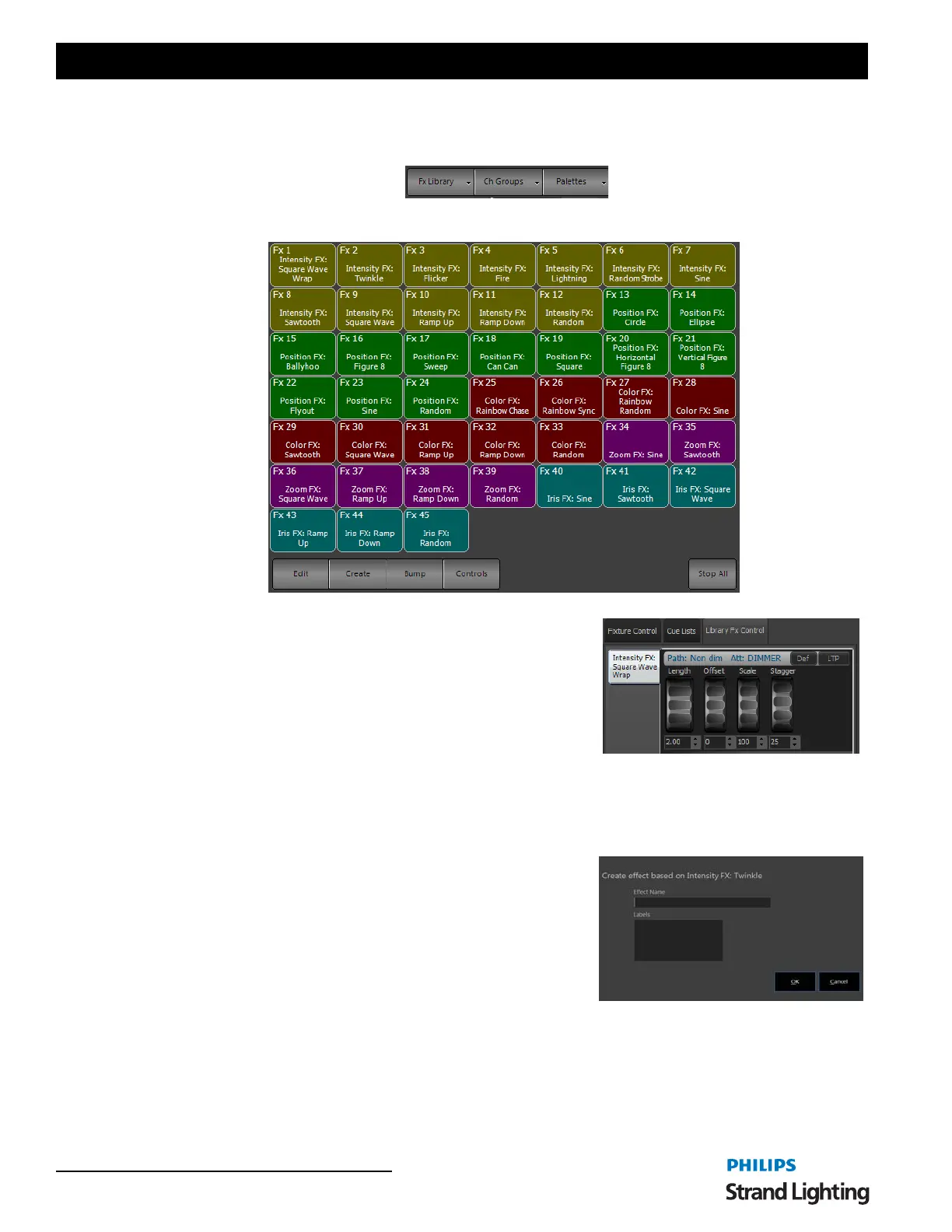
FX Library - opens the FX library. This allows you to apply a pre-built effect to the selected fixtures.
Once the library effect is running, the controls for the running effect is
available on the encoders or is available in the Side Bar > Library FX
Controls.
Should you want to edit and store this for the showfile, create a show fx
from the library fx so that it doesn't change the fx library.
Step 1. Select desired fixtures.
Step 2. Select fx from library.
Step 3. Press [CREATE FX] and follow the dialogue to create the show fx.
Step 4. Name the fx and press ENTER. Now the effect is running as a standalone. Modify and store with any cue.
Edit - opens the Effects Editor.
Create - opens up the "Create effect based on…" dialogue box.
Make sure you have a library effect running prior to pressing the Create
button.
Bump - will bump the FX out as a latched button. Pressing Bump again
will restart the FX.
Controls - will bring the FX controls into focus.
Stop All - will stop all running library FX.



 To Next Page