User’s Manual
172 Software Configuration
28. Intermediate Options
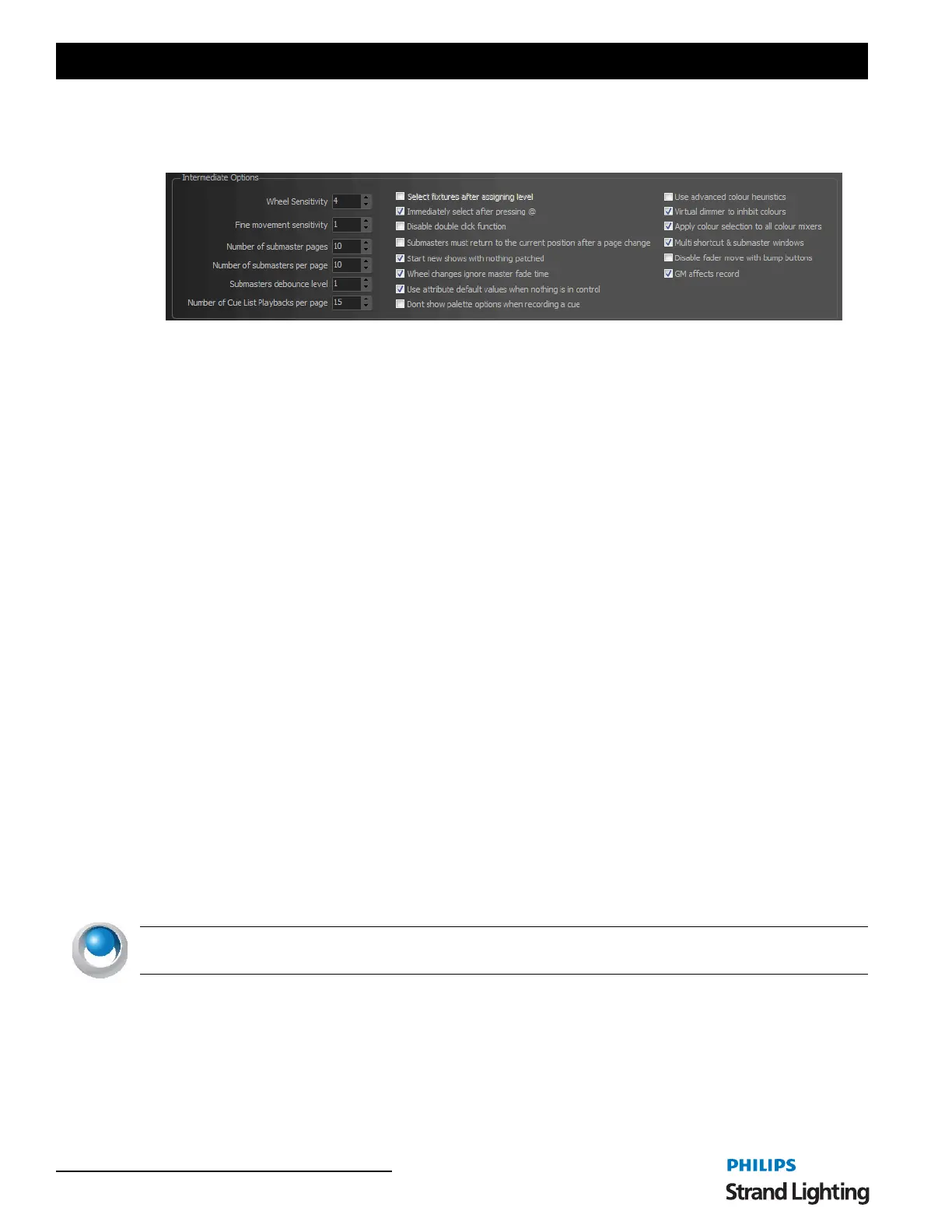
These are options that are needed when more than basic programming is required.
Mouse Wheel Sensitivity
The mouse wheel sensitivity allows you to alter the percentage increment that will apply for each segment rotation.
By default, rotating the mouse wheel by one increment will change the fixtures or groups by 5%.
Fine Movement Sensitivity
The fine movement sensitivity determines the resolution moved when the fixture control is set to fine mode.
Number of Submaster Pages
This setting will allow you to configure the maximum page number for the onscreen submasters, external submasters
connected via MIDI, DMX or the Playback wing.
Number of Submasters Per Page
The software will allow up to 100 submasters per page. Use this option to configure the submasters per page count to
match the number of physical handles on the device you are using.
For example if you have a external 24 channel DMX lighting board connected to DMX input then it is recommended
that you set number of submasters per page to 24. This means that when you change to the second page in NEO
channel 1 on you physical lighting desk will correspond to submaster 25.
Submaster Denounce Level
The submaster sensitivity option will determine how much the DMX value of an external or hardware submaster
must change before it is registered by the system. In most cases this option should be left at 1 as we want the software
to register a change every time the submaster moves.
In some cases the external submaster can be set just between 2 values and the output may jump between these values
continuously (This is known as bouncing). To get around this problem we can set the submaster debounce to 2 and
the system will not update the submaster unless the value moves by 2 or more.
Number of Cue List Playbacks Per Page
There are virtually unlimited cue list playbacks that can be setup in NEO. To manage the display of the playbacks set
the number you want to appear on each page with this setting.
NEO NOTES & TIPS: It is recommended that you set this to the maximum number that is visible without the need
for the scroll bar.
Select Fixtures After Setting
Default off - When using the command line to set channel values this option will allow you to perform a selection at
the same time. The channels set will automatically become selected after applying the value.
Immediately Select After Pressing @
When on, and typing in a fixture number, the moment the @ is pressed, the fixture is selected. This is to help the
designer find the fixture on the grid.


 To Next Page