System Properties 165
NEO Lighting Control Console
25. System Properties
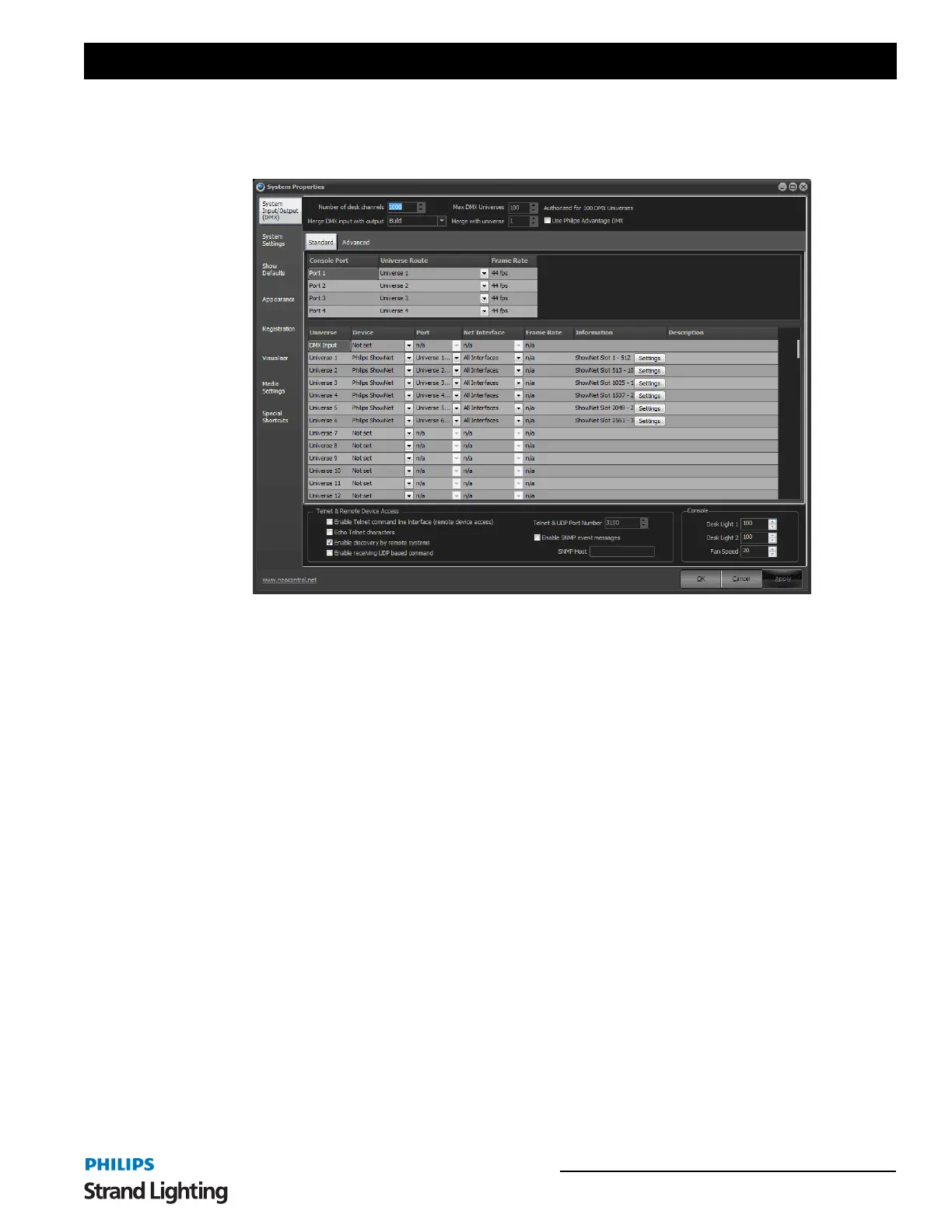
The "system properties" window can be accessed by selecting the "Options" drop down menu.
There are nine tabs of settings that you can configure in this window:
System Input/Output (DMX) - provides access to settings affecting the flow of DMX data and system channels.
This is primarily related to external DMX hardware installed with your software
System Settings - provides settings that effect the operation of the software. This tab also provides access to the
tracking backup options.
Show Defaults - setting in this tab provide default options for cue lists, channel groups and recording.
Appearance - the appearance tab allows you to change colors and fonts used throughout the software.
Registration - Options for registering your NEO software. Without a valid registration, NEO will not produce any
DMX output.
Visualizer - Configures integration with WYSIWYG, Capture, or Light Converse visualization tool.
Media - Setting that control the global output of media playback
Special Shortcuts - Setup special shortcuts to control miscellaneous functions.


 To Next Page