Command Pulldowns 39
NEO Lighting Control Console
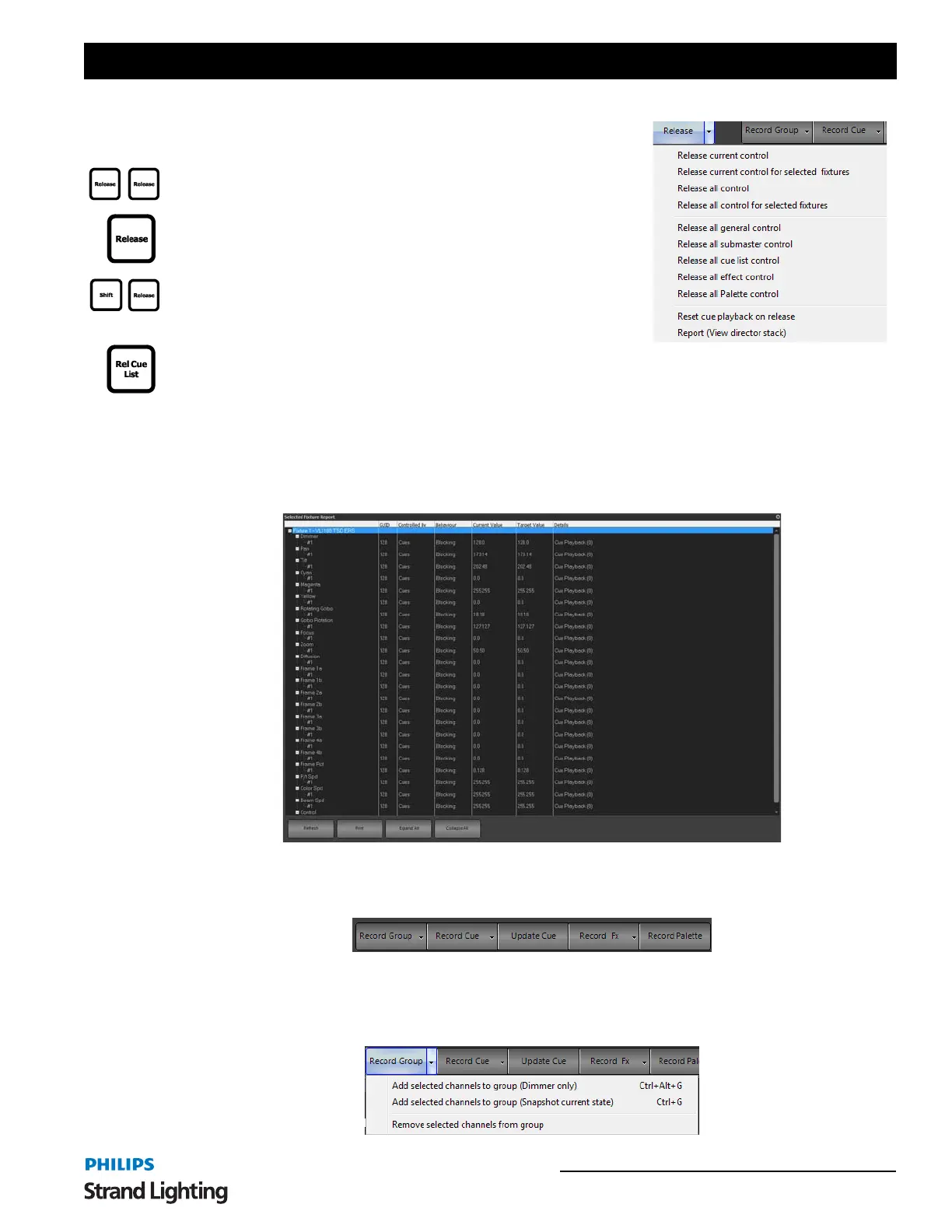
Release current control - releases control of current fixtures.
Release current control for selected fixtures - releases control for
selected fixtures only.
Release all control - releases all control. This is equivalent to the second
stage of the Release key. Example: [RELEASE][RELEASE].
Release all control for selected fixtures - release all control for selected
fixtures. This is equivalent to the first stage of the Release key. Example:
[RELEASE].
Release all general control - releases all selected channel control.
Changes due to groups, cues and effects are not touched.
Release submaster control - releases all control coming from submasters.
Release all cue list control - releases all channels that are outputting from a cue.
Release all effect control - releases all running effects.
Release all Palette control - releases all fixture palettes that are outputting.
Reset cue playback on release - (this is a mode and can be toggled on or off), will reset the cue playback when
fixtures are released.
Report (View director stack) - is a diagnostic tool to show diagnostic level detail about fixture status.
Command Pulldown - Record
Record Group - activates the Record / Update Group dialogue box in order to facilitate storing / editing a group.
RECORD GROUP OPTIONS



 To Next Page