User’s Manual
40 Software Configuration
Add selected channels to group (Dimmer only) - brings up the Record/Update Group dialogue box to add selected
fixtures' intensity to the designated group.
Add selected channels to group (Snapshot current state) - bring up the Record/Update Group dialogue box to add
selected fixtures to the designated group.
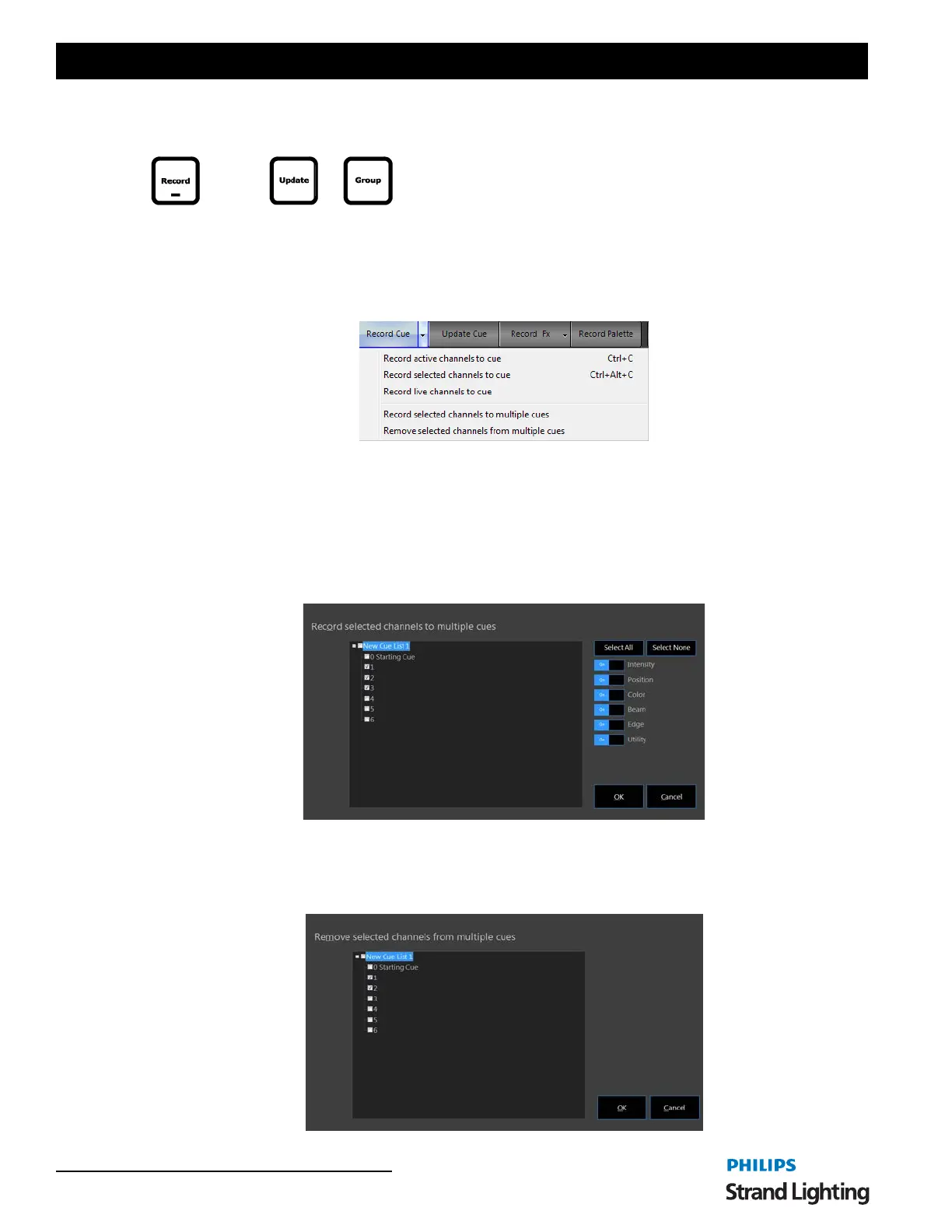
Record Cue - activates the Record Cue dialogue box in order to facilitate storing a cue.
RECORD CUE OPTIONS
Record active channels to cue - sets the Record Mode filter to Active and brings up the Record Cue dialogue box.
Record selected channels to cue - sets the Record Mode filter to Selected and brings up the Record Cue dialogue
box.
Record live channels to cue - sets the Record Mode filter to Live and brings up the Record Cue dialogue box.
Record selected channels to multiple cues - brings up a dialogue box to allow the user to check off cues where
selected fixtures will be stored.
Attribute family filtering is available.
Remove selected channels from multiple cues - brings up a dialogue box to allow the user to identify cues where
fixture instructions will be removed.
or


 To Next Page
 Loading...

