Objet30 User Guide 6 Operating and Maintaining the Printer
DOC-34025 Rev. I 6-13
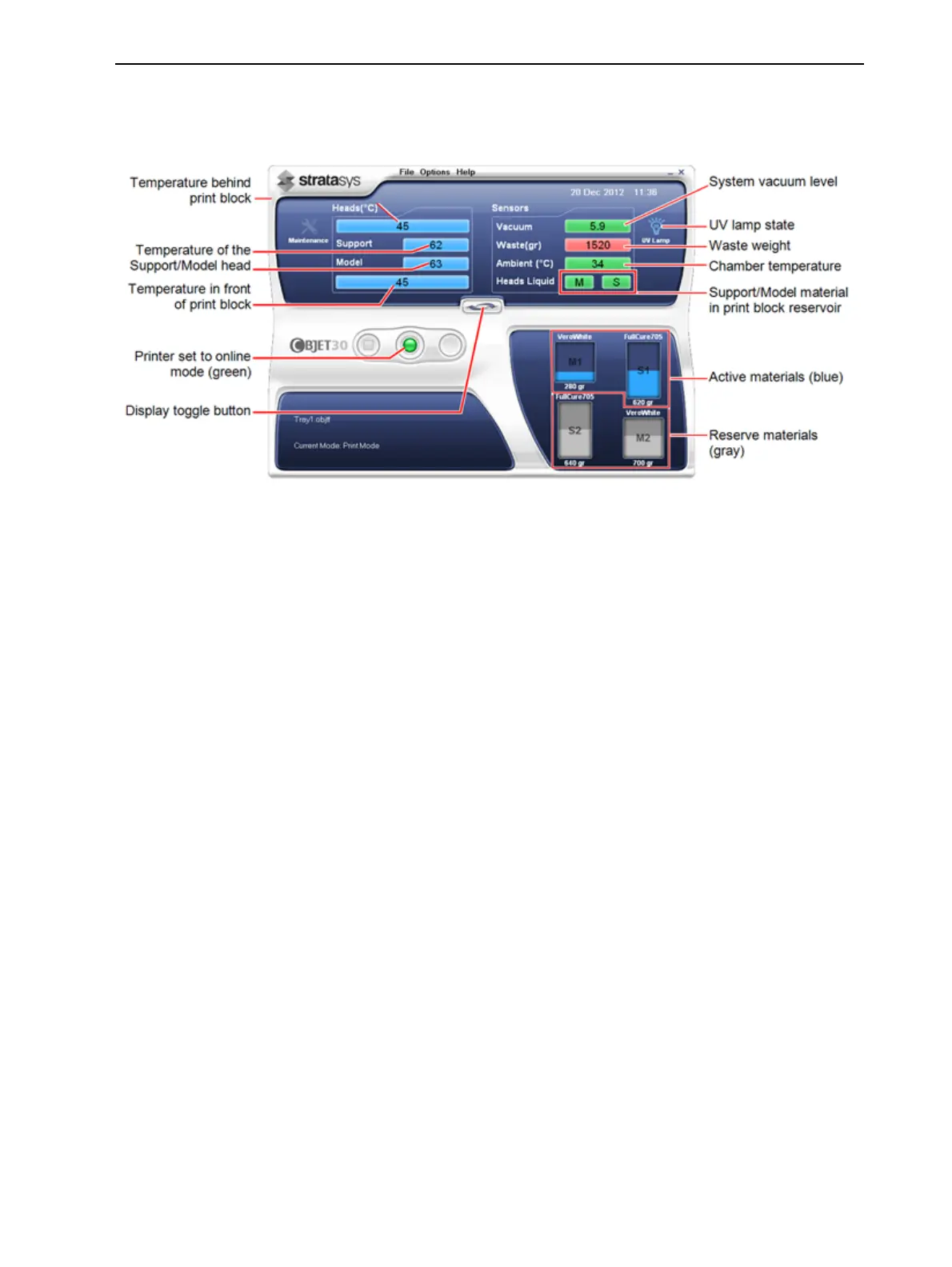
• Blue—not ready
For example, in Figure 6-7 on page 6-10:
❒ UV lamp—The UV lamp is not on.
❒ Heads (°C)—The heads have not reached the temperature required for
printing models (in printing mode).
• Red—not suitable for printing (or indicates a warning)
For example, in Figure 6-7 on page 6-10:
❒ Waste—The weight of the waste container is 1520 grams, more than
allowed when beginning a print job. (See "Replacing the Waste
Container" on page 6-104.)
The color of the material cartridges displayed in the printer interface indicates
which cartridges are active for the current (or next) print job.
For example, in Figure 6-3 on page 6-4:
• Blue—active cartridge
• Gray—reserve cartridge













 To Next Page