Objet30 User Guide 5 Using Objet Studio
DOC-34025 Rev. I 5-53
Customizing Objet Studio
You can customize Objet Studio to suit your particular working needs and
preferences. Features that you can customize include:
❒ Creating a quick-access toolbar for frequently used commands.
❒ Changing the position of the Quick Access toolbar.
❒ Minimizing the ribbon.
❒ Changing the Objet Studio color theme.
❒ Configuring default settings for objects placed on the build tray.
Creating a Quick Access Toolbar
As you work with Objet Studio, you may use certain commands frequently. You
can create a quick-access toolbar to make your work easier.
To create a quick-access toolbar:
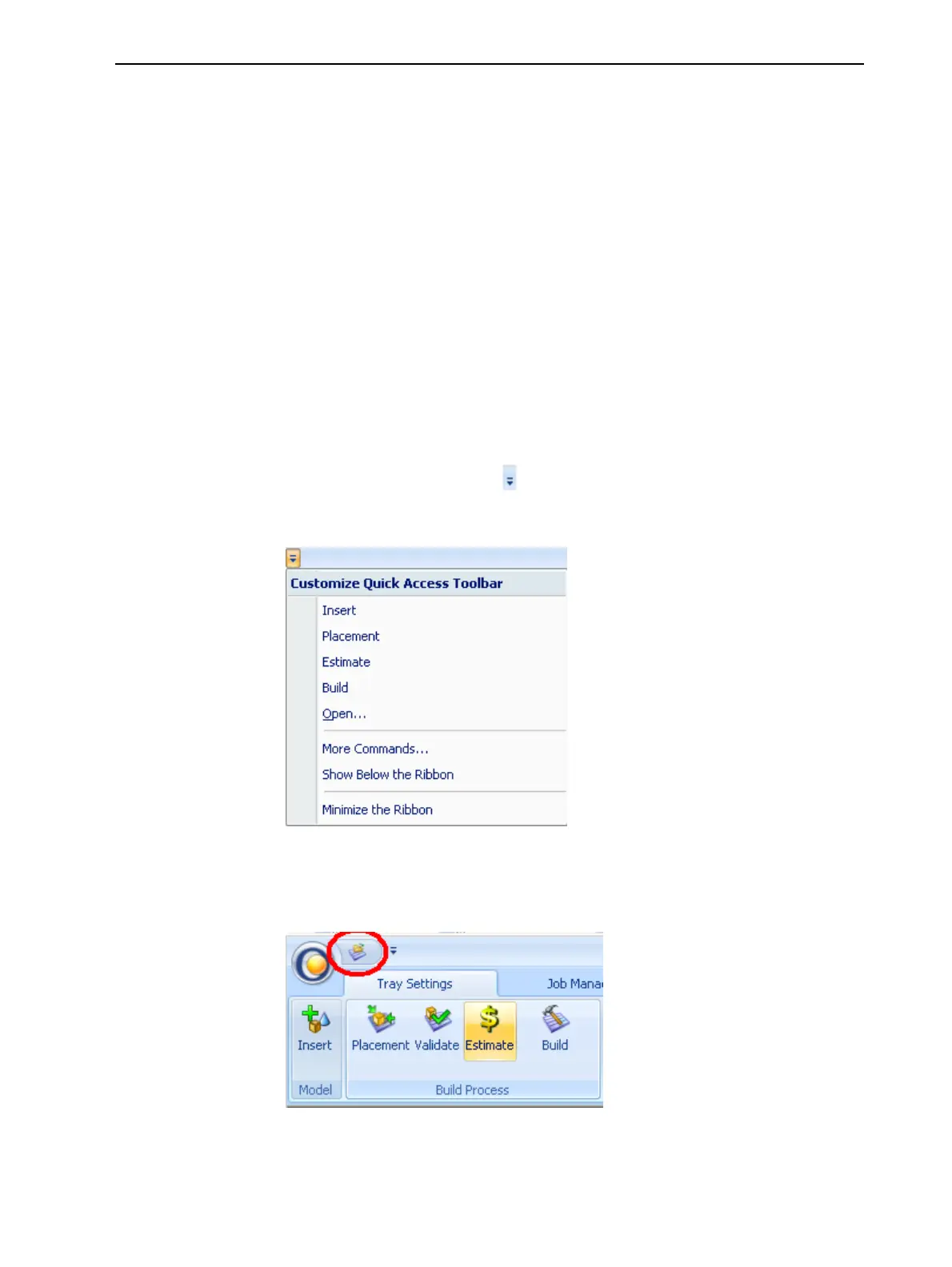
1. Above the ribbon tabs, click .
The Customize Quick Access Toolbar menu opens.
Figure 5-59 Customize Quick Access Toolbar menu
2. Select a command you want to add to the toolbar.
An icon for the selected command is added to the toolbar.
Figure 5-60 Quick Access toolbar
To add another command, repeat the above procedure.













 To Next Page