Objet30 User Guide 5 Using Objet Studio
DOC-34025 Rev. I 5-24
Manipulating Objects on the Tray
Positioning Objects on the Z-Axis
When you use the automatic positioning option to arrange objects on the build
tray (see "Automatic Orientation" on page 5-20), the objects are positioned
directly on the tray. If you do not insert objects with automatic positioning, they
often appear either above or below the tray.
In practice, the Objet30 system prints all models on the build tray on a one-
millimeter bed of support material. The importance of positioning objects
directly on the build tray with Objet Studio is to correctly display the objects
on the screen.
To position objects directly on the tray:
1. Select the object.
2. From the Object menu, select Lay On.
To ensure that objects are always positioned directly on the tray:
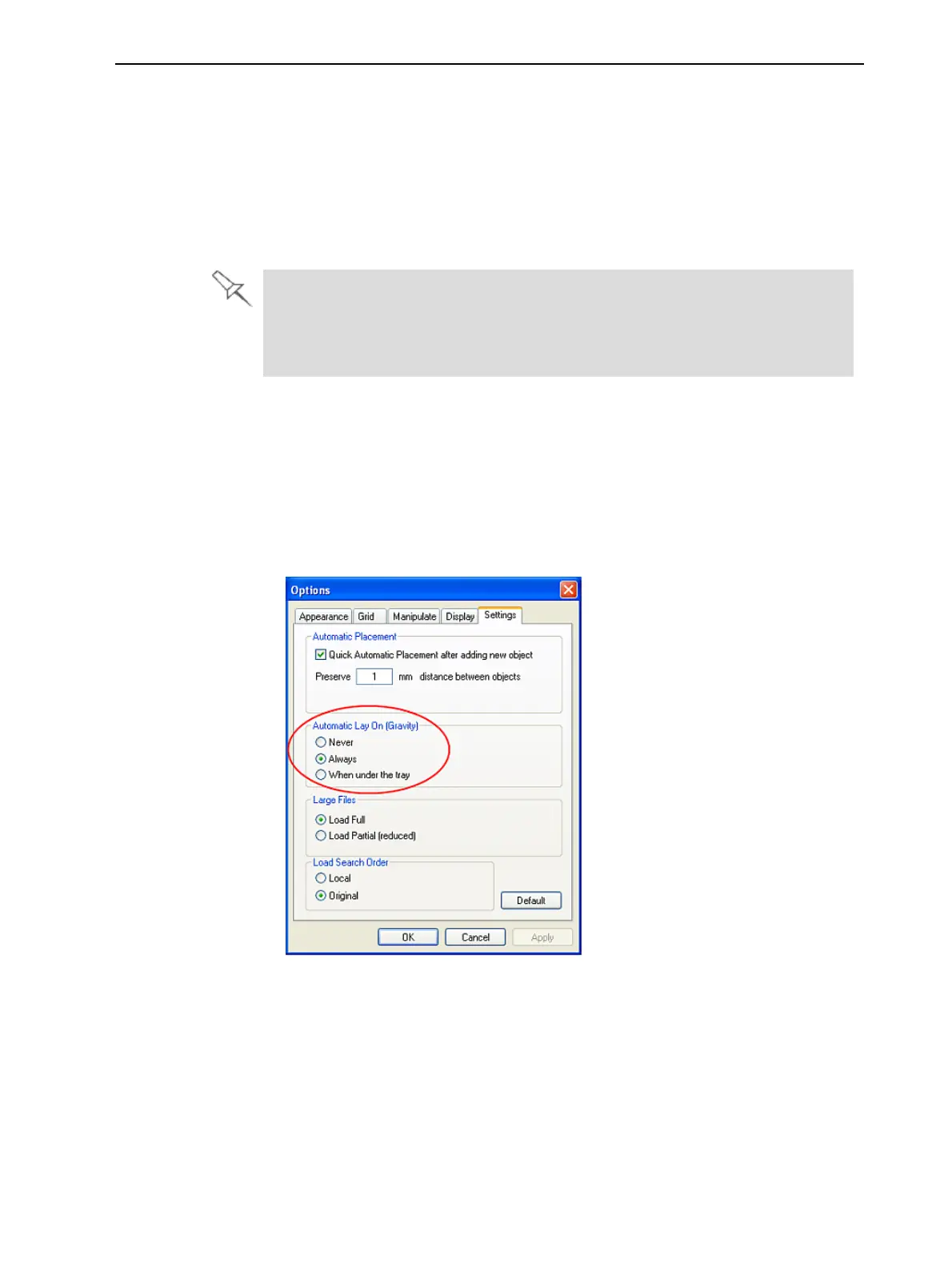
1. From the Tools menu, select Options, and display the Settings tab.
Figure 5-19 Options dialog box, Settings tab
2. In the Automatic Lay On (Gravity) section, select Always.
Other Z-axis options (in the Automatic Lay On section):
• When under the tray—The display of objects that are below the build tray
is automatically changed so that the object is at tray level.
• Never—The display of objects that are above or below the build tray is not
changed.













 To Next Page