Troubleshooting
Topcon HiPer+ Operator’s Manual
5-8
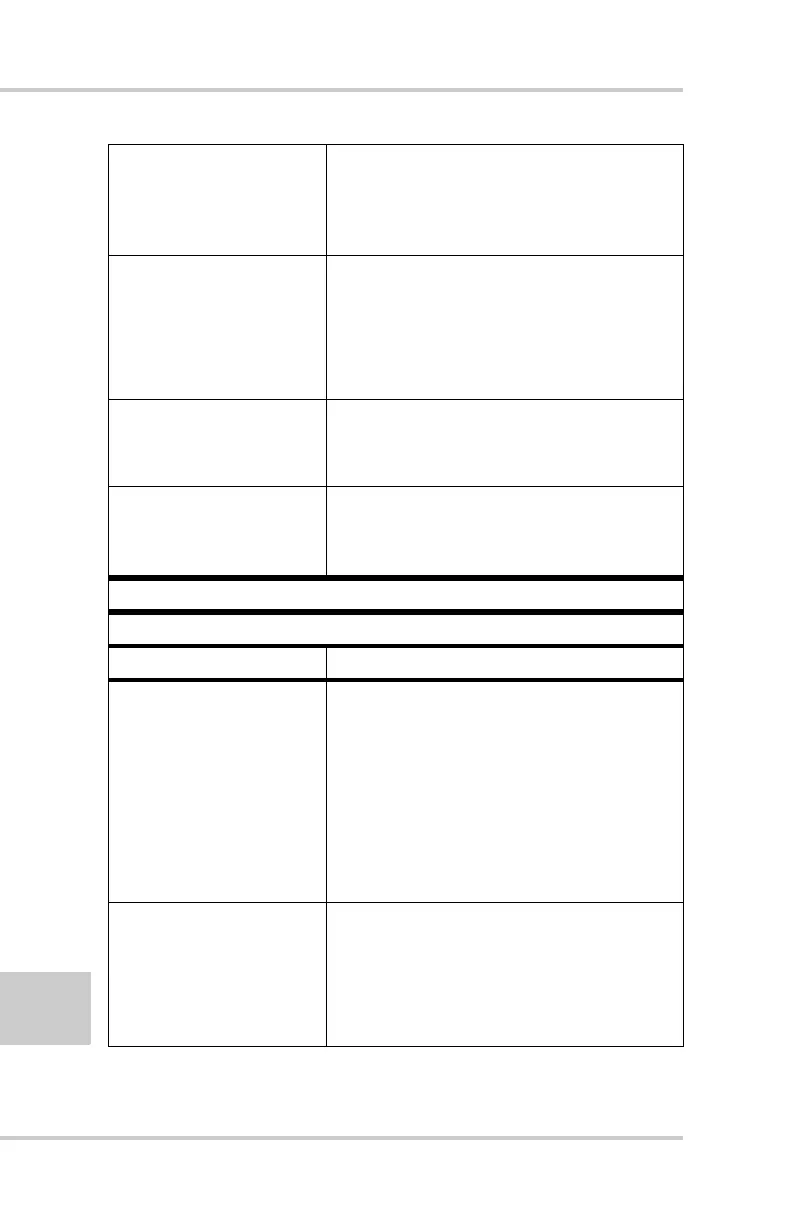
The Digisquelch
control at the receiving
modem is set
incorrectly.
The Digisquelch control at the
receiving modem should be On and set
to Medium or High.
The modem battery is
low.
• Attach an external power source to
the receiver. See “External Batteries”
on page 2-3.
• See “Powering the HiPer+” on
page 2-2.
Poor bandwidth quality
(a high number of
jamming signals).
Use another frequency channel for
both the Base and Receiver modems.
The distance between
the Base and Rover is
too far.
• Close the distance between the Base
and Rover.
• Use a radio repeater.
Problem
The receiver does not start data logging.
Causes Solutions
The receiver has no
free space for files.
• Download receiver files to a
computer (if needed) and delete files
(see “Downloading Files to a
Computer” on page 4-8 and
“Deleting Files” on page 4-12).
• Use the AFRM feature. See
“Automatic File Rotation Mode
(AFRM) parameters” on page 2-26.
The receiver has
already logged 256
files into the internal
memory.
• Delete unnecessary files (see
“Deleting Files” on page 4-12)
• Use the AFRM feature. See
“Automatic File Rotation Mode
(AFRM) parameters” on page 2-26.



 To Next Page