USTER®
HVI 900
Instruction Manual
Uster Technologies, Inc.
Chapter 6
Version 4.0 (1.99) HVI 900 System Testing - Page 6-7
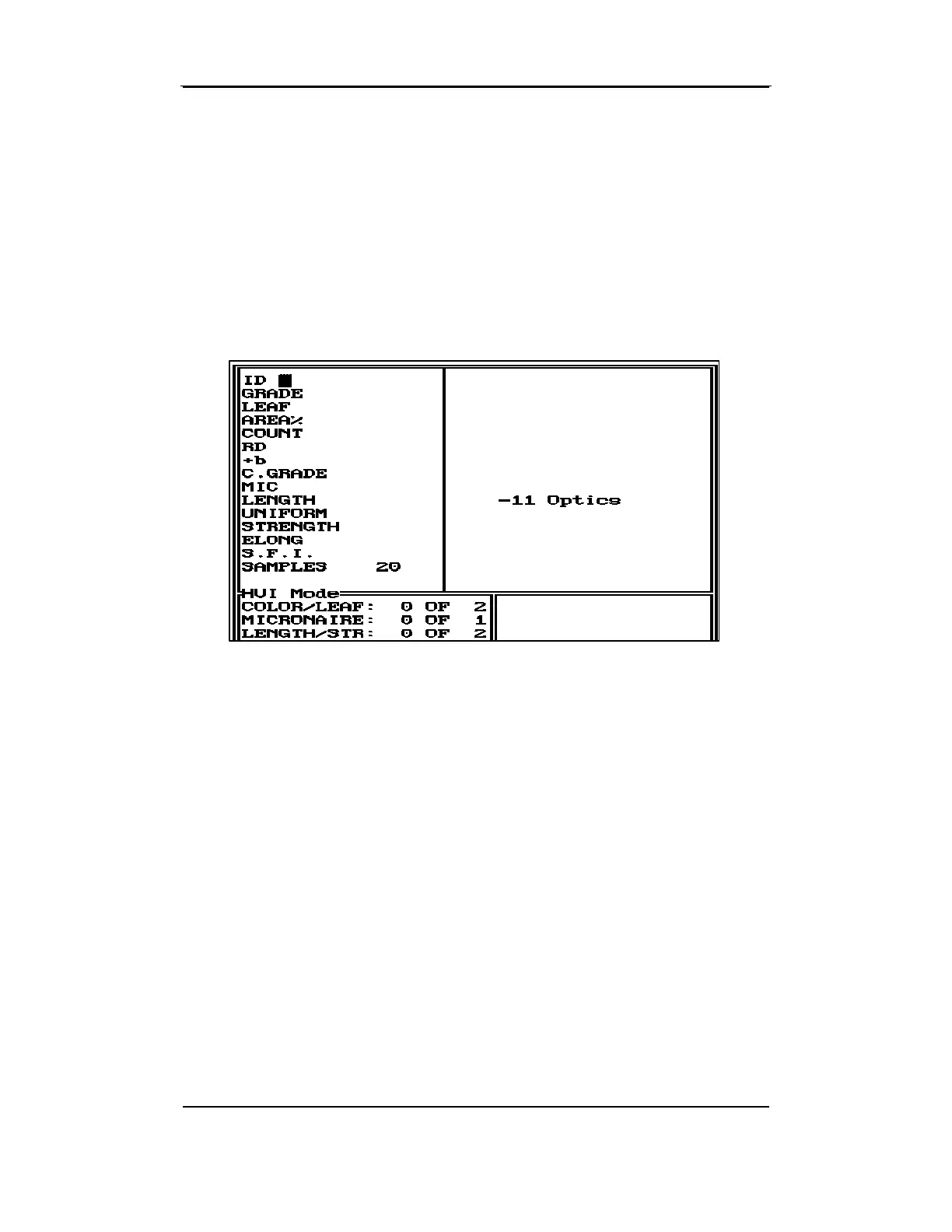
For this reason, the System Testing screen displayed may vary from the
one shown below. The screen displayed depends on the modules to be
tested and the optional equipment installed for the system.
The System Testing screen is split vertically allowing you to view the test
results from two samples simultaneously. Test results for the first sample
are displayed on the left side of the screen and those for the second
sample are displayed on the right of the screen.
The list of properties (field labels) appears down the left side of the
screen, the results of the measurement for the first sample will be
displayed to the immediate right of the field label. The test results for
the second sample are to the right of the center bar. If there is an error
message pertaining to the property, it is displayed on the far right side
of the screen.
The box in the bottom left provides information regarding the number of
repetitions to be performed for each property as it was set in Status; the
count is updated as the repetitions are performed.
The box in the bottom right of the screen will display various messages
that involve the external computer system, retests, lot limits, rejecting
sample test results, and leaving System Testing.


 To Next Page