1128600 SmartPAC 2 with WPC 2000 Integration User Manual
4-58 Initialization Mode
SMARTVIEW FUNCTION
(INITIALIZATION – SETUP NETWORK – SMARTVIEW FUNCTION)
SmartPAC 2’s SmartView function enables individuals in your SmartPAC 2 network to view
the operation of each press in your pressroom from a remote location. (See Appendix E for
more information.) If you plan to use SmartView, do the following to enable this function:
1. With the highlight bar on the SMARTVIEW FUNCTION item on the Network Setup
Utility screen, press ENTER to toggle the setting to ENABLED.
2. Press RESET to return to the Main Initialization Menu.
If you don’t plan to use SmartView, set the SMARTVIEW FUNCTION item to DISABLED.
SETUP E-MAIL
(INITIALIZATION – SETUP NETWORK – SETUP E-MAIL)
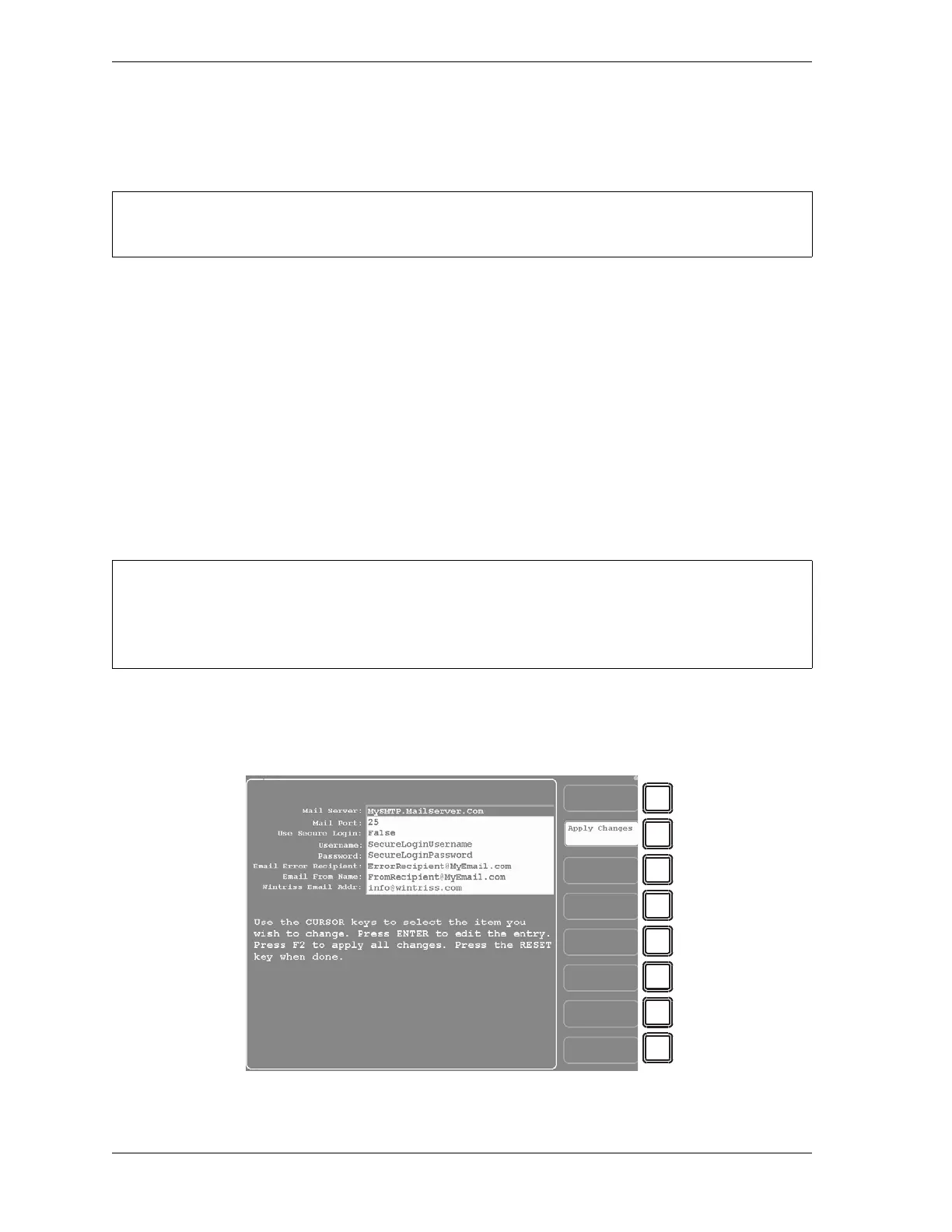
If you have enabled the SmartPAC 2 E-mail function, you should use the SETUP E-MAIL
item on the Network Setup Utility screen to enter E-mail settings. Settings are made on the
Setup E-mail screen, which is shown in Figure 4-38.
Consult your network administrator when setting up SmartView.
• Consult your network administrator when setting up e-mail.
• Use the SmartView remote viewing utility (see previous item) to set up e-mail messages and
recipients.
Figure 4-38. Setup E-mail Screen



 To Next Page