5.2 PPG/ED Panel
5-7
5
How to Operate BERT
5.2.1 Setting Reference Clock
BERT uses the reference clock to generate the data and detect an error.
The reference clock can be selected from the following supply sources:
Internal clock generated inside the MP2110A
External clock input from the
Ext Clk In
connector
The internal clock accuracy is ±10 ppm after power is applied for 1 hour.
The external clock is used under the following conditions:
When synchronizing other equipment with clock
When using clock with higher accuracy than internal clock
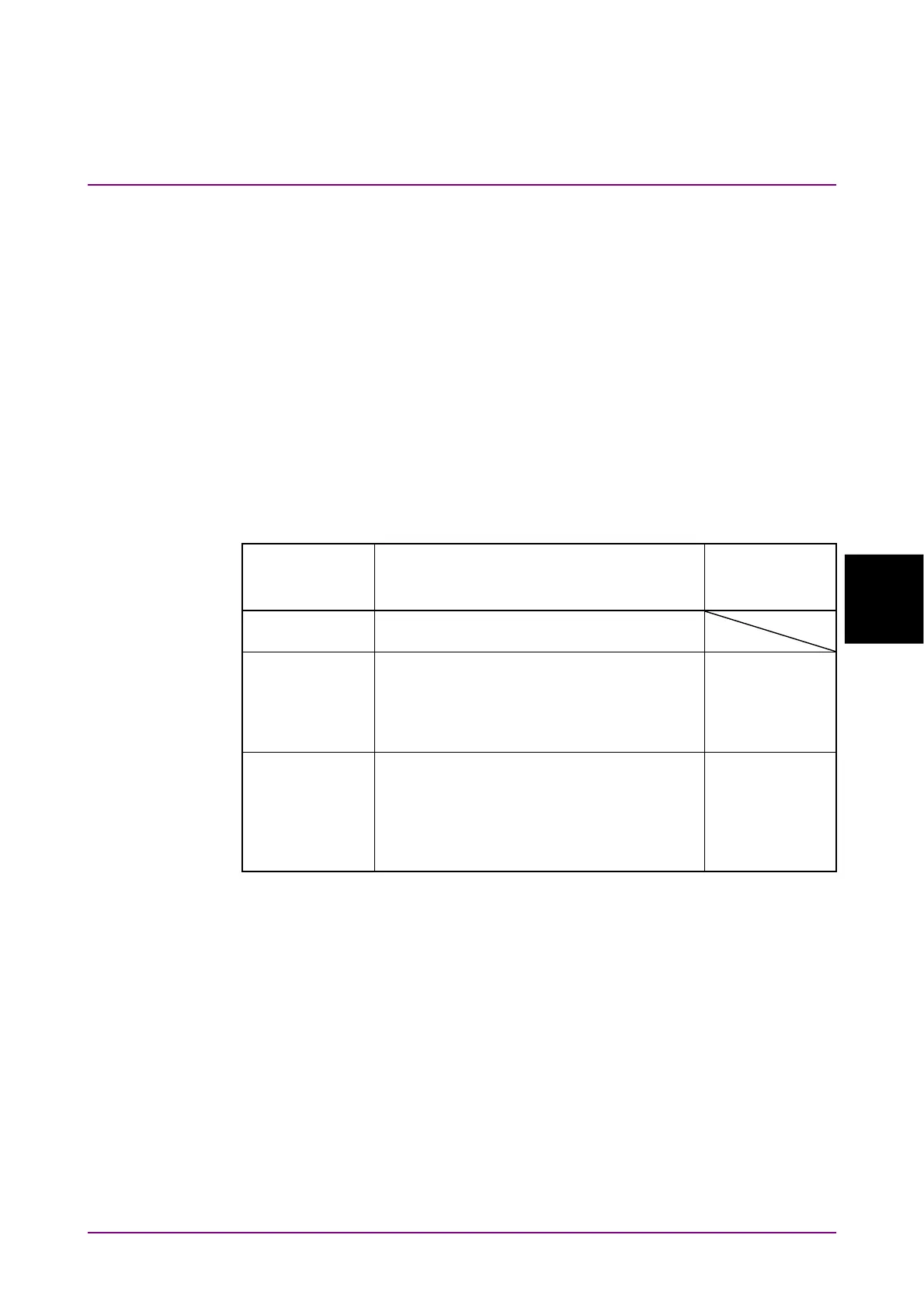
Table 5.2.1-1 Reference CLK Settings
Reference CLK Description
Frequency of
Clock Input to
Ext Clk In (MHz)
Internal
Use the internal clock based on the internal
10 MHz oscillator
Ext Clk 1/16*
Use the external clock input from the
Ext
Clk In
connector
When the bitrate is within 9.5 to 14.2 Gbit/s
The division ratio of external clock
frequency and bit rate is 16.
593.75 to 887.5
Ext Clk 1/40 Use the external clock input from the
Ext
Clk In
connector
When the bitrate is within 24.3 to 28.2
Gbit/s
The division ratio of external clock
frequency and bit rate is 40.
607.5 to 705.0
*: This is displayed when MP2110A-093 is installed.
Note:
Click Apply when the Reference CLK status display is lit in yellow
while the external clock is used.
The
Ext Clk In
connector is an AC coupling.
Input the signal of the sine wave or square wave where the amplitude is
0.2 to 1.6 Vp-p.














 To Next Page