6.2 Explanation of Windows
6-13
6
How to Operate Sampling Scope
Status Display
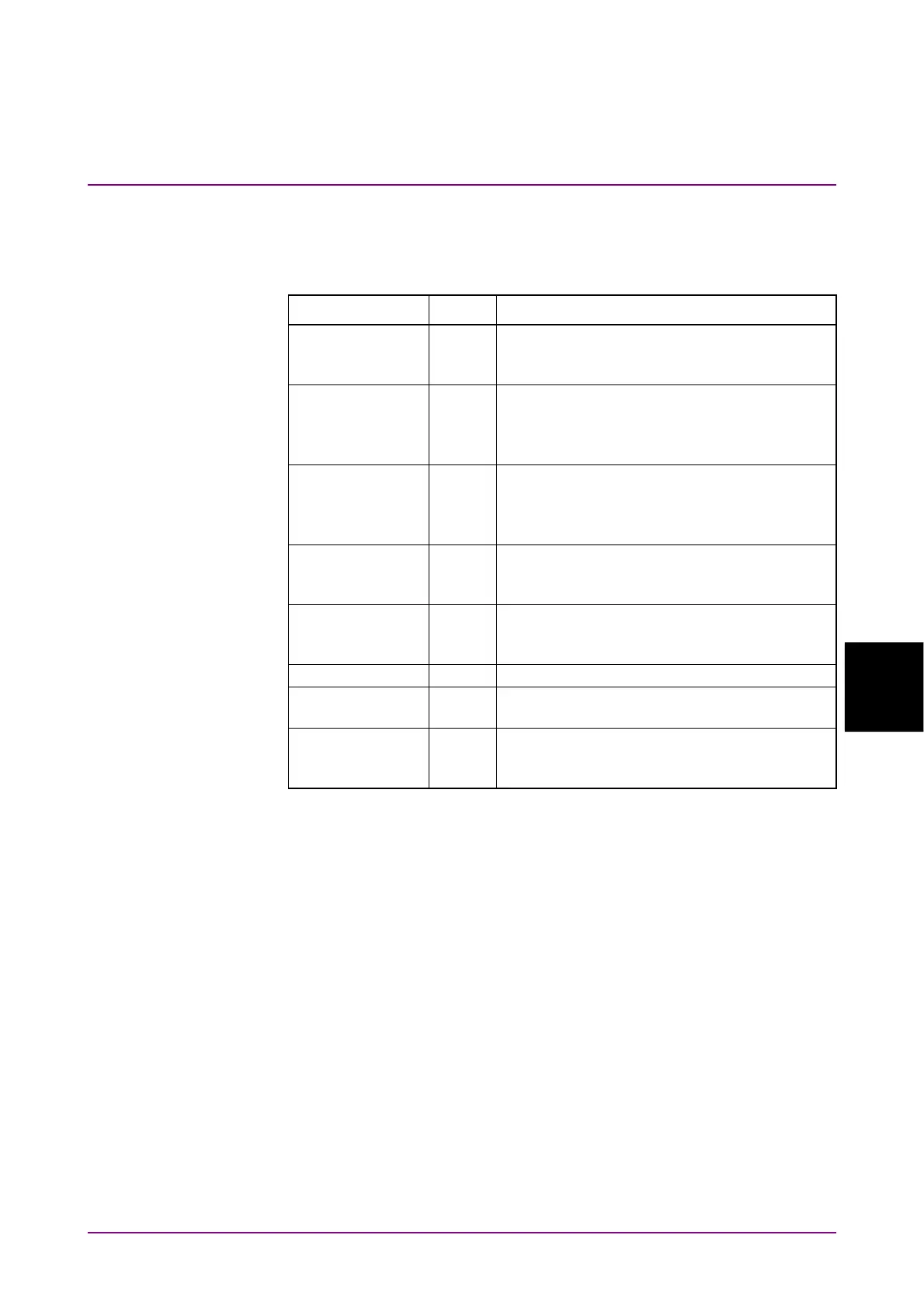
The following statuses of the sampling scope are displayed.
Table 6.2.1-1 Status Display Items
Item Color Description
CAL Orange The correction value of O/E is not
appropriate. Calibrate the O/E module
according to 6.3.2, “Adjusting Dark Current”.
CAL Yellow There is a difference of ± 2.5 °C or more from
the calibration temperature.
Calibrate the level according to 6.3.1,
“Calibrating Level”.
CAL Red There is a difference of ± 5.0 °C or more from
the calibration temperature.
Calibrate the level according to 6.3.1,
“Calibrating Level”.
26G CRU Unlock Orange MP2110A-054 Clock Recovery
(Electrical/Optical) is not locked on the input
signal.
53G CRU Unlock Orange MP2110A-055 26G/53Gbaud Clock Recovery
(SM Optical) is not locked on the input
signal.
Free Running Red The trigger clock cannot be detected.
PT phase unlock
*
Orange Precision Trigger is not locked on the input
signal.
Trigger setting
wrong
Orange The trigger clock can be detected, but its
frequency does not match the clock frequency
setting value
*: Displayed when the MP2110A-024 is installed.














 To Next Page