Chapter 6 How to Operate Sampling Scope
6-90
To set measurement method of rise/fall time
When measuring the rise time and fall time levels, select from amplitude
10/90% level or 20/80% level.
● Click the Rise/Fall Time button to display 10/90% or 20/80%.
The bandwidth of the sampling oscilloscope is corrected with the
measurement value of the Rise/Fall time, and the corrected bandwidth is
displayed.
1. Click NRZ at Measure Setup.
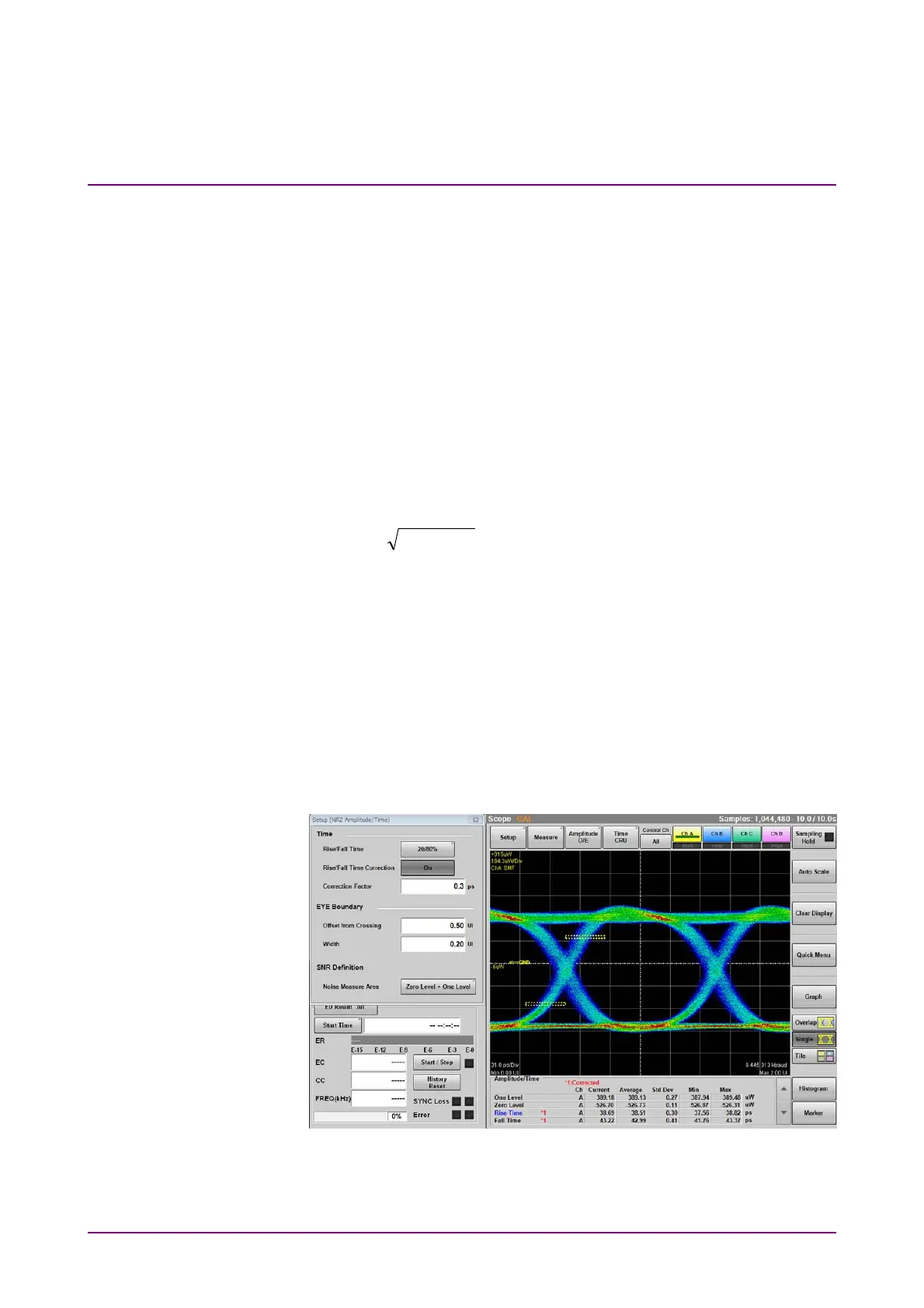
2. Click Rise/Fall Time Correction to set the button display to On.
3. Click the Correction Factor text box.
4. Input the correction value in ps.
The calculation formula is as follows:
22
TcTmTd
Td: display value (ps), Tm: measurement value (ps),
Tc: correction value (ps)
If the measurement value is larger than the correction value, the result
displays N/A.
“*1” is displayed in red at the Rise/Fall time when Rise/Fall Time
Correction is set to On. When Rise/Fall Time Correction is On, “*1” is
displayed in red at Rise Time and Fall Time. “*1:Corrected” is displayed
in the measurement result display area and indicates that the values
with “*1” have been corrected. The number is subject to change from 1.
Figure 6.9.1.1-3 Display Example of Measurement Results














 To Next Page