Operational Mode Input
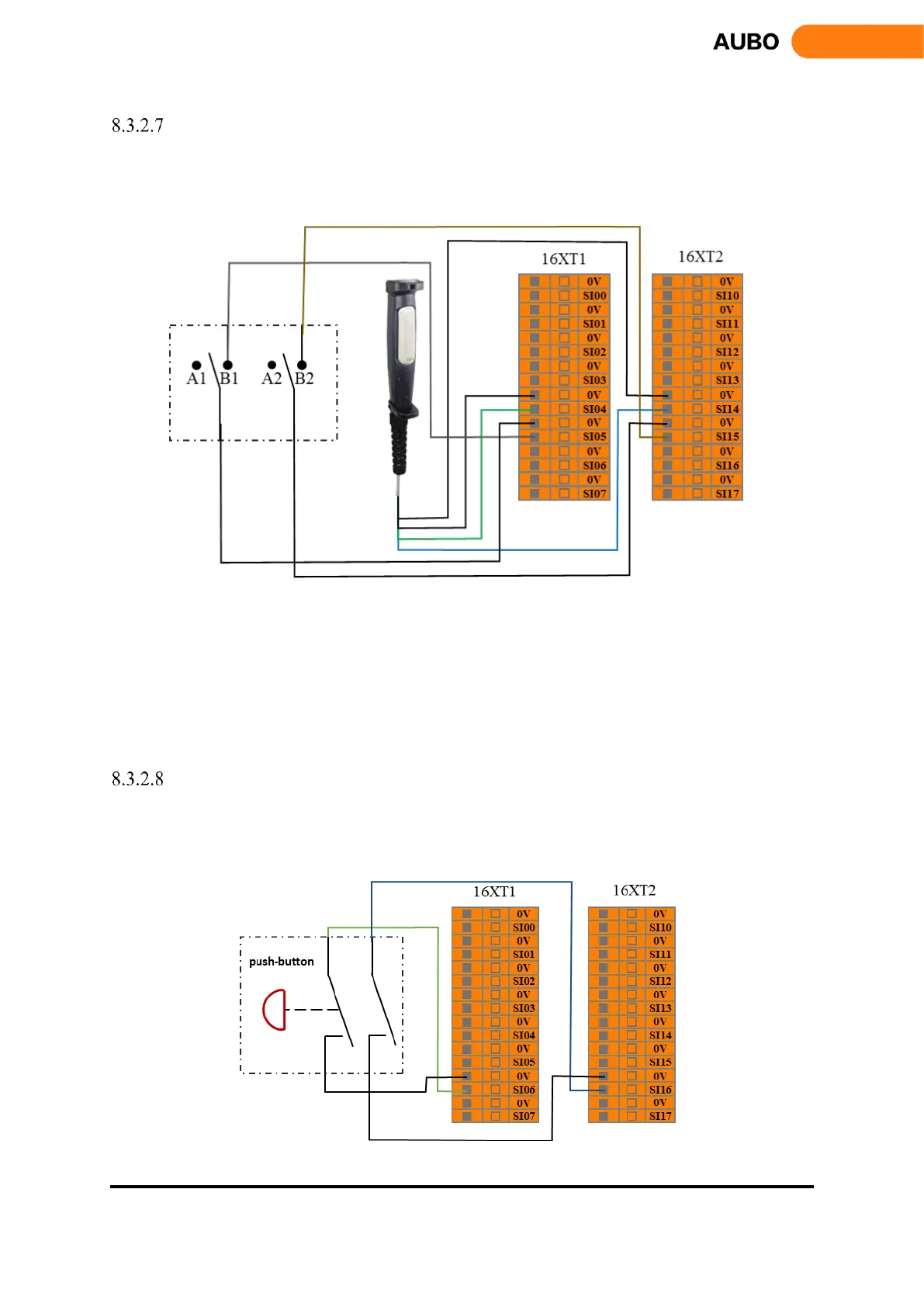
Users can use this interface to connect an external safety device (mode selector switch, etc.) and select the
robot working mode. The user can refer to the following example, using the safety selector switch to connect
to the operation mode input interface. See the next figure.
Figure 8.12 operation mode input connection
When the user switches the selector switch to the A position, the robot enters the normal mode, and the user
can use the robot normally. When the user switches the selector switch to the B position, the robot enters the
verification mode. In this mode, only when the enabling device input is valid, the manipulator executes the
verification project and operates normally. When the enabling device input is invalid, the robot stops
immediately.
Hand Guiding Enable Input
User can use this interface to receive external hand guiding enable signal input, then the robot enters hand
guiding mode. The user can refer to the following example, using the hand guiding function without the
force control button in the teach pendant.
Figure 8.13 hand guiding enable input



 To Next Page