The Clear button function clears the calibration results from Point1 to Point3 in the Calibration Mode.
Display the Mode function is to display the value of the three waypoints of the calibrated coordinate
system. After a coordinate system is selected on the list, it automatically enters the Display Mode.
Clicking Point1 to Point3, the three waypoints used to calibrate the coordinate system are displayed in
the simulation interface.
Move Here function is to move to a waypoint, the specific operation is in the Calibration Mode, select
any one of Point1 to Point3 buttons, click Move Here will move to the corresponding calibration
point; in the Display Mode, select the selected Point1 To any of the Point3 buttons, click Move Here
to move to the waypoint that used to calibrate the coordinate system.
Safety
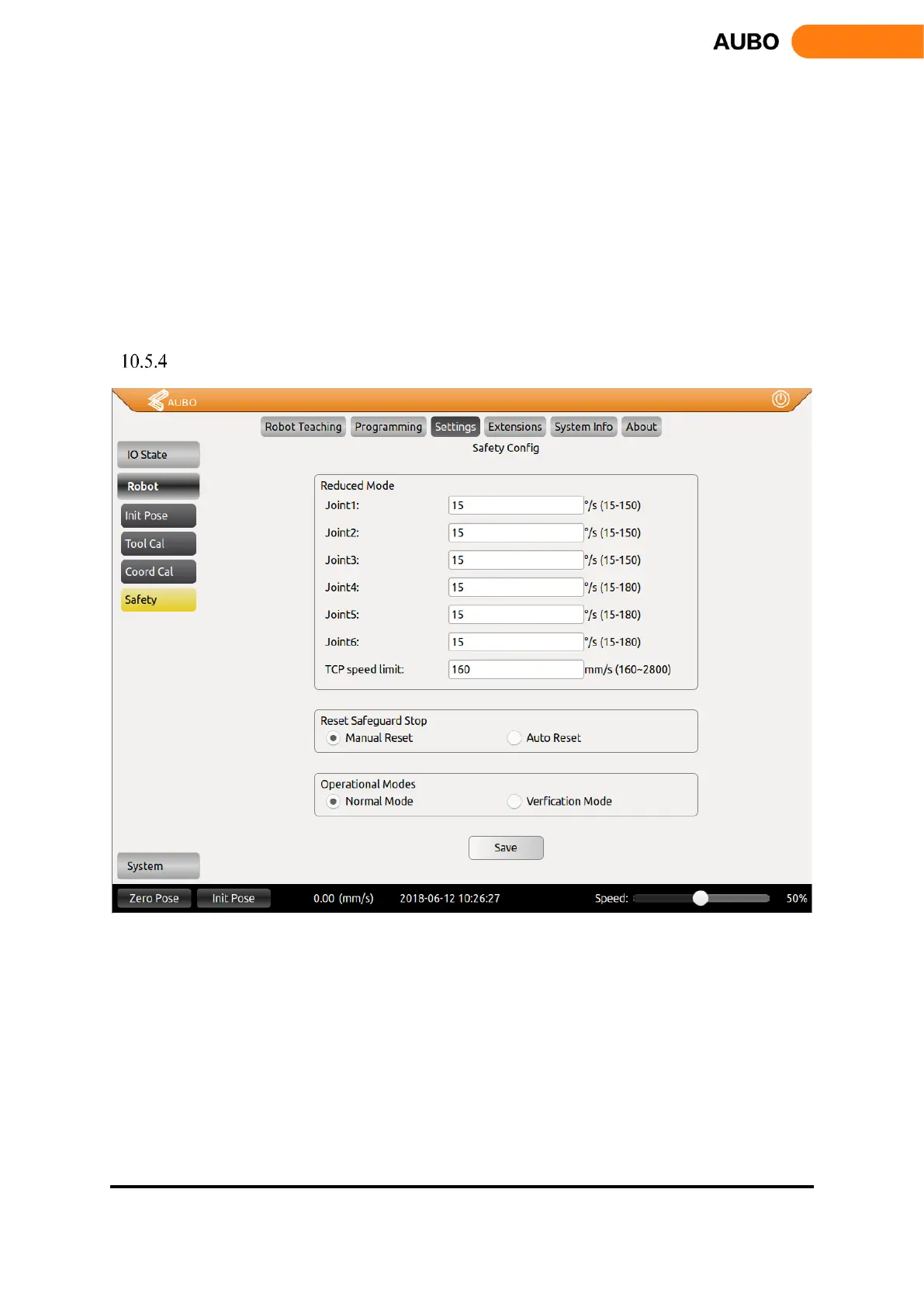
Figure 10.37 Safety Setting
Reduced mode: in this mode, the joint speed of the manipulator shall be limited to the value of the
corresponding text box.
Reset Safeguard Stop: select manual reset, only the external safeguard reset signal can invalid the
safeguard stop; select auto reset, ignore the external safeguard reset signal, only when safeguard stop
signal invalid can invalid the safeguard stop.
Operational mode: When "Normal mode" is selected, the external enabling device input signal is
invalid. When "verification mode" is selected, the external enabling device input signal is valid.



 To Next Page