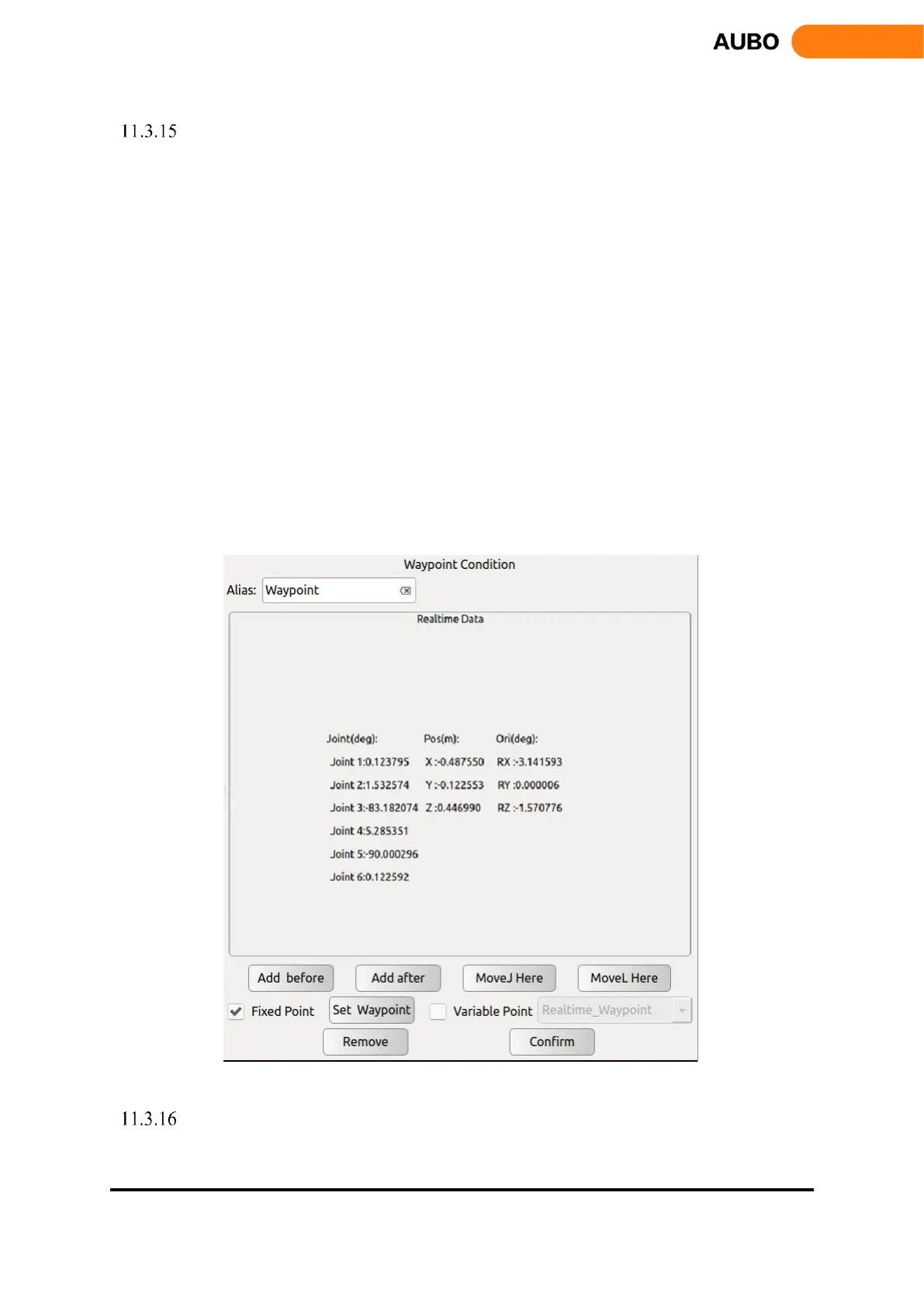
Waypoint
Waypoint is an important part of AUBO-i5 program, which represents the position that the end-
effector needs to arrive. Usually, the trajectory of the end consists of two or more waypoints.
Waypoint can only be added after【Move】command.
Click【Add before】to add a new waypoint before the current waypoint.
Click【Add after】to add a new waypoint after the current waypoint.
Click on【Move here】to move the robot to the current waypoint. It's only effective for the real
robot, not for the simulator.
Click waypoint which is needed to copy under Program Logic. Click【Copy】to copy current
waypoint.
Click waypoint which is needed to paste under Program Logic. Click【Paste】to paste current
waypoint.
Click【Remove】to delete a waypoint.
Click【Set waypoint】to configure a waypoint with robot pose. After clicking【Set Waypoint】,
Robot Teaching is automatically activated. Users can move the robot end to a new waypoint, then
click on the confirm button on the lower right corner.
Click【Confirm】to confirm the status configurations of this waypoint and save.
Figure 11.25 Waypoint
Thread
Thread is a multi-threaded control command. In the Thread block, there must be a Loop command.



 To Next Page