Processing Audio
104 APOLLO
Digital Broadcast Production Console
VCA GROUPS
Apollo’s moving fader VCA groups
provide control over fader level, cut
status and APFL status.
Creating and dissolving VCA groups
To set up a VCA group, first choose a fader
to be master and then assign a number of
other faders for it to control as slaves. To do
this push and hold the master fader’s assign
button, then press the assign buttons of any
paths which are to become slaves, or press
again to remove. Slaves can only have one
master.
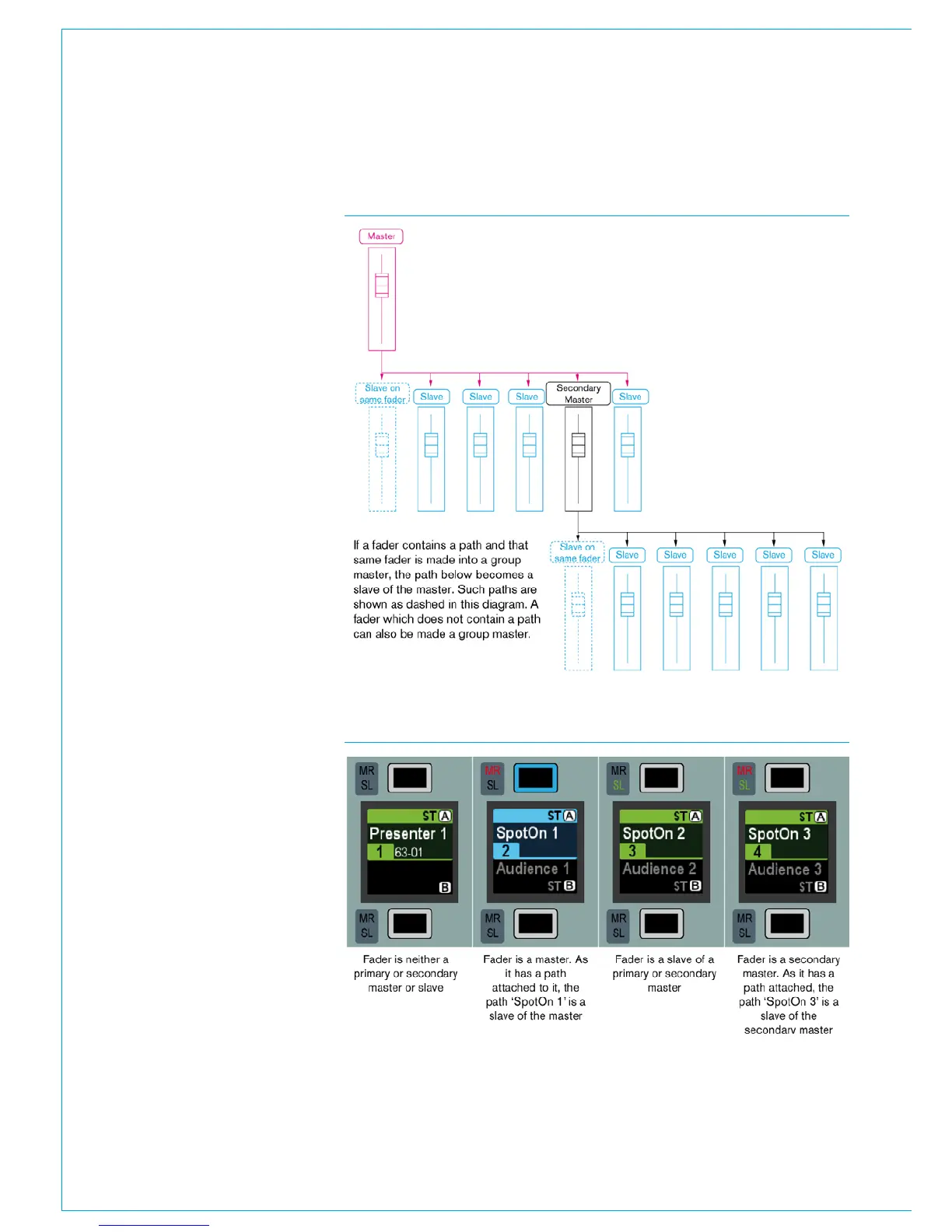
Group hierarchy
Apollo provides up to three levels of group
hierarchy. A master can have slaves but
can also be made a slave of another master.
Fig 1 illustrates the hierarchy. When the
full hierarchy is in place, the slave master
is known as the secondary master, and its
master is known as the primary master.
When the level of a primary master is
adjusted it will change the audio level of its
own slaves and the level of its secondary
master’s slaves by the same amount.
Changing the CUT, AFL and PFL settings of
a primary master applies the settings to the
slaves, secondary masters and their slaves.
When the level of a secondary master
is adjusted, the audio level of all its
slaves changes by the same amount. Its
adjustment will not affect the level of the
primary master or its slaves. Changing the
CUT, AFL or PFL of a secondary master
applies the settings to the secondary
master’s slaves only.
Fader status indicators
Each fader contains two indicators next to
each assign button as shown in Fig 2.
• Neither indicator will be illuminated
if the fader is not part of any VCA
group.
• The MR indicator illuminates red if the
fader is a master.
• The SL indicator illuminates green if
the fader is a slave.
• Both MR and SL indicators illuminate
if the fader is a secondary master.
FIG 1 - GROUP HIERARCHY
FIG 2 - FADER STATUS



 To Next Page