Passing Signals out of Apollo
132 APOLLO
Digital Broadcast Production Console
OUTPUT CONTROL
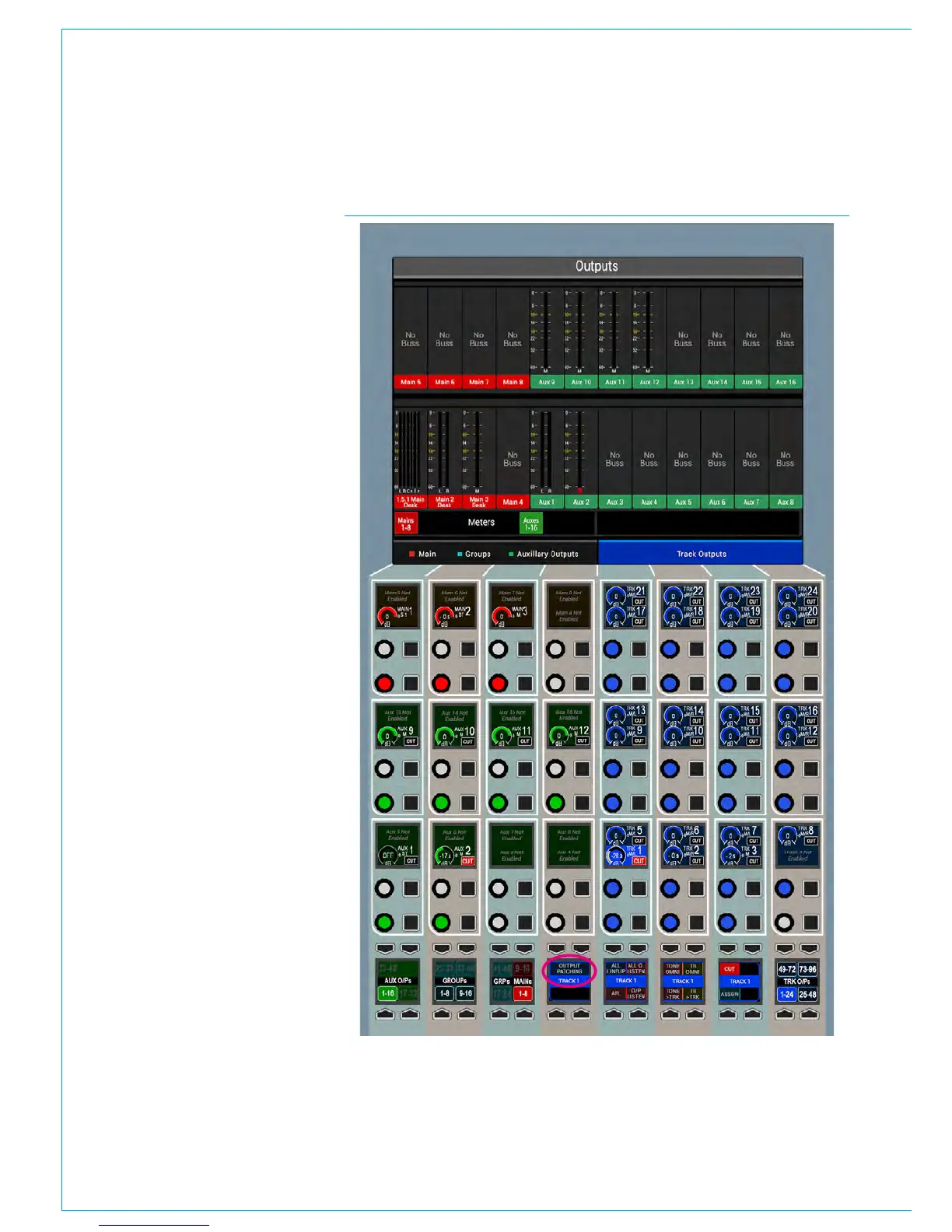
FIG 1 - OUTPUTS MODE CONTROL LAYOUTOutputs mode provides control over
output buses and displays relevant
output meters.
The layout of controls on a panel set into
outputs mode is shown in Fig 1.
The rotary controls provide level control
for Main, Group, Aux and Track outputs.
The buttons cut or uncut the output (there
is no cut functionality on a Main output).
Depending on the configuration of the
system, there may be more outputs than
can be viewed at one time on the control
cells. In this case, the outputs can be
paged through using the buttons in the
button cells at the left and right of the
panel.
Accessing further controls
Four of the button cells at the bottom
of the panel are used for more detailed
control over the currently selected output.
To select an output, push down on
its rotary control.
The current selection is indicated by the
colour of the four control cell displays and
also by a text label which spans across
the centre of them. Controls that can
be accessed in this way include direct
talkback to the output, tone to the output
and PFL.
This section also contains an ‘ASSIGN’
button. Selecting this makes the current
output the assigned path on the desk.
The same as selecting a fader’s assign
button to make that Channel/Group/Main
path the current focus of all the assign
panels, this button provides an alternative
for outputs that may not be allocated to
faders, or for when the fader is not close
to hand.



 To Next Page