Getting Signals into Apollo
80 APOLLO
Digital Broadcast Production Console
HYDRA2 PATCHBAYS
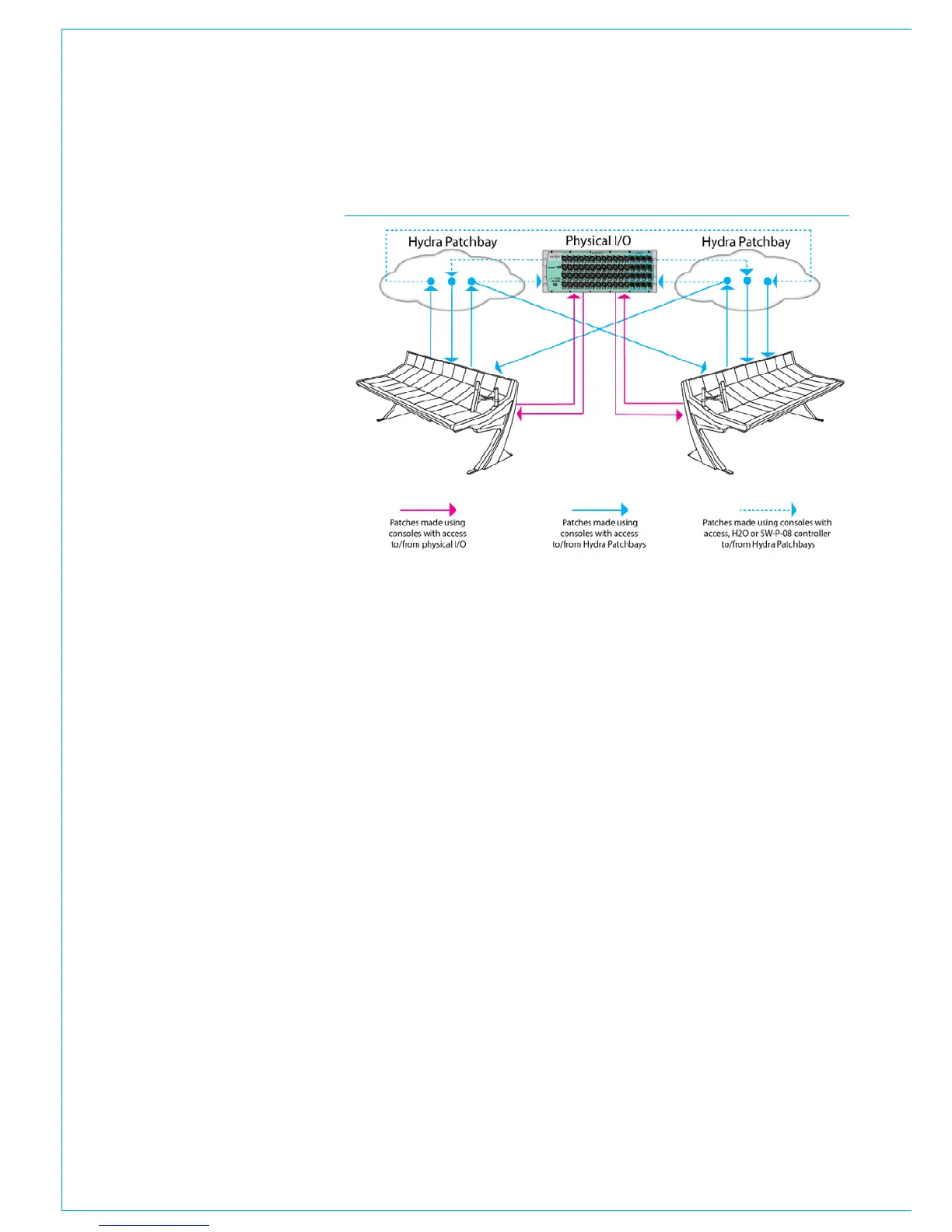
Hydra2 patchbays (HPBs) allow
console operators to make selected
DSP audio outputs available on
the Hydra2 network, allowing other
Hydra2 users to access them as well
as allowing console input sources and
output feeds to be changed remotely.
HPBs are virtual patchbays within the
Hydra2 domain. Like physical patchbays,
HPBs have a number of input ports which
are ‘hard wired’ to output ports.
For port patching purposes, Hydra2
Patchbay inputs are destinations and
Hydra2 Patchbay outputs are sources,
see Fig 1.
When a source is patched to a Hydra2
Patchbay input, it immediately becomes
available at the corresponding Hydra2
Patchbay output.
For example, if a console operator
patches a direct output to a Hydra2
Patchbay input, the direct output feed
becomes available to all Hydra2 users
(who have been granted access,) as the
corresponding Hydra2 Patchbay’s output.
There are two types of HPB: ‘console
specific’ and ‘shared’. Console specific
Hydra2 Patchbays are available to the
console that they have been created for,
plus H2O and 3rd party controllers via
SW-P-08.
Shared Hydra2 Patchbays are available
to all Hydra2 users who have been
granted access, plus H2O and 3rd party
controllers via SW-P-08.
Consoles can patch signals to their own
or shared Hydra2 Patchbay inputs in the
same way they patch to physical output
ports.
Hydra2 Patchbays allow network
administrators (via H2O) to patch console
inputs and outputs (which have been
patched to Hydra2 Patchbay ports) to
physical I/O ports.
H2O users can choose physical input
ports to connect to console’s Hydra2
Patchbay inputs, and physical output
ports to connect to console’s Hydra2
Patchbay outputs allowing them to choose
and change console feeds and output
destinations.
External routers supporting the SW-P-08
protocol can also have access to Hydra2
patchbays enabling 3rd party control over
console patching.
Hydra2 patchbays are created from the
H2O user interface. See the H2O user
guide for more information.
FIG 1 - HYDRA2 PATCHBAYS
HPBs and different sample rates
From version 8.0 Hydra2 patchbays can
be configured to operate at 48kHz, 96kHz
or follow the sample rate of a particular
console when it loads a show. See “I/O
Boxes & Hydra Patchbays Sample Rate
Selection in H2O” on page 54
A Hydra2 Patchbay set to a different rate
than the desk will behave in the same way
as ports at different sample rates to the
desk. See the H2O user guide for more
information.
Once created, Hydra2 patchbays are
available for patching, they appear ‘online’
in the >Hydra2 Settings>Edit Network
screen of main application from where
they can be added to the console’s
Required List for use in port patching.



 To Next Page