CALREC Putting Sound in the Picture 65
Patching Shortcuts
From V6.0 there are some added
shortcuts on the Apollo and Artemis
surfaces and in the main application,
which will dramatically speed up the
patching workflow.
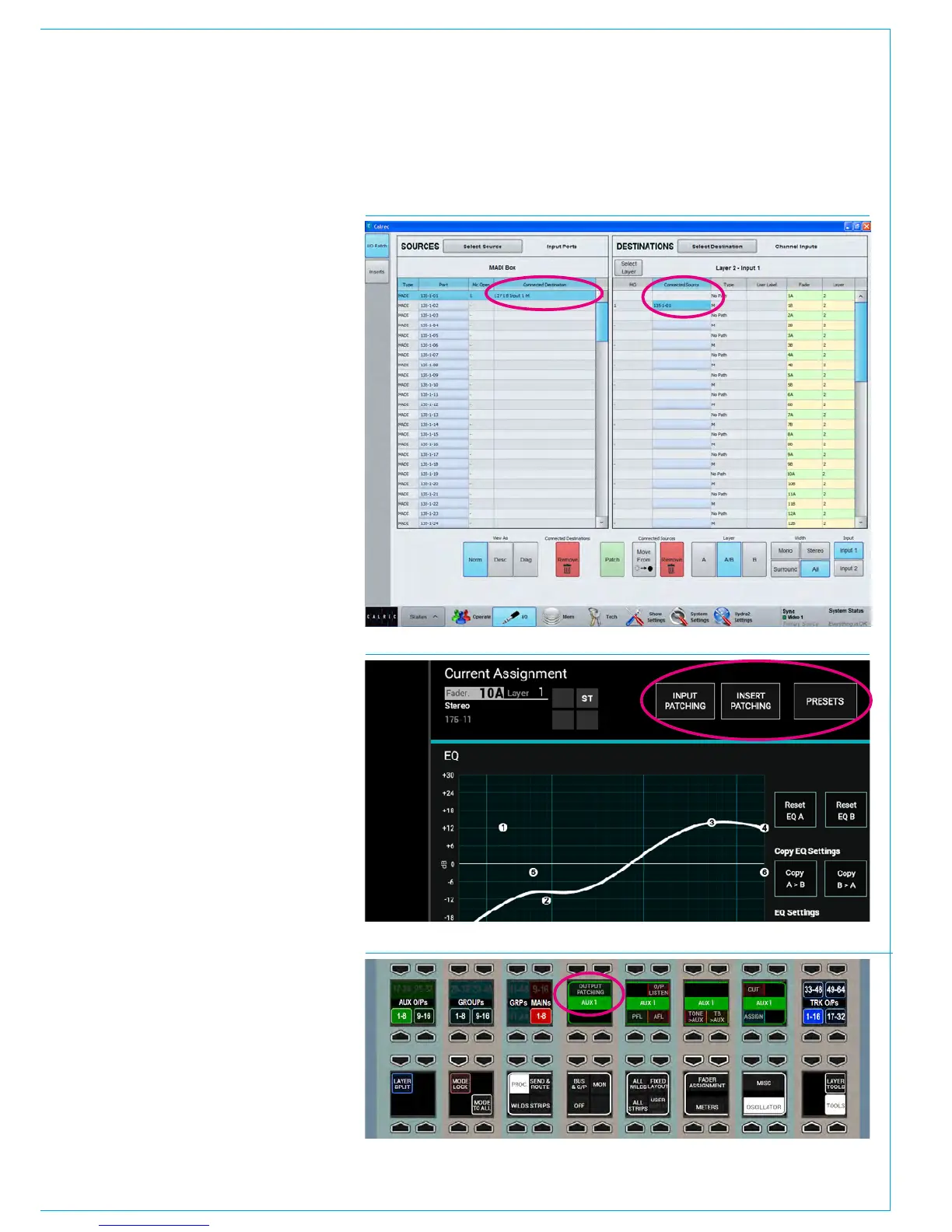
The first few shortcuts are in the patching
screens on the main application. In any
source list, double tapping (or double
clicking) any connected destination cell
will change the destination area to display
a list containing the relevant destination,
which will be selected ready to be easily
moved, replaced, or removed.
Similarly, you can double tap (or double
click) on any connected source cell in any
destination list. Doing this will change the
source area to display a list containing the
relevant source, which will be selected
ready for you to remove it, or make
another connection. See Fig 4.
The remaining shortcuts are available on
the surface. In the area at the top of the
touch display in Processing mode, INPUT
PATCHING. OUTPUT PATCHING and
INSERT PATCHING buttons are available,
depending on the type of path accessed.
Tapping one of these buttons will change
the main application to show the relevant
patching screen, show the appropriate
source and destination lists, and select
the specific sources and destinations.
See Fig 5.
In the Focus Area, at the bottom of
Routing mode when you tap on a direct
output level rotary control, or at the bottom
of Buses & Outputs mode when you tap
on an output level control, we have added
an “Output Patching” button. Pressing
this button changes its display to show
‘SEE PC’ and will again instruct the main
application to show the relevant patching
screen, show the appropriate source and
destination lists, and select the specific
sources and destinations. See Fig 6.
FIG 4 - PATCHING SHORTCUTS IN MAIN APPLICATION
FIG 5 - PATCHING SHORTCUTS IN THE CONSOLE PROCESSING MODE SCREENS
FIG 6 - PATCHING SHORTCUTS IN THE BUSES & OUTPUTS FOCUS AREAS



 To Next Page