Processing Audio
106 APOLLO
Digital Broadcast Production Console
AUTOFADERS
Autofaders allow Apollo faders to be
opened and closed under the control
of another system using GPIs.
To control an assignable autofader, select
the PROCESSING-AUTOFADER panel
mode and press the appropriate assign
button for the channel whose autofader is
to be accessed.
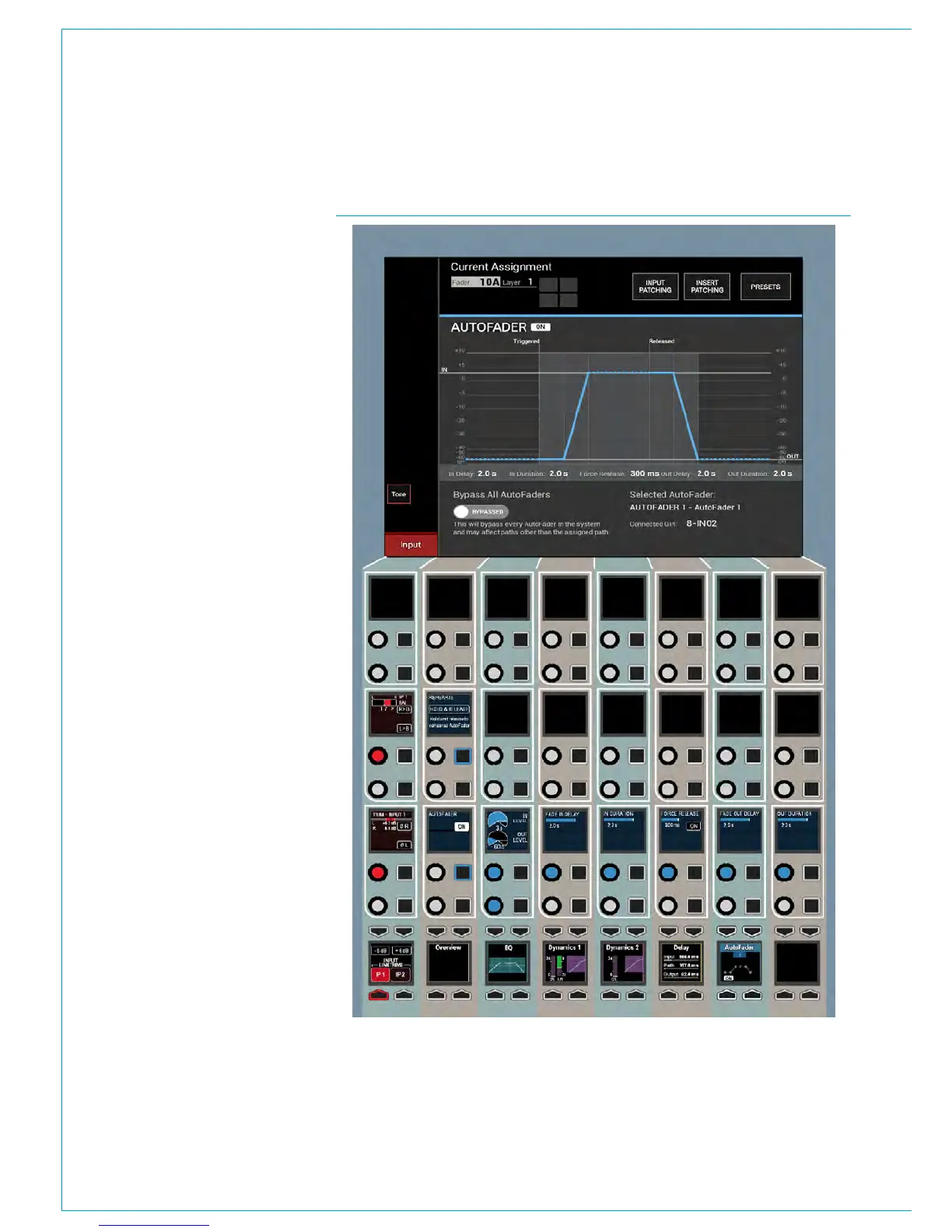
The AutoFader TFT screen gives a visual
representation of the behaviour of the
autofaders position over time and provides
information about which autofader is in
use and which GPI the autofader is being
triggered from. See Fig 1.
There are 9 individual autofader controls
provided and a global on screen switch to
Bypass All Autofaders.
• AUTOFADER ON - Enables the
Autofader on this assign path. Note if
the autofader is shared across several
paths only this path is affected by this
switch.
• REHEARSE - Press and Hold this
button to trigger the autofader and
release to release the autofader.
This button allows the user to walk
through the action of the autofader
and adjust parameters if necessary.
• IN LEVEL - This is the level that
the fader goes to when the GPI is
triggered shown as an ‘IN’ line.
• OUT LEVEL - This is the level that
the fader goes to when the GPI is
released shown as an ‘OUT’ line.
• FADE IN DELAY - This is the delay
period before the fader starts to ramp
up to the IN LEVEL.
• IN DURATION - This is the fader
ramp up period.
• FORCE RELEASE - When ON this
time period is used to force the
autofader into the fade out delay
phase even if the autofader is still
triggered via the GPI.
FIG 1 - AUTOFADER CONTROLS ON THE PROCESSING-AUTOFADER ASSIGN MODE
Note if the control is set to ‘Never’ the
AutoFader remains triggered indefinitely
whilst the connected GPI is triggered
• FADE OUT DELAY - This is the delay
period before the fader starts to ramp
down to the out level
• OUT DURATION - This is the fader
ramp down period.
Note that the autofader thumbnail shows
which autofader is in use and its On / Off
state even when the PROCESSING mode
is on a different control page.



 To Next Page