CALREC Putting Sound in the Picture 139
CONTROL ROOM MONITORING
Apollo features powerful pre-
selectors for fast and clear access
to multiple control room monitor
sources.
Pre-selectors (Favourites)
The idea behind pre-selectors is to enable
multiple sources to be set up, each ready
to be fed to the main loudspeakers
instantly at the touch of a button.
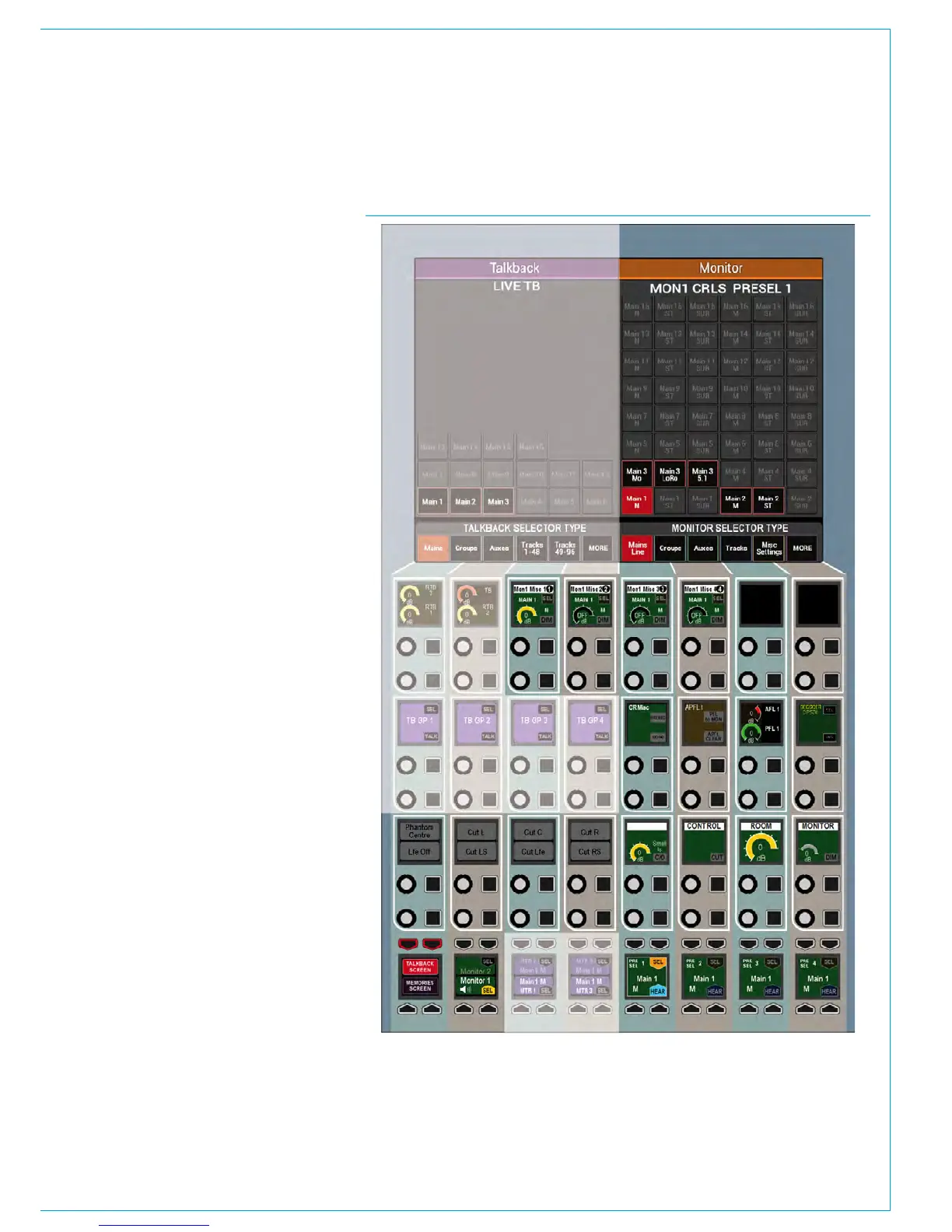
Control Room speaker pre-selectors
There are four pre-selectors available
for choosing which source is fed to the
control room speakers for monitoring.
These are shown in Fig 1. The label
on each display show which path has
been set to that pre-selector. Pressing
the button below the triangular HEAR
indicator in the lower right hand corner of
each pre-selector, makes that the chosen
source to be fed to the control room
speakers.
Changing pre-selector source
The right hand side of the wild assign
touchscreen displays the available sources
which the user can set to a pre-selector.
This is also shown in Fig 1. Tabs at the
bottom of the screen allow different types
of paths to be shown in the main area
above.
To change the source set to a given pre-
selector, press the SEL button above it.
The control cell display will be highlighted
to indicate the selection. Now touch
the required path on the wild assign
touchscreen area described previously.
The pre-selector display will update to
display this newly set path. Pressing the
HEAR button will select that path to be
sent to the control room loudspeakers.
FIG 1 - CONTROL ROOM MONITORING



 To Next Page