CALREC Putting Sound in the Picture 181
PRESETS
A Preset is a snapshot of a path’s
parameter settings which can be
loaded on to other paths. The scope
of each preset determines which
parameters will be loaded, and can be
changed after it has been saved.
Using presets can speed up workflow
when several paths with similar settings
are required.
Creating a Preset
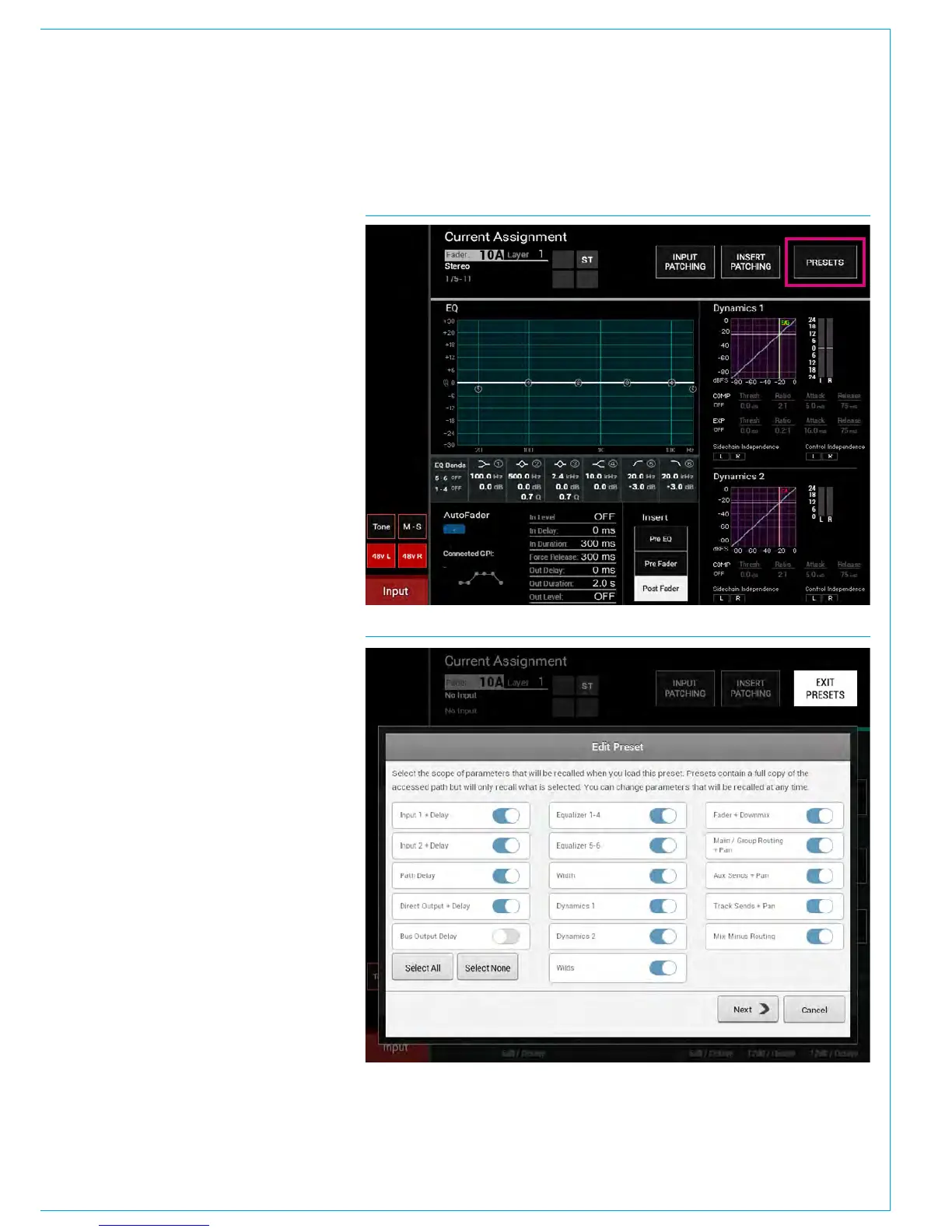
To create a preset from the currently
assigned path:
1. From any Processing panel mode on
the panel touch screen (next to Current
Assignment - see Fig 1),
or from the Send-Routes mode, tap
PRESETS.
2. Navigate to the folder you wish to
save the preset, making a new folder if
necessary.
3. Tap NEW.
4. Select the scope of parameters that
will be recalled when you load the
preset (these can be changed later),
and choose NEXT.
5. Enter a label and description, then tap
OK.
Loading a Preset
To load a preset to the currently assigned
path:
6. From any Processing panel mode on
the panel touch screen (next to Current
Assignment - see Fig 1) tap PRESETS.
7. Navigate to and select the preset that
you wish to use.
8. Tap LOAD.
Editing a Preset
Once a preset has been created you
can edit its scope (see Fig 2), label
and description at any time by tapping
PRESETS, selecting the relevant file from
the popup and tapping EDIT.
FIG 2 - EDIT PRESETS
FIG 1 - SELECT PRESETS FUNCTION



 To Next Page