Processing Audio
96 APOLLO
Digital Broadcast Production Console
STEREO/SURROUND SPILL
Apollo makes very efficient use of
surface controls for accessing and
controlling stereo/surround signals.
Whether controlling mono, stereo
or surround signals, only one fader
is required on the surface for global
manipulation and application of signal
processing to the complete collection
of paths that make up that signal. For a
stereo signal, two mono paths are required
and controlled simultaneously by a single
fader. For surround signals, six or more
mono paths are required and controlled
simultaneously by a single fader.
Under normal circumstances this provides
an extremely quick way to alter the level
of, or assign processing to all component
paths of a given signal. However for times
when more flexibility or greater control of
individual component signals is required,
the signal can be expanded onto the spill
faders.
Accessing the spill faders
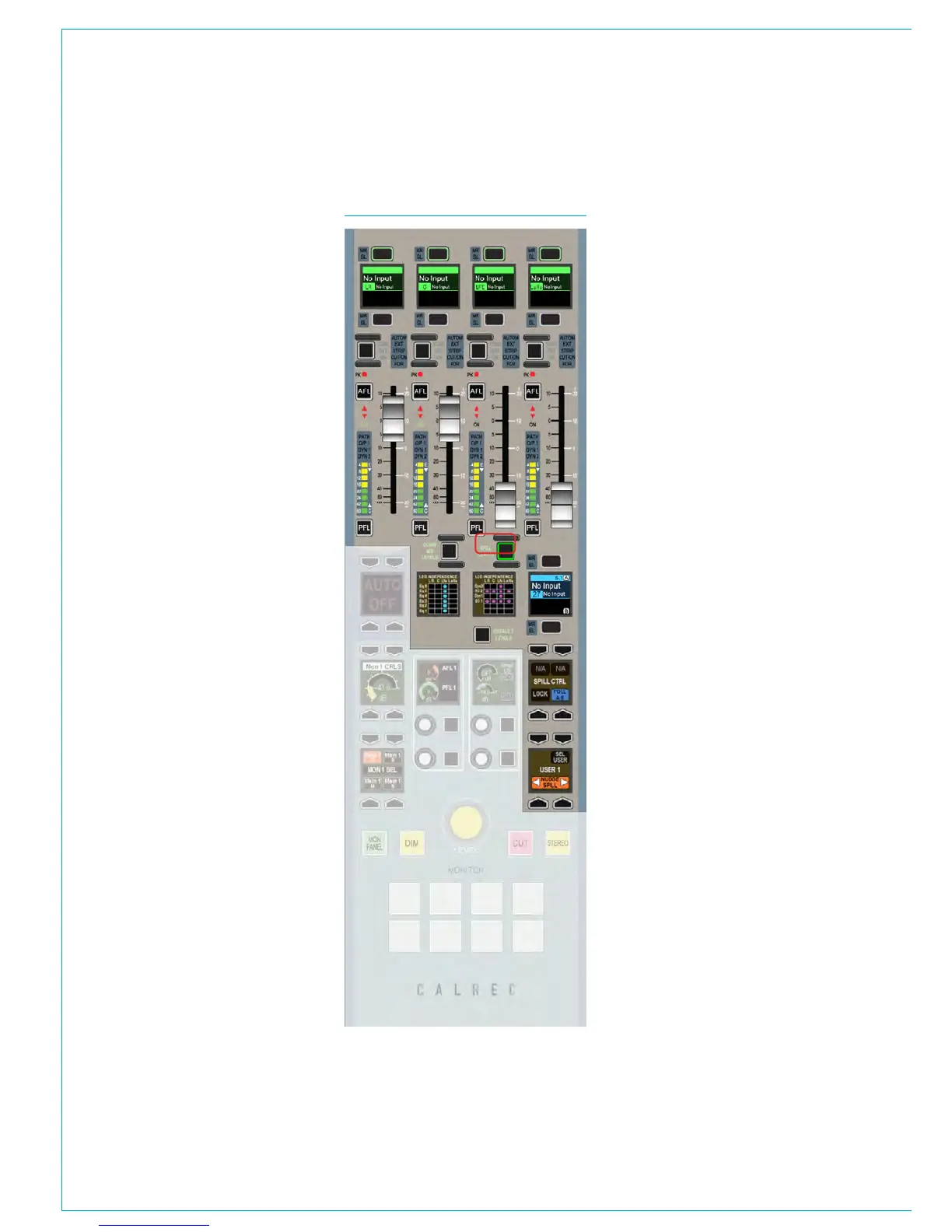
On the dedicated monitor panel, shown in
Fig 1 (or the Joystick panel which has the
exact same upper section as highlighted
right) press the SPILL LEVELS button.
This upper section will now allow access
and control of the individual legs of a
stereo or surround path via the spill faders.
Spill faders
The spill controls follows the currently
assigned path. When a fader which
controls a stereo or surround signal is
selected as the currently assigned fader,
the spill panel updates to reflect the
status of the component signals. If the
assigned fader controls a mono path, the
spill panel will become unavailable until a
fader controlling a stereo or surround path
is assigned.
The faders on the spill panel behave in
the same way as every other fader on
FIG 1 - SPILL CONTROLS
the surface. They have the same assign
buttons above and below the fader label
display, the same AFL, PFL and cut
buttons and the same bar graph meters.
They can be assigned in the same way as
any other fader and by doing so, individual
control of the processing of a specific
component path is possible.
Depending on the width of the signal
present on the assigned fader, the
component signals will be arranged
differently on the spill faders. Stereo
components of a surround signal such
as L-R and Ls-Rs are normally grouped
together and controlled by a single spill
fader, whereas mono components such as
LFE are present on their own fader.
In spill mode with a stereo path selected,
the first two faders control the left and
right channels. The fader label displays
above each fader list the available
component paths which may be split
between the A and B paths. These are
accessed and behave in the same way as
all other A and B paths on the surface.
Current spill panel assignment
The fader label display above the currently
assigned fader is mirrored below the
right most spill fader. This can be used to
change the path assignment between the
A and B paths on that same fader without
leaving the spill controls.
The spill controls can be set to follow the
current path assignment, or they can be
locked to a specific path. This function
can be changed by pressing either the
FOLL A/B or LOCK buttons respectively.
If the path controlled by the spill faders is
locked, the fader label display on the spill
panel will not follow the path assignment
on the surface. It will display the locked
path as an indicator of which path is being
controlled by the spill panel.



 To Next Page