Routing Audio
112 APOLLO
Digital Broadcast Production Console
BUSES OVERVIEW
There are a pool of mono DSP
resources available for each bus type.
The user may configure the number
and width of the buses they require
from these pools of resources.
The number of resources available to
each bus type and the maximum number
of each bus type supported by the Apollo
system are detailed in Fig 1. From a pool
of mono resources, the user can define
the number and widths of the buses they
require.
For example, there are 48 mono DSP
resources available for Aux buses at
48kHz. The maximum number of Aux
buses that can be configured in the
system is 48 and these would all be
mono. The maximum number of stereo
Aux buses that can be created is 24. It
takes two mono DSP resources to create
a stereo bus and so the maximum number
of Auxiliaries that can be created is
reduced..
Buses which can be configured up to 5.1
width (mains and groups for example)
each use 6 mono DSP resources.
The buses do not all have to be the same
width, and any combination of mono,
stereo and surround formats can be
created from the pool of mono resources.
Setting bus widths
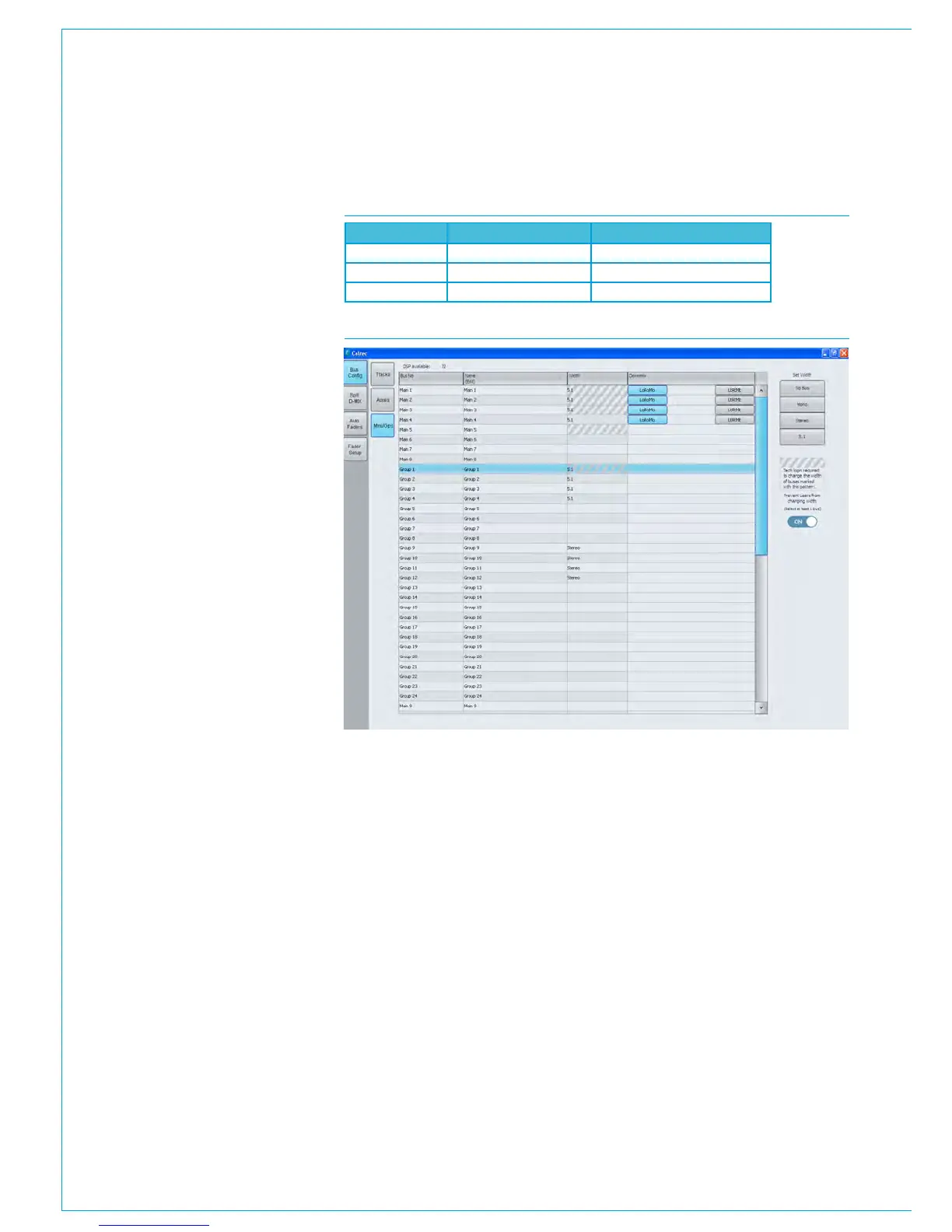
The number and width of buses chosen
for use are defined in the >Operate>Bus
Config screen in the main application,.
see Fig 2. Select a bus type using the
buttons on the left of the screen. The
total number of buses will now be listed,
which in the case of Auxiliaries at 48kHz
is 1-48.
For each of these the width can be
defined by selecting the relevant row or
rows and choosing the desired width from
the buttons on the right of the screen.
At the top of the screen a number shows
the remaining mono DSP resources for
that bus type.
When this number reads zero, no more
buses may be created unless more
resource is made available. This can be
achieved by setting previously configured
buses to NO BUS in the WIDTH column.
Admin protection for Bus widths
Admin users can prevent bus widths from
being changed by non-admin users. Once
logged in the administrator can click on
each Main, Group Aux or Track Bus as
required and using the ON slider switch as
shown in Fig 2 can prevent the widths of
those buses from being changed.
Buses at different sample rates
From version 8.0 the desk can be
configured to operate at different sample
rates such as 48kHz & 96kHz.
As a consequence the pool of buses
available at the higher sample rate for
Mains & Groups, Auxes and Tracks is
halved for Mains & Groups on an Apollo
running at 96kHz. Fig 3 on the next page
shows the availability of buses at 96kHz
for Apollo.
See “Apollo Sample Rate Comparison” on
page 13 for further information on the
effect of available resources when running
the desk at different sample rates.
FIG 1 - BUS RESOURCES FOR APOLLO AT 48KHZ
FIG 2 - BUS SETUP SCREEN
Bus Type
Mono Resources Available Max Number Configurable Buses
Mains & Groups 128 16 Mains, 48 Groups
Auxes 48 48
Tracks 96 96



 To Next Page