Passing Signals out of Apollo
134 APOLLO
Digital Broadcast Production Console
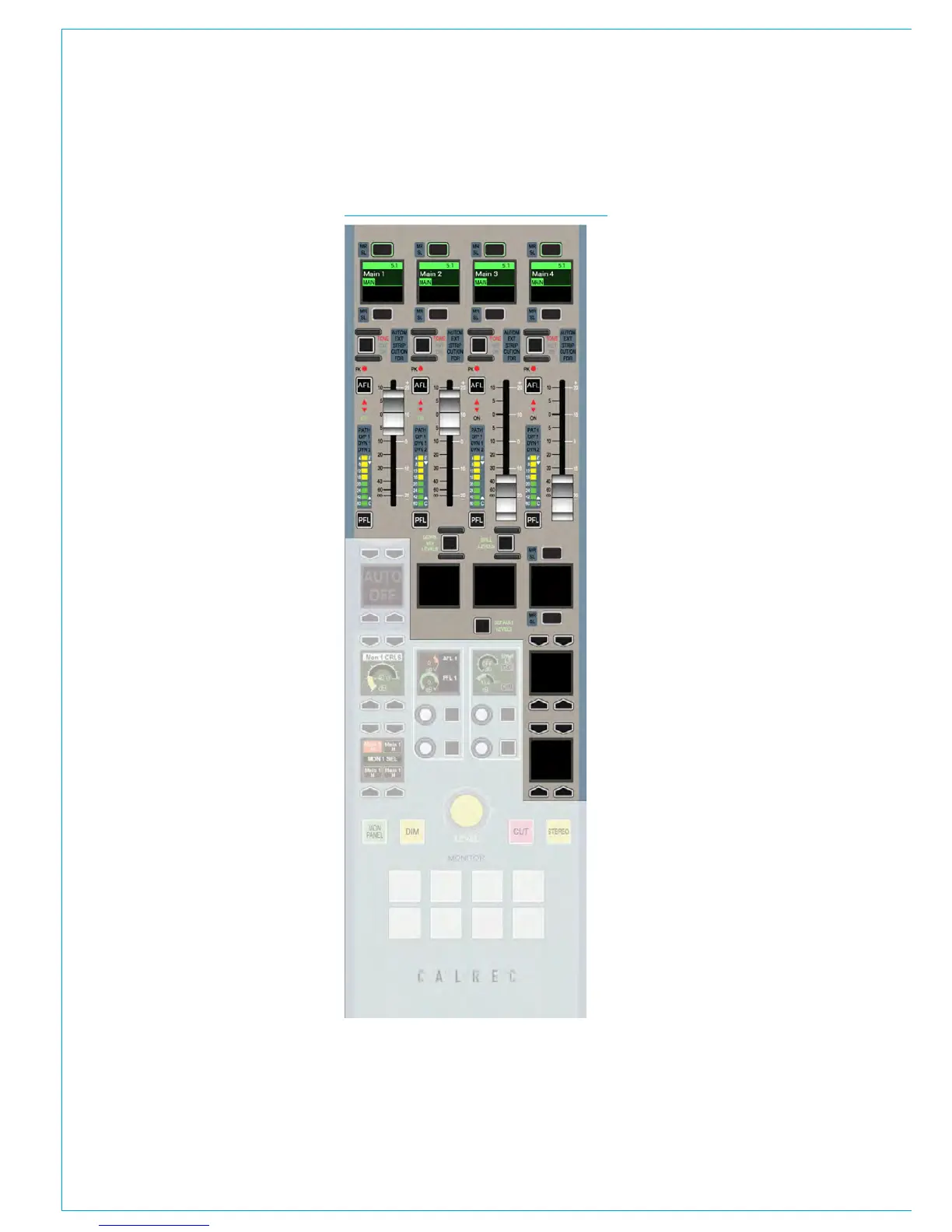
MAIN PATHS ON SPILL/MONITOR AND SPILL/JOYSTICK PANELS
The faders on the monitor and
joystick panels can be switched to
allow control over the main paths in
the system.
This is achieved by ensuring the SPILL
LEVELS and DOWNMIX LEVELS buttons
are deselected on the panel.
Main paths can then be patched to the
faders in the same way as other faders
on the surface. See “Allocating Signal
Paths to Faders” on page 58 for more
information on this process.
These faders can be assigned and have
processing and routing applied in the
same way as any other fader on the
surface. See Fig 1.
Tone to mains
When controlling main paths, the buttons
above each fader that performed the CUT
or ON functions for spill levels now inject
tone into the relevant main output. The
hidden-till-lit indicators will confirm this
function.
Accessing Spill controls for Main
faders
When controlling main paths and a main
path on one of these faders is assigned, it
is not possible to switch the mode of the
faders on the same panel and use them to
alter the spill legs of the assigned main.
The function of the faders cannot be
switched unless a path from a normal
fader or another monitor or joystick panel
is assigned. This is intended to avoid the
confusion of having a single fader indicate
the assigned path and the relevant spill
leg at the same time.
FIG 1 - MAIN PATHS ON MONITOR PANEL



 To Next Page