CALREC Putting Sound in the Picture 115
Using Strips or Wilds Mode
Routes to buses can also be made when
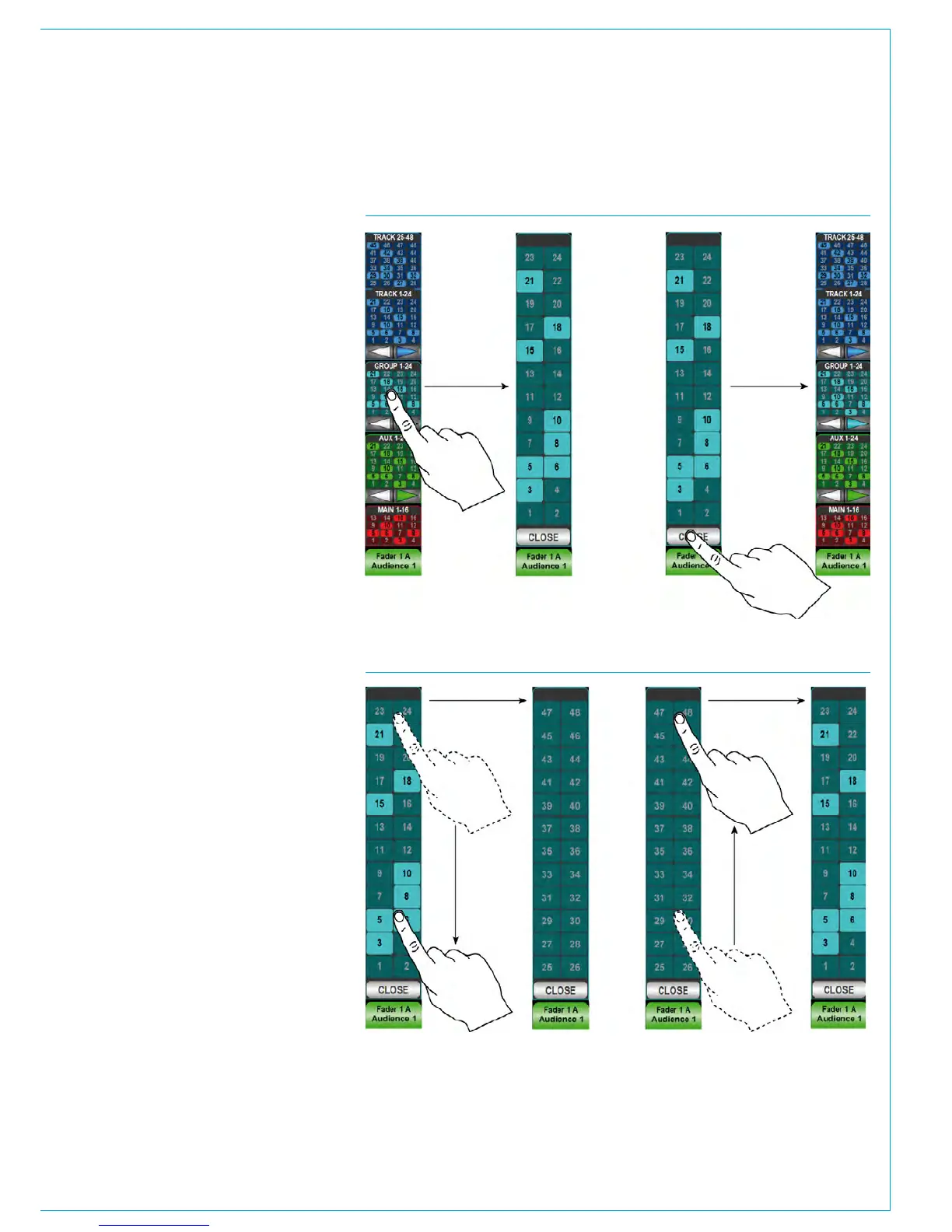
using Strips or Wilds mode. Each vertical
strip on the touchscreen displays an
overview of the routing of the relevant
path. A strip of the touchscreen is shown
in Fig 2. There may not be room to show
every destination of each bus type and so
paging buttons are provided.
Routes can be made or broken by
touching the required destination bus type
on the touch screen strip. The strip will be
populated with larger routing buttons of
the selected type, which can be touched
to create or remove routes. As with the
overview, it may not be possible to fit all
possible routing destinations on a single
page. The destinations can be paged
through either by using paging buttons
similar to the overview screen, or by
swiping the screen up or down as shown
in Fig 3.
To exit the routing screen for the selected
bus type and return back to the routing
overview, touch the CLOSE button.
FIG 2 - STRIPS OR WILDS MODE ROUTING ON TOUCHSCREEN
FIG 3 - SWIPING THROUGH BUSES



 To Next Page