CALREC Putting Sound in the Picture 125
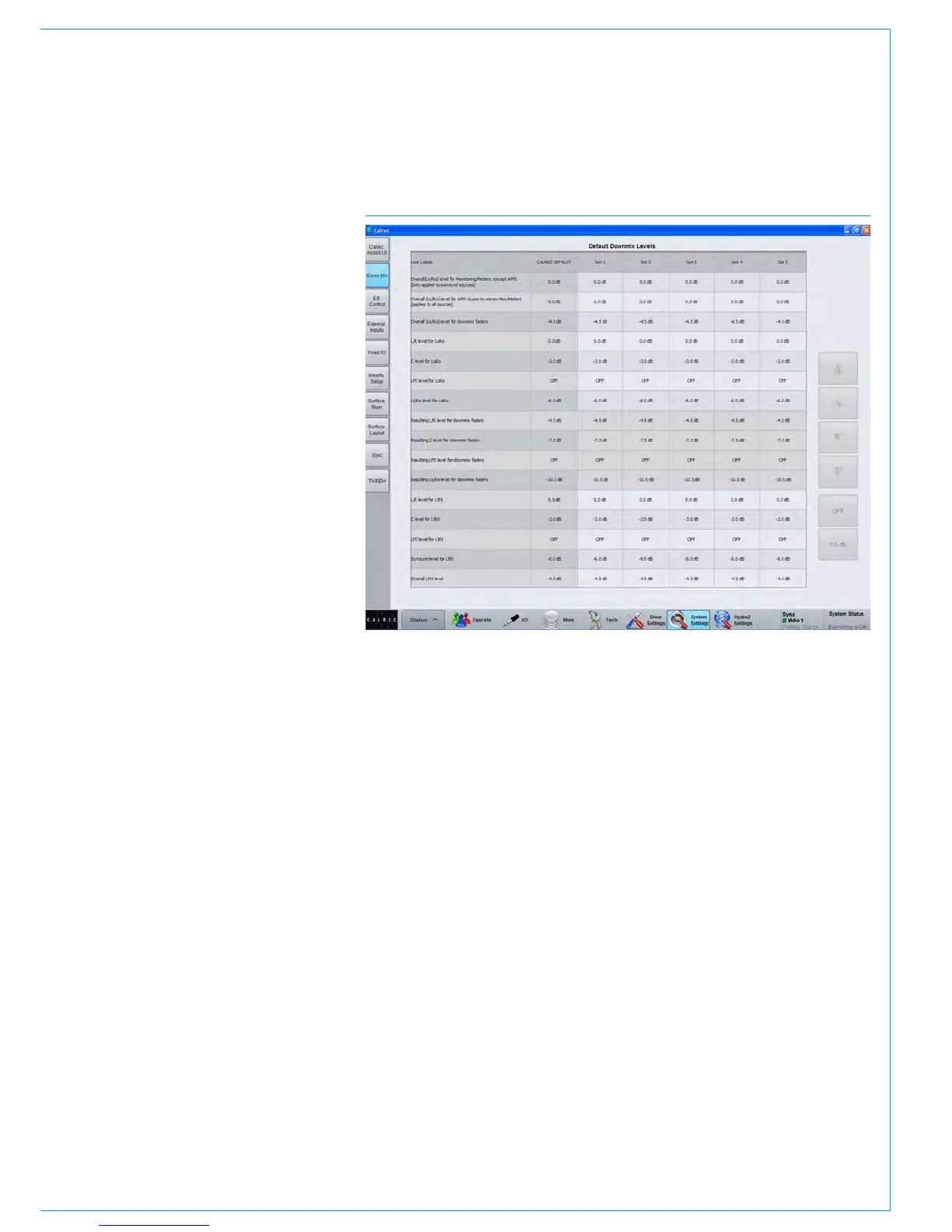
FIG 2 - DOWNMIX DEFAULTSNavigate to >System Settings>DownMix
in the main application as shown in Fig 2.
The six downmix defaults are presented
in a table. The first set of downmix values
is set by Calrec and cannot be changed.
User sets 1-5 may be altered freely by the
technician.
Default values can be provided for most
parameters including L, C, R, Surround
L&R, and LFE contributions to LoRo
downmixes, with separate adjustments
available for the levels sent to any LtRt
downmixes that are being created.
Levels may be set by selecting the
relevant cell, then using the buttons at the
right to increase or decrease the value.
Buttons are provided to quickly set a given
cell to 0dB or to turn the level off entirely.
Once the levels have been set, resultant
levels are shown in the cells below. These
resultant levels include:
• Resulting L/R level for downmix faders
• Resulting C level for downmix faders
• Resulting LFE level for downmix faders
• Resulting Ls/Rs level for downmix
faders
These resulting levels are the levels which
will be applied to the downmix faders
and to the metering, monitoring and
APFL downmixes due to the overall LoRo
offsets.



 To Next Page