CALREC Putting Sound in the Picture 145
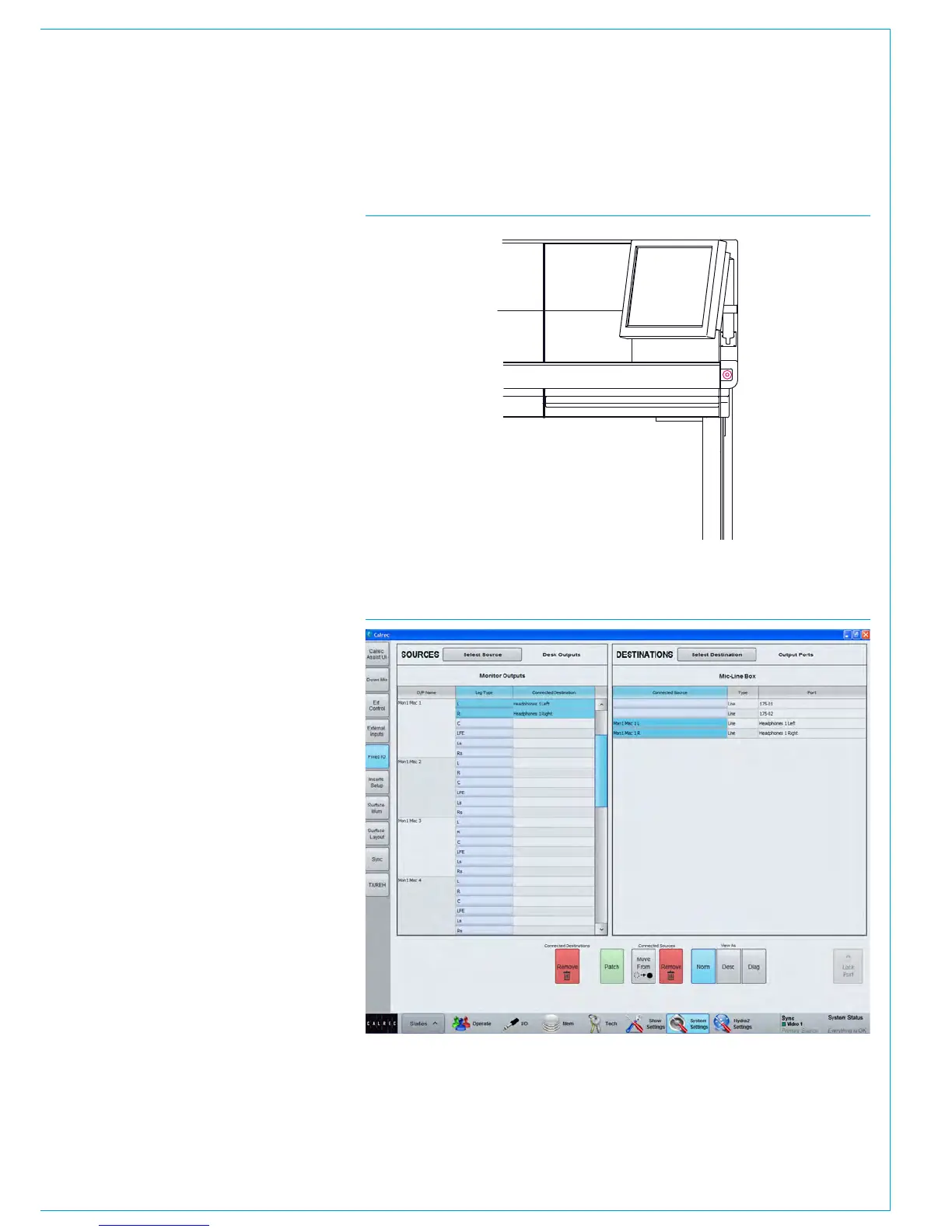
A headphone jack is located in the
control surface chassis, the default
location shown in Fig 1.
The quantity and location of headphone
jacks can vary depending on the chassis
build ordered. Please note that in order
to use the headphone jacks, balanced
analogue audio needs to be fed to the
control surface via the rear interface
panel. This would normally be fed
from Hydra2 output ports allowing the
headphone feed to be selected from
the control surface. Please consult with
your installation engineer if unsure of
connectivity.
Patch the headphone output
Navigate to >System Settings>Fixed I/O
shown in Fig 2.
In the sources list on the left, press the
filter button and select ‘Monitor Outputs’
From the list select any monitor output
you wish to drive the headphones.
In the right hand list select the output
ports that the headphone jack has been
wired to and click ‘Patch’.
HEADPHONES
FIG 2 - PATCHING HEADPHONE CONNECTIONS
FIG 1 - DEFAULT LOCATION OF HEADPHONE JACK SOCKET



 To Next Page