CALREC Putting Sound in the Picture 147
MONITOR FUNCTIONS
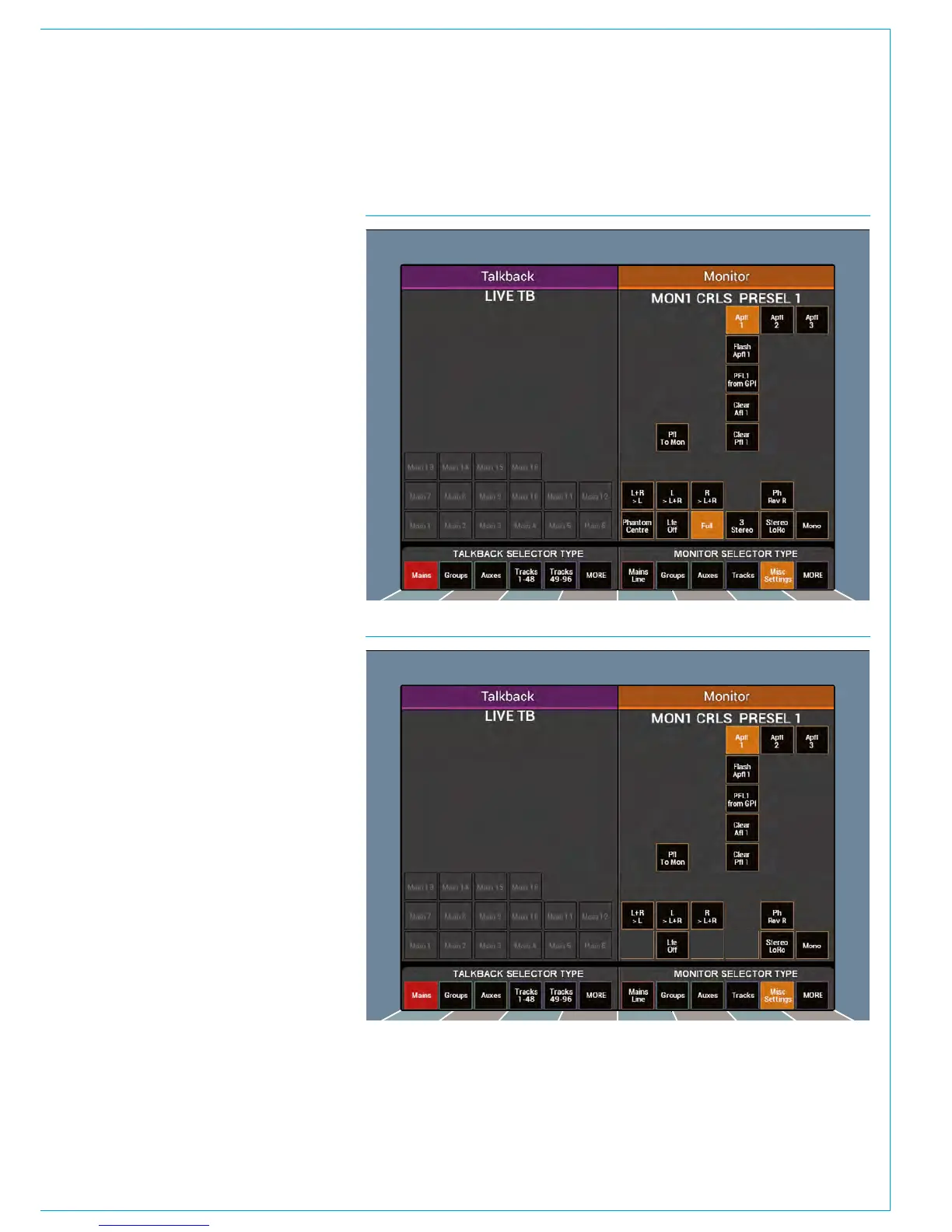
FIG 1 - MAIN LS SURROUND OPTIONS
FIG 2 - MAIN LS STEREO OPTIONS
The touchscreen in Monitor mode
provides a range of controls to access
various functions for each monitor
output.
Select a Main LS pre-selector using the
relevant SEL button. On the right hand
side of the touchscreen, touch the ‘Misc
Settings’ button to reveal the controls.
Different control arrangements appear for
surround and stereo outputs as shown in
Figs 1 and 2.
Misc LS functions are accessed in the
same manner, but by selecting a Misc
Monitor output using the relevant SEL
button. The available functions are shown
on the next page in Fig 3. Note that all
Misc Mon Outputs are surround capable
so a stereo option isn’t presented.
The lower area of the touchscreen is
common to both Main LS and Misc LS
selections. It contains controls over
individual legs and downmixes of the
signals sent to the monitoring outputs
The upper area of the Misc LS screen
contains options for changing a button on
the relevant Misc LS control cell between
CUT or DIM.



 To Next Page