CALREC Putting Sound in the Picture 163
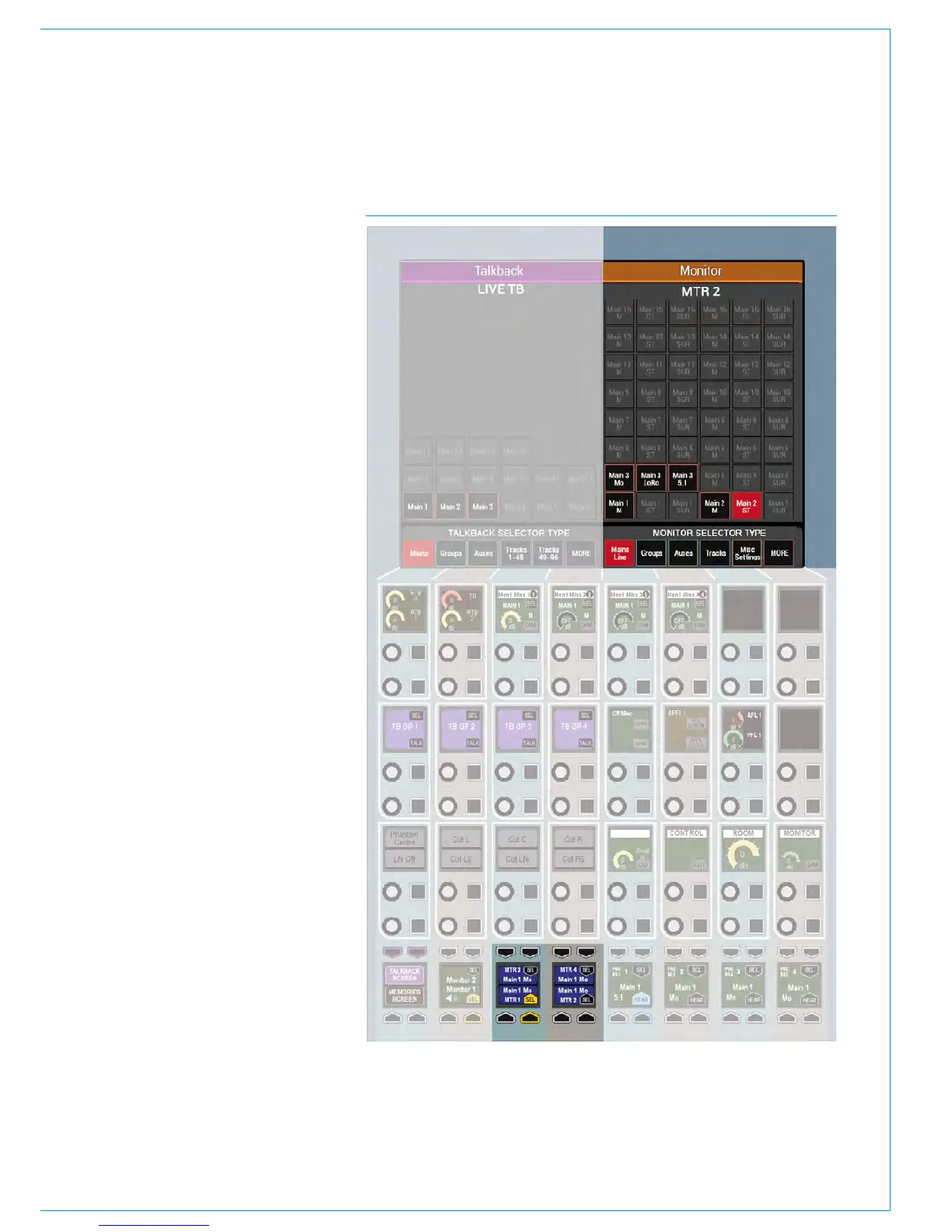
FIG 6 - METER SELECTORSMeter Selectors
There are four meter selectors available
which can be accessed from the wild
assign row of any panel in MONITOR
mode, labelled MTR1 - 4. Meter selectors
allow quick access to four meters which
can be either internal or external to the
console. The output of these meter
selectors can be displayed on up-stand
TFT meter panels or can be patched to
any Hydra2 audio port to feed:
• A non-TFT meter within the console,
such as the DK/RTW surround meters.
• External meters outside of the console.
• Anywhere you want to feed a
selectable audio source.
Selecting a meter selector to display on
the upstand TFT is done as normal from
>Show Settings>Meter Layout.
MTR1-4 are located within the ‘Other
Meter’ source menu. Patching the meter
selector output to an audio output is done
from >System Settings>Fixed I/O then
select ‘Ext Meter Outputs’ from the ‘Select
Source’ list.
Meter selectors are available in the lower
button cells when in the Monitor panel
mode. They function in the same way as
the Monitor pre-selectors - press SEL to
make the chosen selector the focus of the
TFT panel above from where a bus can
be chosen as the source for the selected
meter.
As well as for selecting sources, the TFT
screen in this panel mode also has a ‘Misc
Settings’ page from where it is possible to
send tone to the external meter or put the
meter in M/S mode. See Fig 6.



 To Next Page