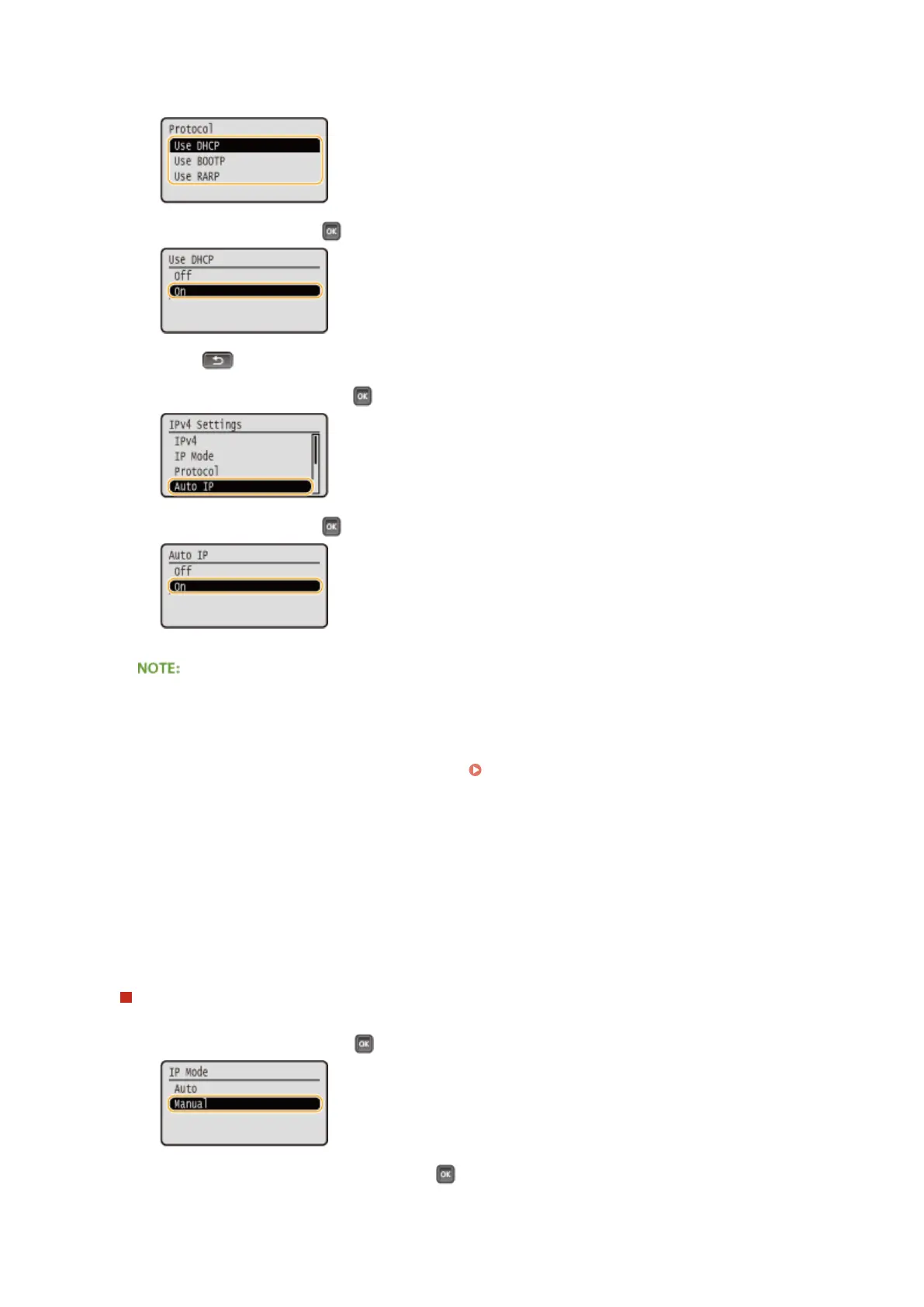
● You can use only one of the protocols DHCP, BOOTP, and RARP. If the selected protocol is set to <On>,
the other two protocols are automatically set to <Off>.
4
Select <On>, and press .
5
Press .
6
Select <Auto IP>, and press .
7
Select <On>, and press .
When using DHCP
If you turn OFF the power and ON again, an IP address differing from the current one will be assigned. This
may disable printing. To use DHCP, specify one of the following settings after consulting the network
administrator.
● Conguring the DNS Dynamic Update Function Conguring DNS(P. 220)
● Specifying Settings for the DHCP Server to Constantly Assign the Same IP Address
If you do not want to use DHCP/BOOTP/RARP to assign an IP address
● Set all the protocols to <Off>. If you set <Use DHCP>, <Use BOOTP>, or <Use RARP> to <On> when the
DCHP/BOOTP/RARP servers are unavailable, the machine will waste time and communication resources in
searching the network for available services.
IP addresses that are given precedence
● IP addresses assigned via DHCP/BOOTP/RARP override the address obtained via Auto IP.
Manually entering an IP address
1
Select <Manual>, and press .
2
Select <IP Address Settings>, and press .
Network
189



 To Next Page