CDM-840 Remote Router MN-CDM840
Ethernet-based Remote Product Management Revision 3
6–53
6.3.3.3 Configuration | Network Pages
Use the Network pages to configure network-based operating parameters. Click the Routing,
ARP, Working Mode, or DNS tab to continue.
6.3.3.3.1 Configuration | Network | Routing Pages
Click the Routes, IGMP, or DHCP tab to continue.
6.3.3.3.1.1 Configuration | Network | Routing | Routes
When operating a network in Bridge Point-to-Multipoint (BPM) mode, user traffic
will pass through the various traffic ports; however, the management of the
network is required to be through the routed Management Network.
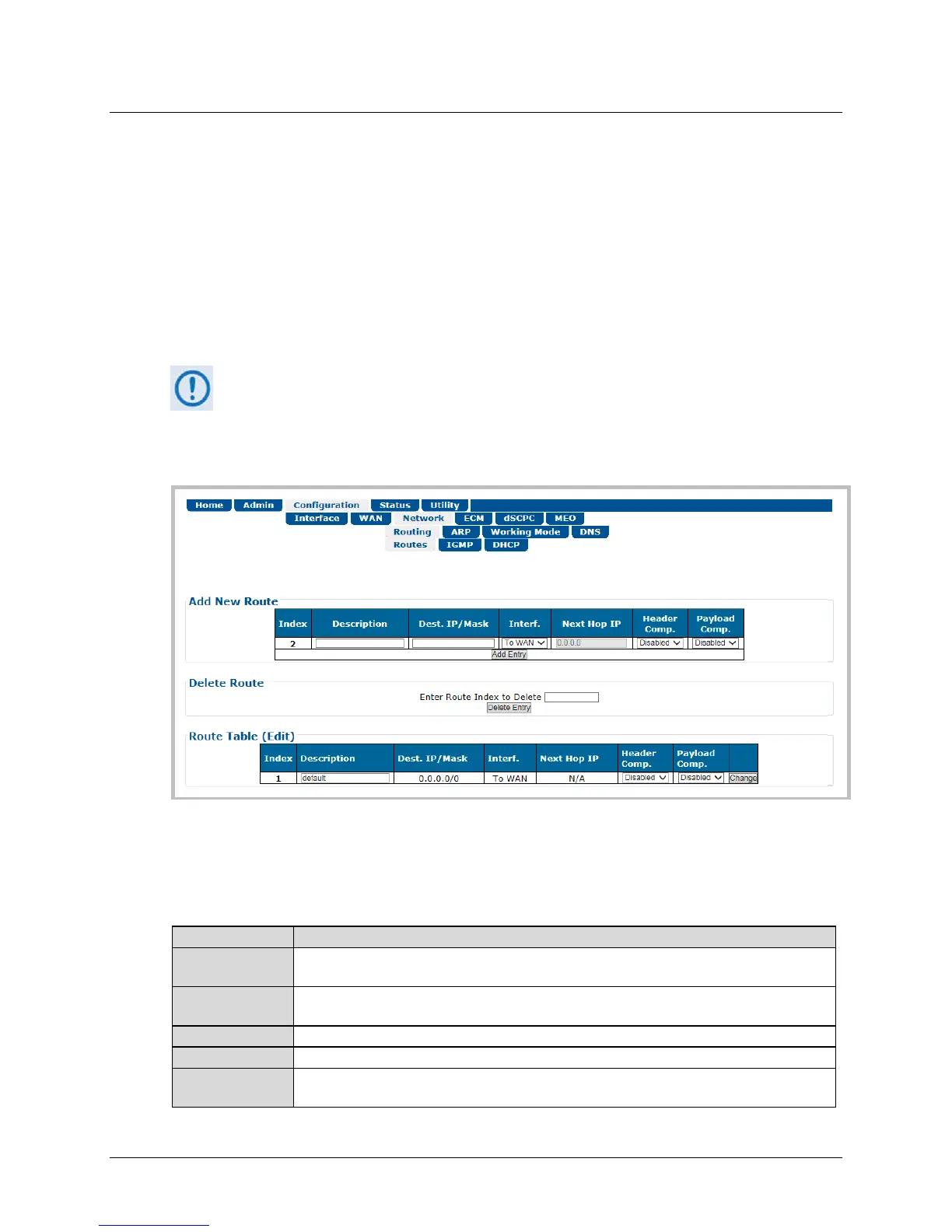
Use this page to enter static routes for IP traffic over the satellite or to another device on the
local LAN.
Figure 6-26. Configuration | Network | Routing | Routes Page
Add New Route
Use this section to directly add a route. From left to right:
This is the read-only internal index number for the route. This number increments or
decrements automatically as you add or delete routes.
This label helps to maintain the network. The name you create must be 20 characters or less,
and it must be unique across all routes.
Enter a Destination IP Address/Mask in the form XXX.XXX.XXX.XXX/YY.
Use the drop-down list to select the Interface as toWAN or toLAN.
Enter the desired Next Hop IP Address for toLAN routes. Note that no Next Hop entry is
needed for toWAN routes.



 To Next Page