CDM-840 Remote Router MN-CDM840
Ethernet-based Remote Product Management Revision 3
6–61
6.3.3.4 Configuration | ECM (Entry Channel Mode)
1)
The Configuration | ECM page is operational only when the optional VIPERSAT
MANAGEMENT SYSTEM (VMS) is installed and enabled.
2) ECM uses Demod 1 of the CDD-880 as the ALOHA channel.
• Appendix G. ECM (ENTRY CHANNEL MODE)
• Appendix G. ENTRY CHANNEL MODE SWITCHING in the adjunct CEFD publication
VMS v3.x.x VIPERSAT Management System User Guide (CEFD P/N MN/22156)
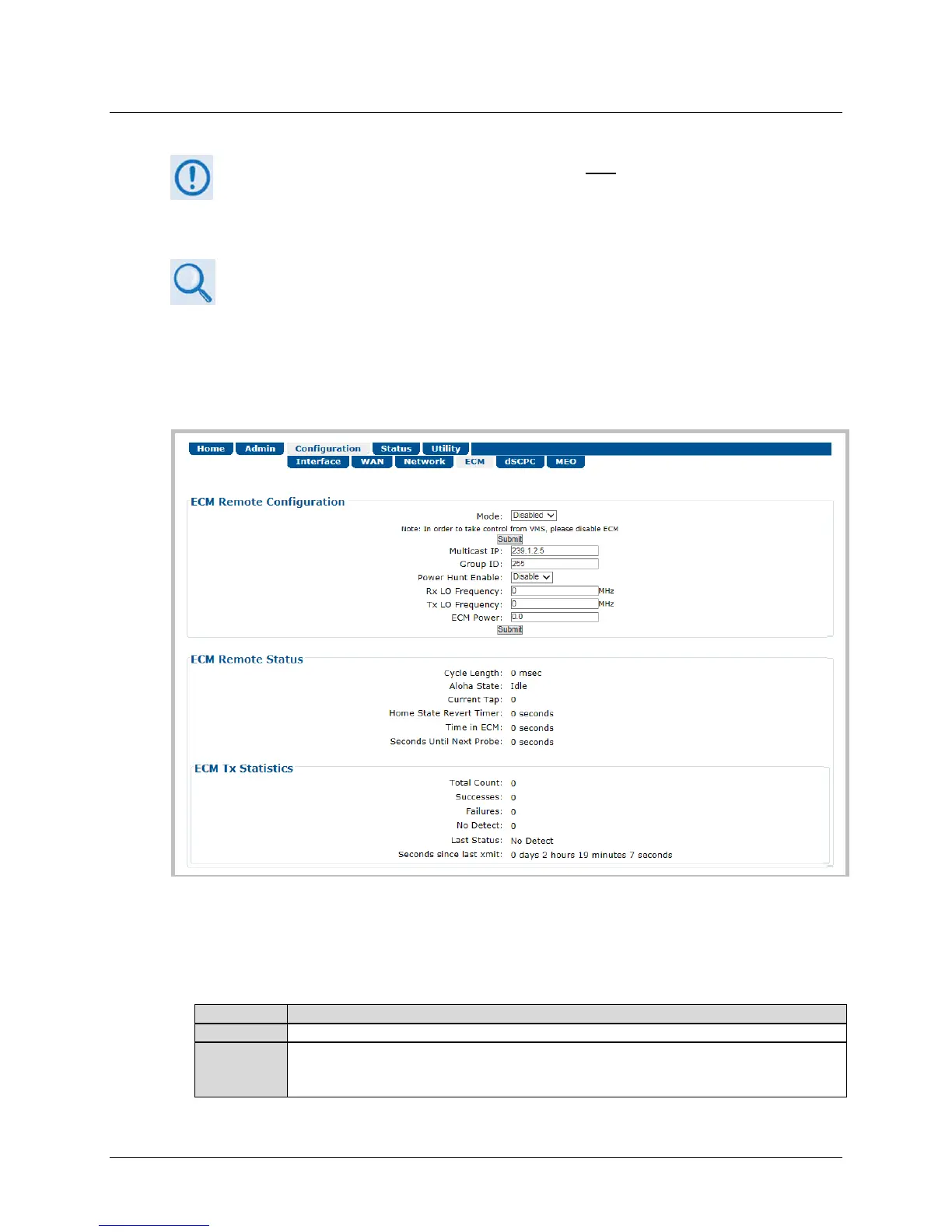
ECM (Entry Channel Mode) provides a method for remotes requiring dSCPC access channels to
either enter the network initially or re-enter the network after a power or service outage. Use
this page to configure ECM.
Figure 6-32. Configuration | ECM Page
ECM Remote Configuration
• Mode – Use the drop-down list to select operation as Disabled, Offline, Wait, or Online:
This disables ECM operation.
The remote will not transmit and remains in this standby mode until a new state is selected,
either locally or from the VMS. Application examples for this mode include COTM
(Communications On The Move) or military maneuvers requiring radio silence conditions.



 To Next Page